




WorkCentre 7535
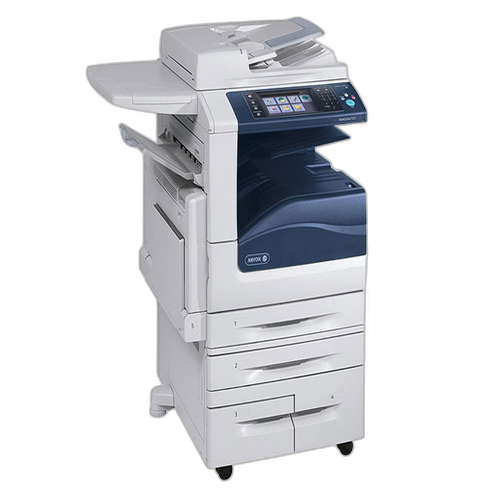
Built for department-wide color document production, the Xerox WorkCentre 7535 prints, copies, scans and faxes with a professional finish, and it runs on 006R01513 toner cartridges. Stocking one means thinking in pairs: black is the cartridge above plus the 006R01509 listing, yellow is stocked as 006R01510 and again as 006R01514, magenta as 006R01511 and 006R01515, and cyan as 006R01512 and 006R01516. Behind them all sits the 013R00662 drum unit, changed only when print quality calls for it.
The 7535 is the machine a department leans on when color output has to look client-ready and black-and-white volume still has to move — proposals and reports in the morning, invoices and forms all afternoon. Mixed duty like that drains the cartridges at different speeds: black goes steadily, colors go in bursts around big jobs. A versatile hub earns its keep when nobody plans their day around it, and that takes a supply shelf stocked for bursts, not averages.
Toner Cartridges for WorkCentre 7535
| Cartridge | Color | Page Yield |
|---|---|---|
| 006R01513 cartridge, shared listing | Black | Listed on the product page |
| 006R01516 cartridge, shared listing | Cyan | Listed on the product page |
| 006R01514 cartridge, shared listing | Yellow | Listed on the product page |
| 006R01515 cartridge, shared listing | Magenta | Listed on the product page |
| 006R01509 — shared WorkCentre listing | Black | Listed on the product page |
| 006R01512 — shared WorkCentre listing | Cyan | Listed on the product page |
| 006R01510 — shared WorkCentre listing | Yellow | Listed on the product page |
| 006R01509 — WorkCentre 7535 shelf listing | Black | Listed on the product page |
| 006R01512 — WorkCentre 7535 shelf listing | Cyan | Listed on the product page |
| 006R01510 — WorkCentre 7535 shelf listing | Yellow | Listed on the product page |
| 006R01511 — WorkCentre 7535 shelf listing | Magenta | Listed on the product page |
For restocking in quantity, this page also carries:
- 006R01509 Black 2 Pack
- 4 Color Set (006R01509, 006R01512, 006R01511, 006R01510)
- 4 Color Set (006R01513, 006R01516, 006R01515, 006R01514)
- WorkCentre 006R01509 Black 2 Pack
- WorkCentre 4 Color Set (006R01509, 006R01512, 006R01511, 006R01510)
Imaging hardware sits outside the toner table:
- 013R00662 Drum Unit — single unit
- 013R00662 Drum Unit 4 Pack — shelf pack of four
Which cartridge should you buy?
Let the work pattern decide. If the 7535 mostly prints office documents with occasional color, singles in black plus one spare color of each kind cover nearly everything, and the 2 pack of black keeps the everyday slot safe. If the department produces color in campaigns — a brochure run, a proposal round — a 4 color set beforehand is cheaper in downtime than three separate emergency orders. Remember that each color can be bought under either of its two part numbers, so a stockout on one listing is not a stockout of the color. The drum stays off the regular list; add it when a fresh cartridge no longer restores clean output.
Chip, toner and everyday use
Fit replacements with the power on and let the machine recognize the new chip before running a job; interrupting that first recognition can leave the level reading wrong until the next swap. Handle cartridges by their ends, keep them sealed until fitting, and store spares flat in a cool cabinet rather than standing by a sunny window. Toner that has sat for months benefits from a slow rock before installation. A light, even fade across the page points to a finishing cartridge; a sharp repeating flaw points past the toner to the drum unit — knowing the difference saves buying the wrong part.
Frequently Asked Questions
What toner does the WorkCentre 7535 use?
It uses the 006R01513 cartridges: black 006R01513 or 006R01509; yellow 006R01510 or 006R01514; magenta 006R01511 or 006R01515; cyan 006R01512 or 006R01516. The drum is the separate 013R00662.
Is there a high-yield option for the 7535?
This page lists the cartridges under two part numbers per color rather than under standard and high-yield labels, and the ratings live on the individual product pages. Compare the rated pages on the listings for the color you need before choosing which number to order.
What happens when one color runs out mid-job?
The machine stops on the empty color, and only that cartridge needs changing. Swap the flagged slot, leave the other colors and black untouched, and the job queue can continue — one reason a spare of each color is worth shelf space on a shared machine.
When does the drum unit need replacing?
The 013R00662 drum outlasts several toner changes. Replace it when clean output does not return with a fresh cartridge — repeating marks, background shading or streaks at fixed intervals are its usual signatures.
More printers that use the same cartridges
One black cartridge family covers the whole bench of machines below as well: WorkCentre 7525, WorkCentre 7530, WorkCentre 7545, WorkCentre 7556, WorkCentre 7830, WorkCentre 7830i, WorkCentre 7835, WorkCentre 7835i, WorkCentre 7845, WorkCentre 7845i, WorkCentre 7855, WorkCentre 7855i, WorkCentre 7970, WorkCentre 7970i.