





 See Compatible Printers
 Read more about our ink!
Hewlett Packard
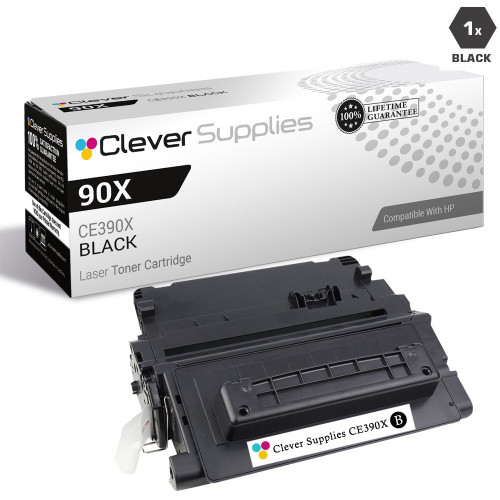
CS Compatible Replacement for HP LaserJet M4555h MFP Toner Cartridge Black

Amazon Price:

- Page Yield:
- 10,000 Pages
- Availability:
- In Stock
- Shipping:
- Calculated at Checkout
- Compatible Printers
- Enterprise 600 M601dn
- Enterprise 600 M601n
- Enterprise 600 M602dn
- Enterprise 600 M602n
- Enterprise 600 M602x
- Enterprise 600 M603dn
- Enterprise 600 M603n
- Enterprise 600 M603xh
- Enterprise M4555f
- Enterprise M4555fskm
- Enterprise M4555h
- LaserJet 600 M601dn
- LaserJet 600 M601n
- LaserJet 600 M602dn
- LaserJet 600 M602n
- LaserJet 600 M602x
- LaserJet 600 M603dn
- LaserJet 600 M603n
- LaserJet 600 M603xh
- LaserJet M4555f
- LaserJet M4555fskm
- LaserJet M4555h
- LaserJet Enterprise 600 M601dn
- LaserJet Enterprise 600 M601n
- LaserJet Enterprise 600 M602dn
- LaserJet Enterprise 600 M602n
- LaserJet Enterprise 600 M602x
- LaserJet Enterprise 600 M603dn
- LaserJet Enterprise 600 M603n
- LaserJet Enterprise 600 M603xh
- LaserJet Enterprise M4555f
- LaserJet Enterprise M4555fskm
- LaserJet Enterprise M4555hi>
- HP CE390A
- LaserJet 600
- LaserJet Enterprise 600
- LaserJet Enterprise 600 M601
- LaserJet Enterprise 600 M602
- LaserJet Enterprise 600 M603
- LaserJet Enterprise M4555
- LaserJet Enterprise M4555 MFP
- LaserJet Enterprise M4555F MFP
- LaserJet Enterprise M4555FSKM MFP
- LaserJet Enterprise M4555H
- LaserJet Enterprise M4555H MFP
- LaserJet M4555
- LaserJet M4555 MFP
- LaserJet M4555FSKM MFP
- LaserJet M4555H MFP
- LaserJet M4555f MFP
- LaserJet M601
- LaserJet M601DN
- LaserJet M601N
- LaserJet M602
- LaserJet M602DN
- LaserJet M602N
- LaserJet M602X
- LaserJet M603
- LaserJet M603DN
- LaserJet M603HX
- LaserJet M603N
- LaserJet M603XH
- Laserjet M602dn
- Specifications
- SKU:
- HP-M4555hMFP
- Printer Brand:
- Hewlett Packard
- OEM Number:
- CE390A
- Ink Color:
- Black
- Page Yield:
- 10,000 Pages
- Printer Type:
- Laser Cartridge
- Condition:
- New Compatible
- Description
- Yields up to 10000 pages
- Manufactured specifically for HP printers compatible HP toner cartridges offer fast hassle-free printing
- HP LaserJet M4555h MFP Toner Cartridge Black deliver consistent yields and provide high-quality results
- Streamline your printing needs with the time-saving reliability of compatible HP LaserJet toner cartridges
- Cartridge yield type: Compatible
- Print technology: Laser
- Page yield footnote: Approximate average yield based on ISO/IEC 19752 actual yield varies considerably based on content of printed pages and other factors
- Boost efficiency using compatible HP LaserJet toner cartridges
- Quick and easy installation and exceptional value for frequent printing
- Produce professional-quality documents and get trouble-free printing for your business
- Print crisp text and sharp black graphics page after page
- Compatible HP LaserJet toner cartridges are designed and tested with the printer for consistent results
- Rely on the environmental leadership of HP
- Compatible HP LaserJet toner cartridges with enhanced toner increase energy-savings
- Deliver consistent yields and provide high-quality results
- Operating temperature range: 10 - 32.5 deg C storage temperature range: -20 - 40 deg C storage humidity range: 10 - 90% RH
- Includes: Toner cartridge Recycling guide
- Warranty: Lifetime
- Reviews

/> 

Compatible HP LaserJet M4555h MFP Toner Cartridge Black produce superior quality and consistency for a wide array of printing needs
HP LaserJet M4555h MFP Toner Cartridge Black features latest laser print technology and provides fast reliable high-quality prints. Toner cartridge is compatible with HP Color LaserJet M4555 M601 M602 M603 LaserJet Enterprise M4555 LaserJet Enterprise 600 M601 M602 M603 series printers and yields up to 10000 pages.
Features:
Frequently Asked Questions
What should the first test page after a swap on the M4555h MFP look like?
Even, dense black from edge to edge, with no bands or pale patches. Print a configuration or demo page straight after fitting the CE390A and read it closely — that sheet is your baseline. If it is clean, everything the cartridge does afterwards can be judged against it.
The low-toner message is still showing after I fitted the new cartridge. Why?
Usually seating. Open the top cover, lift the 90A out, and lower it back in firmly until it clicks home; a cartridge resting a fraction high can fail to register as new. If the message persists after a firm reseat and a restart of the print queue, contact us — do not keep printing on a unit that will not clear.
There are faint streaks on the first day. Should I worry?
Not immediately. Remove the cartridge, rock it end to end to redistribute the toner, wipe nothing inside the machine, and refit it. Streaks caused by settled toner usually vanish within the first twenty pages. Streaks that repeat in the same position on every page, day after day, are a different matter — note them and call us.
Do I need to change any settings after fitting?
No. The M4555h MFP takes the same CE390A with no configuration change: no menus, no calibration routine for the user to run. Fit it, close the cover, print the baseline page. Anything the machine wants to adjust internally, it does itself.
How will the new cartridge behave across its life?
Expect a long, flat plateau: the rating is 10,000 pages at standard coverage, and a healthy cartridge holds density for nearly all of it before the fade at the very end. The pattern to trust is gradual — sudden failure early in the cartridge's life is not wear, and it is not something you should absorb.
What if the first week goes badly?
Sudden early failure is covered: a 1-year warranty and 1-year free returns apply to every cartridge, and support answers Monday through Friday, 9 AM to 5 PM CST. Keep the bad output samples — they speed up diagnosis. Delivery and returns information is on the shipping & returns page.
Where should the next CE390A wait so it is ready the day it is needed?
In its sealed carton in the cupboard beside the machine — flat, dry, and away from windows and heaters. A spare stored at the M4555h itself means the person who finds the machine empty can finish the swap on the spot, instead of starting a search through a distant supply room while stored jobs wait.
How do we avoid ordering the wrong unit for this model?
Quote the code from the cartridge, not the badge on the machine. Every M4555 variant takes the CE390A, also named 90A; the letters after M4555 describe machine features such as storage and finishing, not different supplies. Reading CE390A off the outgoing unit's label settles the order in one step.
How will we come to know our own machine's cartridge rhythm?
Note the total page counter each time a new cartridge goes in. Two cycles of that simple log reveal how many weeks a 10,000-page unit lasts on your particular mix of stored jobs, reprints and copies. After that, reorder timing stops being a guess — it is a date you can see coming on the counter.
When during the working day is the swap least disruptive?
In a lull between stored-job releases. The change asks for about two minutes with the top cover open, touches no settings, and leaves every held job exactly where it was. Pick a quiet moment and nobody's PIN-released printing is interrupted; pick the morning rush and the same two minutes feel much longer.
About This Cartridge for the LaserJet M4555h MFP
For the LaserJet M4555h in MFP form, this is the single black CE390A — the 90A — priced at $48.70 and rated at 10,000 pages. This page covers the first days with a fresh cartridge: the baseline test page, the reseat fix for a lingering warning, and the line between settling-in behavior and a genuine fault. Stock ships from our warehouses in IL, PA, GA and CA; more for the family is under HP.
Related Items
Hewlett Packard
CS Compatible Replacement for HP LaserJet Enterprise M4555h MFP Toner Cartridge Black
/>

Hewlett Packard
CS Compatible Replacement for HP LaserJet M4555H Toner Cartridge Black
/>

Hewlett Packard
CS Compatible Replacement for HP LaserJet Enterprise M4555h Toner Cartridge Black
/>

Hewlett Packard
CS Compatible Replacement for HP LaserJet M4555fskm MFP Toner Cartridge Black
/>