





 See Compatible Printers
 Read more about our ink!
Hewlett Packard
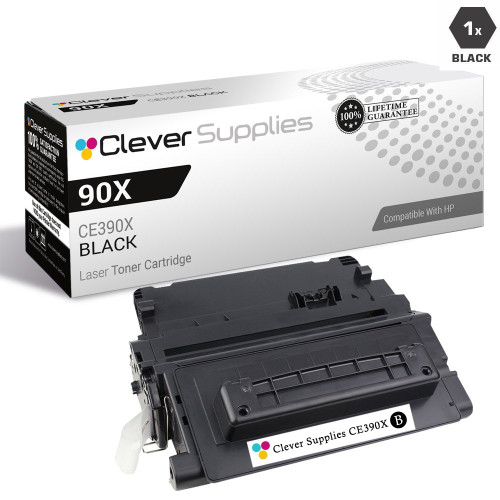
CS Compatible Replacement for HP LaserJet Enterprise M4555fskm MFP Toner Cartridge Black

Amazon Price:

- Page Yield:
- 10,000 Pages
- Availability:
- In Stock
- Shipping:
- Calculated at Checkout
- Compatible Printers
- Enterprise 600 M601dn
- Enterprise 600 M601n
- Enterprise 600 M602dn
- Enterprise 600 M602n
- Enterprise 600 M602x
- Enterprise 600 M603dn
- Enterprise 600 M603n
- Enterprise 600 M603xh
- Enterprise M4555f
- Enterprise M4555fskm
- Enterprise M4555h
- LaserJet 600 M601dn
- LaserJet 600 M601n
- LaserJet 600 M602dn
- LaserJet 600 M602n
- LaserJet 600 M602x
- LaserJet 600 M603dn
- LaserJet 600 M603n
- LaserJet 600 M603xh
- LaserJet M4555f
- LaserJet M4555fskm
- LaserJet M4555h
- LaserJet Enterprise 600 M601dn
- LaserJet Enterprise 600 M601n
- LaserJet Enterprise 600 M602dn
- LaserJet Enterprise 600 M602n
- LaserJet Enterprise 600 M602x
- LaserJet Enterprise 600 M603dn
- LaserJet Enterprise 600 M603n
- LaserJet Enterprise 600 M603xh
- LaserJet Enterprise M4555f
- LaserJet Enterprise M4555fskm
- LaserJet Enterprise M4555hi>
- HP CE390A
- LaserJet 600
- LaserJet Enterprise 600
- LaserJet Enterprise 600 M601
- LaserJet Enterprise 600 M602
- LaserJet Enterprise 600 M603
- LaserJet Enterprise M4555
- LaserJet Enterprise M4555 MFP
- LaserJet Enterprise M4555F MFP
- LaserJet Enterprise M4555FSKM MFP
- LaserJet Enterprise M4555H
- LaserJet Enterprise M4555H MFP
- LaserJet M4555
- LaserJet M4555 MFP
- LaserJet M4555FSKM MFP
- LaserJet M4555H MFP
- LaserJet M4555f MFP
- LaserJet M601
- LaserJet M601DN
- LaserJet M601N
- LaserJet M602
- LaserJet M602DN
- LaserJet M602N
- LaserJet M602X
- LaserJet M603
- LaserJet M603DN
- LaserJet M603HX
- LaserJet M603N
- LaserJet M603XH
- Laserjet M602dn
- Specifications
- SKU:
- HP-EnterpriseM4555fskmMFP
- Printer Brand:
- Hewlett Packard
- OEM Number:
- CE390A
- Ink Color:
- Black
- Page Yield:
- 10,000 Pages
- Printer Type:
- Laser Cartridge
- Condition:
- New Compatible
- Description
- Yields up to 10000 pages
- Manufactured specifically for HP printers compatible HP toner cartridges offer fast hassle-free printing
- HP LaserJet Enterprise M4555fskm MFP Toner Cartridge Black deliver consistent yields and provide high-quality results
- Streamline your printing needs with the time-saving reliability of compatible HP LaserJet toner cartridges
- Cartridge yield type: Compatible
- Print technology: Laser
- Page yield footnote: Approximate average yield based on ISO/IEC 19752 actual yield varies considerably based on content of printed pages and other factors
- Boost efficiency using compatible HP LaserJet toner cartridges
- Quick and easy installation and exceptional value for frequent printing
- Produce professional-quality documents and get trouble-free printing for your business
- Print crisp text and sharp black graphics page after page
- Compatible HP LaserJet toner cartridges are designed and tested with the printer for consistent results
- Rely on the environmental leadership of HP
- Compatible HP LaserJet toner cartridges with enhanced toner increase energy-savings
- Deliver consistent yields and provide high-quality results
- Operating temperature range: 10 - 32.5 deg C storage temperature range: -20 - 40 deg C storage humidity range: 10 - 90% RH
- Includes: Toner cartridge Recycling guide
- Warranty: Lifetime
- Reviews

/> 

Compatible HP LaserJet Enterprise M4555fskm MFP Toner Cartridge Black produce superior quality and consistency for a wide array of printing needs
HP LaserJet Enterprise M4555fskm MFP Toner Cartridge Black features latest laser print technology and provides fast reliable high-quality prints. Toner cartridge is compatible with HP Color LaserJet M4555 M601 M602 M603 LaserJet Enterprise M4555 LaserJet Enterprise 600 M601 M602 M603 series printers and yields up to 10000 pages.
Features:
Frequently Asked Questions
Which cartridge fits the M4555fskm MFP?
The CE390A — HP's 90A. This listing is that cartridge: one black unit at $48.70, rated at 10,000 pages, supplying the LaserJet Enterprise M4555fskm multifunction platform. The MFP suffix describes the machine, and the supply is the family's standard one.
Why does this MFP's toner last longer than our smaller office machine's?
Partly the rating — 10,000 pages is a full-capacity cartridge — and partly the workload split. On an MFP that scans and routes documents electronically for much of the day, only printed pages and copies draw toner down, so the calendar life of a CE390A here is often long.
Everything printed — copies included — is fading together. Diagnosis?
When every printed function fades at once on an MFP, the shared cartridge is the first and usually only suspect. Slide it out and rock it gently from side to side to redistribute the toner; a test copy and print afterwards will show whether density has recovered or the cartridge is spent.
A fax arrived while the toner warning was showing. Was it lost?
No. The machine stores received faxes if it cannot print them immediately, and prints them once a working cartridge is in place. Fit the replacement — old unit out, seal off the new 90A, slide it in — and the held faxes come out in sequence.
How intrusive is the change on a machine this busy?
Minimal: about two minutes with the print bay open. Scanning continues to be available around the change, and no settings for copy, fax or network functions are touched by a toner swap on this platform.
What if a cartridge fails in service?
It is protected by a 1-year warranty with 1-year free returns — premature failure, leaking or streaking qualify for a replacement or refund. Help is on hand Monday through Friday, 9 AM to 5 PM CST.
How do we double-check we are ordering the right cartridge before we buy?
Read the code off the cartridge currently in the machine, or off its supplies status page, and match the full string: CE390A, the 90A. Model names are the trap here — the M4555 family wears several suffixes, and the MFP badge on this listing describes the machine rather than a special supply. If the code on your label reads CE390A, this is the cartridge, whatever combination of letters follows M4555 on the front panel.
How should a spare CE390A be stored in a busy document room?
Sealed in its box, lying flat, in a cool dry spot away from direct sunlight and heat sources such as radiators or the top of other equipment. Toner cartridges are patient stock: an unopened 90A waits without deteriorating, so there is no penalty for buying ahead. Keep it somewhere the person who changes cartridges will actually find it — a labeled shelf in the same room as the M4555fskm MFP beats a general storeroom two floors away.
After a swap, what is the quickest proof the new cartridge is printing properly?
Run one page you can judge. Print a test page or copy a document the office knows well, and check the density is even from edge to edge with no pale bands or streaks. That single sheet separates a good fitting from a cartridge problem before you release a queue of real work through the machine. If the proof page is clean, the MFP is back in service; if it is not, reseat the cartridge once before calling support.
If a document is scanned to a file and then printed twice, how much toner does that use?
The scan itself uses none — it is light and a sensor, no toner involved. Each printed copy is one page against the cartridge, so printing the file twice spends two pages of the CE390A's 10,000-page rating. It is a useful distinction on an MFP: the same original can be scanned fifty times for free, toner-wise, while fifty printed copies of it would count fifty times over.
About This M4555fskm MFP Cartridge
The CE390A (90A) is the standard black cartridge for the LaserJet Enterprise M4555fskm MFP: $48.70 for a rated 10,000 pages. It fits the machine's role as an office document hub, where print and copy volume share one supply and a cartridge change has to be quick and rare. Orders are dispatched from warehouses in IL, PA, GA and CA; consult the shipping & returns page for terms, and browse the rest of the model's supplies under HP.
Related Items

Hewlett Packard
CS Compatible Replacement for HP LaserJet M4555fskm MFP Toner Cartridge Black
/>


Hewlett Packard
CS Compatible Replacement for HP LaserJet Enterprise M4555fskm Toner Cartridge Black
/>

Hewlett Packard
CS Compatible Replacement for HP LaserJet M4555FSKM Toner Cartridge Black
/>
Hewlett Packard
CS Compatible Replacement for HP LaserJet Enterprise M4555h MFP Toner Cartridge Black
/>