




LaserJet Pro M1219MFP
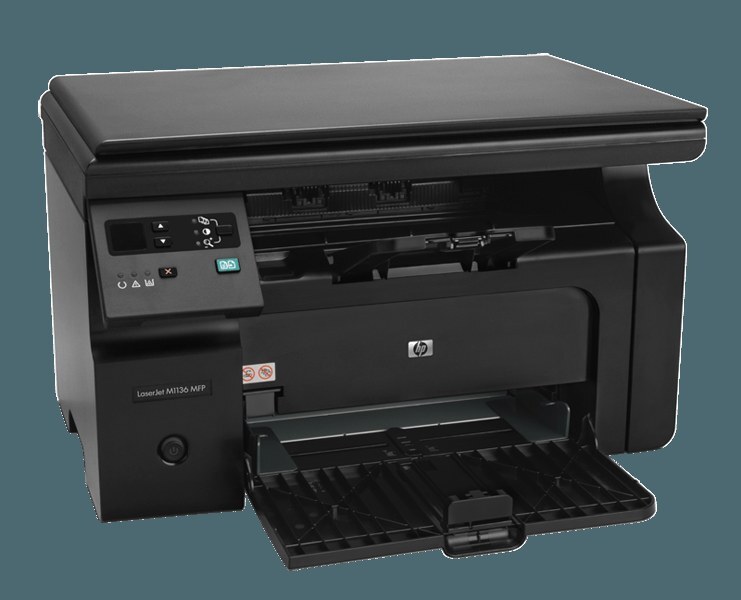
The small office that needs print, scan and copy — but not a server closet — is exactly who HP built the LaserJet Pro M1219MFP for: a complete mono document station in one compact box. Its supply list has a single line, the HP 85A black cartridge, the CE285A, with the maximum-yield CE285X (85X) as the longer-running version of the same cartridge.
Offices choose a machine like this to end the walk to someone else's desk: contracts get scanned where they are signed, forms get copied where they are filled in, and print jobs stay in the room. One ink-free laser engine covers all three jobs, which keeps the running-cost conversation short — the only recurring purchase is the cartridge, and the only recurring question is how many to keep on hand.
Toner Cartridges for LaserJet Pro M1219MFP
| Cartridge | Color | Page Yield |
|---|---|---|
| CE285A Black — 4 Pack | Black | See product page |
| CE285A Premium Quality Black — 4 Pack | Black | See product page |
| CE285A Black — 8 Pack | Black | See product page |
| CE285A Black — 10 Pack | Black | See product page |
| CE285X Maximum Yield Black — 3 Pack | Black | See product page |
| CE285A Black — Single | Black | See product page |
| CE285A Black — 2 Pack | Black | See product page |
| CE285A Black — 3 Pack | Black | See product page |
| CE285A Black — 5 Pack | Black | See product page |
| CE285A MICR Black — Single | Black | See product page |
Which cartridge should you buy?
Scanning and copying do not use toner, but the printed output they generate does — busy MFP desks empty cartridges faster than their owners expect. A two- or three-pack of the standard cartridge is the practical baseline for a small office, so a change never waits on shipping. Where the machine prints all day, the maximum-yield CE285X three-pack cuts the number of swaps across a quarter. The premium-quality four-pack is the pick for customer-facing paperwork, and the MICR cartridge covers offices that print their own checks. All compatible cartridges here include a 1-year warranty and 1-year returns.
Chip, toner and everyday use
When you load a fresh cartridge, strip the seal in one clean pull and confirm the chip faces its contacts as the unit slides home; the printer should report ready without warnings. A gentle rock before installation spreads the toner evenly after shipping. Keep the scanner glass clean — dust there is often blamed on toner — and store the spare cartridge sealed in the supply cabinet rather than on top of the machine, where heat rises. Yield ratings assume light text pages, so form-heavy copying shortens real-world runs.
Frequently Asked Questions
Can I use CE285A toner in the LaserJet Pro M1219MFP?
Yes — the CE285A is this machine's standard cartridge, and the maximum-yield CE285X fits the same bay. Check the code printed on your current cartridge to confirm before ordering.
Where do I get drivers for this model?
Download the latest full-feature driver from HP's official support site, choosing your exact operating system. The current driver behaves better than the version on any old install disc the machine may have shipped with.
How many spare cartridges should a small office stock?
Enough to cover a year or two of printing, no more. An unopened cartridge keeps well sealed, upright and at room temperature, so a small rotation of spares is cheap insurance against an empty machine.
More printers that use the same cartridges
Alphabetically, the extended family drinking from the same cartridge looks like this:
HP CE285A, LaserJet M1130, LaserJet M1132, LaserJet M1134, LaserJet M1134MFP, LaserJet M1136, LaserJet M1136MFP, LaserJet M1137, LaserJet M1137MFP, LaserJet M1138, LaserJet M1138MFP, LaserJet M1139, LaserJet M1139MFP, LaserJet M1210, LaserJet M1210MFP, LaserJet M1212, Laserjet M1212, LaserJet M1212F, LaserJet M1212FMFP, LaserJet M1212MFP, LaserJet M1212NF, LaserJet M1212NFMFP, LaserJet M1213, LaserJet M1213MFP, LaserJet M1213NF, LaserJet M1213NFMFP, LaserJet M1214, LaserJet M1214NFH, LaserJet M1216, LaserJet M1216MFP, LaserJet M1216NFH, LaserJet M1216NFHMFP, LaserJet M1217, LaserJet M1217MFP, LaserJet M1217NFW, LaserJet M1217NFW MFP, LaserJet M1217NFWMFP, LaserJet M1219, LaserJet M1219MFP, LaserJet M1219NF, LaserJet M1219NFMFP, LaserJet P1100, LaserJet P1102, LaserJet P1102W, LaserJet Pro M1130, LaserJet Pro M1132, LaserJet Pro M1132MFP, LaserJet Pro M1134, LaserJet Pro M1134MFP, LaserJet Pro M1136, LaserJet Pro M1136MFP, LaserJet Pro M1137, LaserJet Pro M1137MFP, LaserJet Pro M1138, LaserJet Pro M1138MFP, LaserJet Pro M1139, LaserJet Pro M1139MFP, LaserJet Pro M1210, LaserJet Pro M1210MFP, LaserJet Pro M1212, LaserJet Pro M1212F, LaserJet Pro M1212FMFP, LaserJet Pro M1212NF, LaserJet Pro M1212NFMFP, LaserJet Pro M1213, LaserJet Pro M1213MFP, LaserJet Pro M1213NF, LaserJet Pro M1213NFMFP, LaserJet Pro M1214, LaserJet Pro M1214NFH, LaserJet Pro M1216, LaserJet Pro M1216MFP, LaserJet Pro M1216NFH, LaserJet Pro M1216NFHMFP, LaserJet Pro M1217, LaserJet Pro M1217MFP, LaserJet Pro M1217NFW, LaserJet Pro M1217NFWMFP, LaserJet Pro M1219, LaserJet Pro M1219NFMFP, LaserJet Pro P1100, LaserJet Pro P1102, LaserJet Pro P1102W