




LaserJet Pro M1213MFP
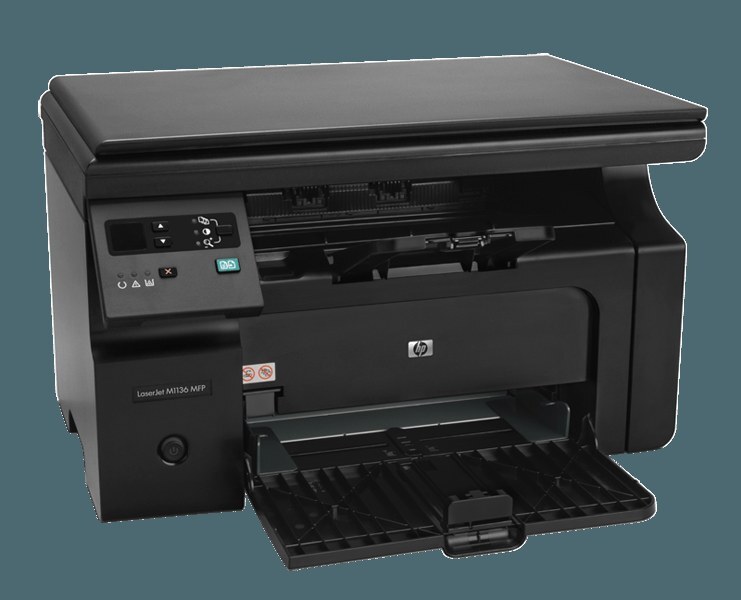
The HP LaserJet Pro M1213MFP packs print, scan and copy into the Pro M1213's compact chassis for home offices short on space. Its supply shelf is as compact as the machine: one black CE285A — the 85A — with the maximum-yield CE285X (85X) 3 pack as the stretch option when the desk prints more than its size suggests.
This is the printer for the corner of a spare room, the end of a kitchen table, the desk that is also three other pieces of furniture. Space-starved setups cannot hide a supply cabinet, so the design's mercy is that there is almost nothing to store: one cartridge in the machine, at most one spare beside it. Everything about owning this model is scaled to the footprint it asks of your home.
Toner Cartridges for LaserJet Pro M1213MFP
The full shelf for a small machine, largest packs first — take only what your space and volume justify:
- CE285A — Black — 10 Pack; page yield: on the product page
- CE285A — Black — 8 Pack; page yield: on the product page
- CE285A — Black — 5 Pack; page yield: on the product page
- CE285A — Black — Premium Quality, 4 Pack; page yield: on the product page
- CE285A — Black — 4 Pack; page yield: on the product page
- CE285A — Black — 3 Pack; page yield: on the product page
- CE285A — Black — 2 Pack; page yield: on the product page
- CE285A — Black — single cartridge; page yield: on the product page
- CE285A — Black MICR — single, for check printing; page yield: on the product page
- CE285X — Black — Maximum Yield, 3 Pack; page yield: on the product page
Which cartridge should you buy?
Do the space math before the volume math. A single standard cartridge suits a desk that prints a little each week, and its box is small enough to live in a drawer. But if the machine works daily, the maximum-yield 3 pack is the cleverer fit for a small room: more pages per box stored, fewer deliveries, fewer empties to dispose of. The 2 pack is the balanced middle — a working cartridge plus its replacement, nothing more. Leave the deep multipacks to offices with shelves; in a spare room they solve a storage problem by becoming one.
Chip, toner and everyday use
Storing the spare is part of the design brief in a tight space: keep it sealed, upright, and out of the sunny corner — toner is content at ordinary room conditions and asks only to be left in its packaging until needed. When the change comes, it is the usual gentle routine: old one out, new one rocked level, tape pulled, seated home. Because the machine scans as well as prints, remember the glass trick too — a quick wipe of the scanner glass fixes more 'print quality' complaints on a compact MFP than any cartridge ever will.
Frequently Asked Questions
Which toner fits the LaserJet Pro M1213MFP?
The black CE285A — the standard cartridge for the whole series — or the maximum-yield CE285X 3 pack when the desk prints heavily. One cartridge covers its printing and copying; scanning uses none.
How do I keep a spare cartridge in a small home office?
In its sealed box, in a drawer or on a closet shelf, away from windows and radiators. Toner stores happily at room temperature for a long time; it does not need special conditions, just an undisturbed corner.
Do copies wear the cartridge faster than prints?
A copy is a printed page, so copies and prints draw toner at the same rate per page. A copying-heavy desk simply makes more pages than it realizes — which is the usual reason a cartridge ends sooner than expected.
Is a bigger cartridge available for this compact machine?
Yes — the CE285X maximum-yield build fits the same slot and runs longer between changes. For a small-footprint setup it is doubly useful: fewer swaps and fewer spare boxes to find room for.
More printers that use the same cartridges
Compact as it is, the M1213MFP shares its cartridge with a long family list — every machine below takes the same supply: HP CE285A, LaserJet M1132, LaserJet M1134MFP, LaserJet M1136MFP, LaserJet M1137MFP, LaserJet M1138MFP, LaserJet M1139MFP, LaserJet M1210MFP, LaserJet M1212F, LaserJet M1212MFP, LaserJet M1212NFMFP, LaserJet M1213MFP, LaserJet M1213NFMFP, LaserJet M1214NFH, LaserJet M1216MFP, LaserJet M1216NFHMFP, LaserJet M1217MFP, LaserJet M1217NFW MFP, LaserJet M1219, LaserJet M1219NF, LaserJet P1100, LaserJet P1102W, LaserJet Pro M1132, LaserJet Pro M1134, LaserJet Pro M1136, LaserJet Pro M1137, LaserJet Pro M1138, LaserJet Pro M1139, LaserJet Pro M1210, LaserJet Pro M1212, LaserJet Pro M1212FMFP, LaserJet Pro M1212NFMFP, LaserJet Pro M1213NF, LaserJet Pro M1214, LaserJet Pro M1216, LaserJet Pro M1216NFH, LaserJet Pro M1217, LaserJet Pro M1217NFW, LaserJet Pro M1219, LaserJet Pro M1219NFMFP, LaserJet Pro P1102, Laserjet M1212, LaserJet M1130, LaserJet M1134, LaserJet M1136, LaserJet M1137, LaserJet M1138, LaserJet M1139, LaserJet M1210, LaserJet M1212, LaserJet M1212FMFP, LaserJet M1212NF, LaserJet M1213, LaserJet M1213NF, LaserJet M1214, LaserJet M1216, LaserJet M1216NFH, LaserJet M1217, LaserJet M1217NFW, LaserJet M1217NFWMFP, LaserJet M1219MFP, LaserJet M1219NFMFP, LaserJet P1102, LaserJet Pro M1130, LaserJet Pro M1132MFP, LaserJet Pro M1134MFP, LaserJet Pro M1136MFP, LaserJet Pro M1137MFP, LaserJet Pro M1138MFP, LaserJet Pro M1139MFP, LaserJet Pro M1210MFP, LaserJet Pro M1212F, LaserJet Pro M1212NF, LaserJet Pro M1213, LaserJet Pro M1213NFMFP, LaserJet Pro M1214NFH, LaserJet Pro M1216MFP, LaserJet Pro M1216NFHMFP, LaserJet Pro M1217MFP, LaserJet Pro M1217NFWMFP, LaserJet Pro M1219MFP, LaserJet Pro P1100, LaserJet Pro P1102W.