




LaserJet M1214NFH
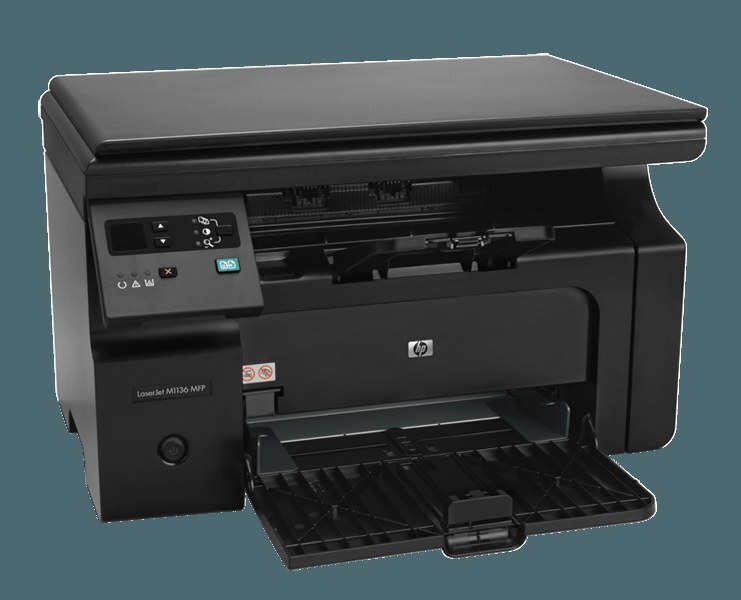
With fax and networking aboard, the LaserJet M1214NFH was the connected M1214 — a compact four-function mono multifunction for small offices that needed one machine reachable by everyone. It prints, scans, copies and faxes from a single small footprint. Its cartridge is the HP 85A in full — the CE285A — with the maximum-yield CE285X (85X) stocked as the long-interval alternative.
Four-function machines live in paperwork businesses: the clinics, agencies and front desks where forms arrive by fax, get copied for the file, scanned for the record and printed for the customer. The M1214NFH was specced for exactly that churn, and its designers kept the consumable side mercifully short. However the document arrives, it leaves on the same single black cartridge, so the person who orders supplies never has to ask which of four toners the fax uses. It uses the same one as everything else.
Toner Cartridges for LaserJet M1214NFH
| What you get | Color | Rated yield |
|---|---|---|
| CE285A Black — 10 Pack | Black | See product page |
| CE285A Black — 8 Pack | Black | See product page |
| CE285A Black — 5 Pack | Black | See product page |
| CE285A Premium Quality Black — 4 Pack | Black | See product page |
| CE285A Black — 4 Pack | Black | See product page |
| CE285A Black — 3 Pack | Black | See product page |
| CE285A Black — 2 Pack | Black | See product page |
| CE285A Black — Single Cartridge | Black | See product page |
| CE285A MICR Black — Single, for Check Printing | Black | See product page |
| CE285X Maximum Yield Black — 3 Pack | Black | See product page |
Which cartridge should you buy?
A connected machine that other people depend on should never be one cartridge from stopping, so this shelf is best read from the top: the big boxes first. The eight- and ten-pack CE285A options suit offices that treat toner like copier paper — a stockroom item, bought in quantity. Smaller teams get the same security from the two-pack rhythm, one cartridge working and one waiting. The maximum-yield CE285X three-pack is the alternative strategy: fewer, longer-running cartridges instead of many standard ones. Add the MICR single only if the office prints its own checks, and the Premium Quality four-pack if you prefer the uprated build. Every compatible cartridge listed is backed by a 1-year warranty and 1-year returns.
Chip, toner and everyday use
On a shared machine, the person swapping the cartridge is rarely the person who noticed it fading, so the routine is worth keeping foolproof: it is printed on the cartridge's bag, and it amounts to tape off, cartridge in, click, done. The M1214NFH recognizes the CE285A's chip automatically once it is fully seated; if a replacement ever shows as unrecognized, the fix is almost always mechanical — open up, lift the cartridge, wipe nothing, simply seat it again with firm, even pressure. Because fax pages print the moment they arrive, a cartridge that is merely low can announce itself on an incoming form; swapping at the first fade, rather than the last gasp, keeps the fax line trustworthy.
Frequently Asked Questions
Which cartridge fits the LaserJet M1214NFH?
The black CE285A — the HP 85A — is its only cartridge. The maximum-yield CE285X three-pack on this page is the longer-running alternative for offices that print and fax heavily.
Our faxes are coming through faint. Is that a toner problem?
Very likely. Incoming faxes print with the same CE285A as copies and print jobs, so a cartridge near the end of its life shows on fax pages first. A gentle shake buys a little time; a fresh cartridge settles it.
Can I print checks on the M1214NFH?
Yes, with the MICR build of the CE285A, whose magnetic toner lays down the bank-readable line. Keep a standard cartridge for everything else — MICR toner is a specialist supply, not a general upgrade.
Does the M1214NFH use the same toner as the plain M1214?
It does. Every M1214 variant, and the wider family listed below, runs on the CE285A line, so one shelf of stock can cover several different models in the same office.
More printers that use the same cartridges
The connected M1214 shares its cartridge with the whole 85A clan. First, the M1130 and M1210 branches: HP CE285A, LaserJet M1130, LaserJet M1132, LaserJet M1134, LaserJet M1134MFP, LaserJet M1136, LaserJet M1136MFP, LaserJet M1137, LaserJet M1137MFP, LaserJet M1138, LaserJet M1138MFP, LaserJet M1139, LaserJet M1139MFP, LaserJet M1210, LaserJet M1210MFP, LaserJet M1212, LaserJet M1212F, LaserJet M1212FMFP, LaserJet M1212MFP, LaserJet M1212NF, LaserJet M1212NFMFP, LaserJet M1213, LaserJet M1213MFP, LaserJet M1213NF, LaserJet M1213NFMFP, LaserJet M1214, LaserJet M1216, LaserJet M1216MFP, LaserJet M1216NFH, LaserJet M1216NFHMFP, LaserJet M1217, LaserJet M1217MFP, LaserJet M1217NFW, LaserJet M1217NFW MFP, LaserJet M1217NFWMFP, LaserJet M1219, LaserJet M1219MFP, LaserJet M1219NF, LaserJet M1219NFMFP, LaserJet P1100, LaserJet P1102.
And the rest of the family — the Pro-badged versions and the P1100 line: LaserJet P1102W, LaserJet Pro M1130, LaserJet Pro M1132, LaserJet Pro M1132MFP, LaserJet Pro M1134, LaserJet Pro M1134MFP, LaserJet Pro M1136, LaserJet Pro M1136MFP, LaserJet Pro M1137, LaserJet Pro M1137MFP, LaserJet Pro M1138, LaserJet Pro M1138MFP, LaserJet Pro M1139, LaserJet Pro M1139MFP, LaserJet Pro M1210, LaserJet Pro M1210MFP, LaserJet Pro M1212, LaserJet Pro M1212F, LaserJet Pro M1212FMFP, LaserJet Pro M1212NF, LaserJet Pro M1212NFMFP, LaserJet Pro M1213, LaserJet Pro M1213MFP, LaserJet Pro M1213NF, LaserJet Pro M1213NFMFP, LaserJet Pro M1214, LaserJet Pro M1214NFH, LaserJet Pro M1216, LaserJet Pro M1216MFP, LaserJet Pro M1216NFH, LaserJet Pro M1216NFHMFP, LaserJet Pro M1217, LaserJet Pro M1217MFP, LaserJet Pro M1217NFW, LaserJet Pro M1217NFWMFP, LaserJet Pro M1219, LaserJet Pro M1219MFP, LaserJet Pro M1219NFMFP, LaserJet Pro P1100, LaserJet Pro P1102, LaserJet Pro P1102W, Laserjet M1212.