




LaserJet Pro M1132MFP
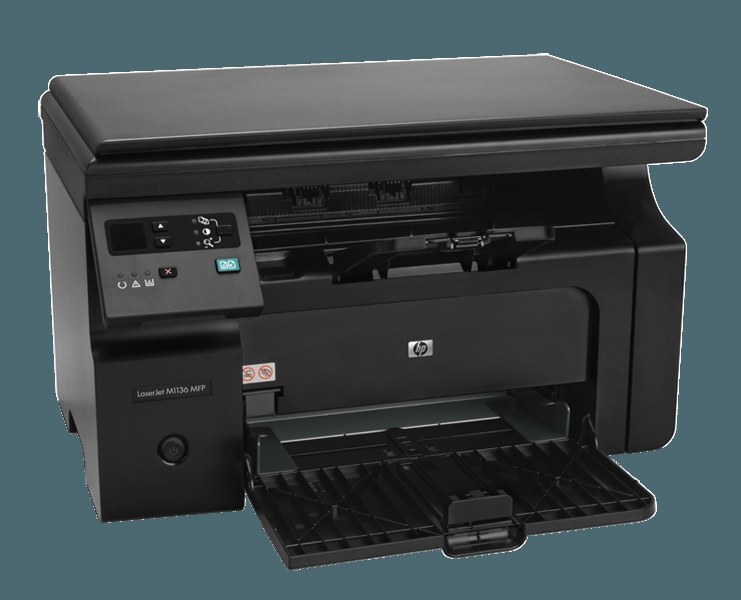
The LaserJet Pro M1132MFP delivered the M1132's upgraded feature set with full print, scan and copy capability in one compact Pro multifunction. It takes a single black cartridge from the HP 85A shelf — the CE285A by full part number, with the maximum-yield CE285X (85X) stocked alongside it. Three functions, one cartridge: every page the machine produces, however it is made, draws on that same fill.
Naming the MFP out in full underlines what this configuration is for: a small team that prints, scans and copies at one station and wants no second device. Copies consume toner exactly as prints do, so an office that photocopies heavily will move through fills faster than its print count suggests. The consolation is simplicity — one black cartridge to stock, with pack sizes running from a single unit to a ten pack.
Toner Cartridges for LaserJet Pro M1132MFP
| Cartridge | Color | Page Yield |
|---|---|---|
| CE285A black, 2 pack | Black | Check the product page |
| CE285A black, 3 pack | Black | Check the product page |
| CE285A black, 4 pack | Black | Check the product page |
| CE285A black, 5 pack | Black | Check the product page |
| CE285A black, 8 pack | Black | Check the product page |
| CE285A black, 10 pack | Black | Check the product page |
| CE285A Premium black, 4 pack | Black | Check the product page |
| CE285X maximum-yield black, 3 pack | Black | Check the product page |
| CE285A standard black | Black | Check the product page |
| CE285A MICR black, for check printing | Black | Check the product page |
Which cartridge should you buy?
Copy-heavy stations should size their buying to total pages, not print jobs. The CE285A standard single suits a lightly used MFP; the 2 pack, 3 pack, 4 pack and 5 pack cover growing teams; and the 8 pack or 10 pack serve offices that copy daily. The Premium 4 pack is the upgraded standard bundle, while the maximum-yield CE285X — sold as a 3 pack — puts the longest fill in the machine three times over. The MICR CE285A handles check printing. Every cartridge here is covered by a 1-year warranty and 1-year returns.
Chip, toner and everyday use
Because copies and prints share one fill, watch density on copies as your early warning — a scanner lid left open or a dirty glass can mimic toner fade, so clean the glass before blaming the cartridge. Genuine end-of-fill fading responds to a gentle rock of the unit, which redistributes the remaining toner; after that, install the replacement with its seal fully pulled and the cartridge seated until the chip reads it. Yield figures assume roughly 5% coverage, and dense copied forms draw a fill down well ahead of the rating. Store spares sealed, cool and dry.
Frequently Asked Questions
What toner does the LaserJet Pro M1132MFP take?
A single black cartridge: the CE285A standard fill or the maximum-yield CE285X, both from the HP 85A family. Printing, scanning output and copying all rely on that one unit.
Do copies use more toner than prints on the M1132MFP?
A copy uses toner the same way a print does, page for page. Offices that photocopy heavily should size pack purchases to their combined volume — the larger multipacks or the CE285X 3 pack fit that pattern.
Why do copies from my M1132MFP look faded when prints look fine?
Check the scanner glass first — dust and fingerprints lighten copies without affecting prints. If prints fade too, the cartridge is nearing its end and a rock or replacement is due.
Can I stock one spare for both an M1132MFP and an M1212?
Yes. The M1212 series appears in the family list below because it runs on the same CE285A and CE285X cartridges, so a single spare shelf covers both machines.
More printers that use the same cartridges
One cartridge covers this entire extended family: HP CE285A, LaserJet M1130, LaserJet M1132, LaserJet M1134, LaserJet M1134MFP, LaserJet M1136, LaserJet M1136MFP, LaserJet M1137, LaserJet M1137MFP, LaserJet M1138, LaserJet M1138MFP, LaserJet M1139, LaserJet M1139MFP, LaserJet M1210, LaserJet M1210MFP, LaserJet M1212, LaserJet M1212F, LaserJet M1212FMFP, LaserJet M1212MFP, LaserJet M1212NF, LaserJet M1212NFMFP, LaserJet M1213, LaserJet M1213MFP, LaserJet M1213NF, LaserJet M1213NFMFP, LaserJet M1214, LaserJet M1214NFH, LaserJet M1216, LaserJet M1216MFP, LaserJet M1216NFH, LaserJet M1216NFHMFP, LaserJet M1217, LaserJet M1217MFP, LaserJet M1217NFW, LaserJet M1217NFW MFP, LaserJet M1217NFWMFP, LaserJet M1219, LaserJet M1219MFP, LaserJet M1219NF, LaserJet M1219NFMFP, LaserJet P1100, LaserJet P1102, LaserJet P1102W, LaserJet Pro M1130, LaserJet Pro M1132, LaserJet Pro M1134, LaserJet Pro M1134MFP, LaserJet Pro M1136, LaserJet Pro M1136MFP, LaserJet Pro M1137, LaserJet Pro M1137MFP, LaserJet Pro M1138, LaserJet Pro M1138MFP, LaserJet Pro M1139, LaserJet Pro M1139MFP, LaserJet Pro M1210, LaserJet Pro M1210MFP, LaserJet Pro M1212, LaserJet Pro M1212F, LaserJet Pro M1212FMFP, LaserJet Pro M1212NF, LaserJet Pro M1212NFMFP, LaserJet Pro M1213, LaserJet Pro M1213MFP, LaserJet Pro M1213NF, LaserJet Pro M1213NFMFP, LaserJet Pro M1214, LaserJet Pro M1214NFH, LaserJet Pro M1216, LaserJet Pro M1216MFP, LaserJet Pro M1216NFH, LaserJet Pro M1216NFHMFP, LaserJet Pro M1217, LaserJet Pro M1217MFP, LaserJet Pro M1217NFW, LaserJet Pro M1217NFWMFP, LaserJet Pro M1219, LaserJet Pro M1219MFP, LaserJet Pro M1219NFMFP, LaserJet Pro P1100, LaserJet Pro P1102, LaserJet Pro P1102W, Laserjet M1212.