




LaserJet Pro M1137
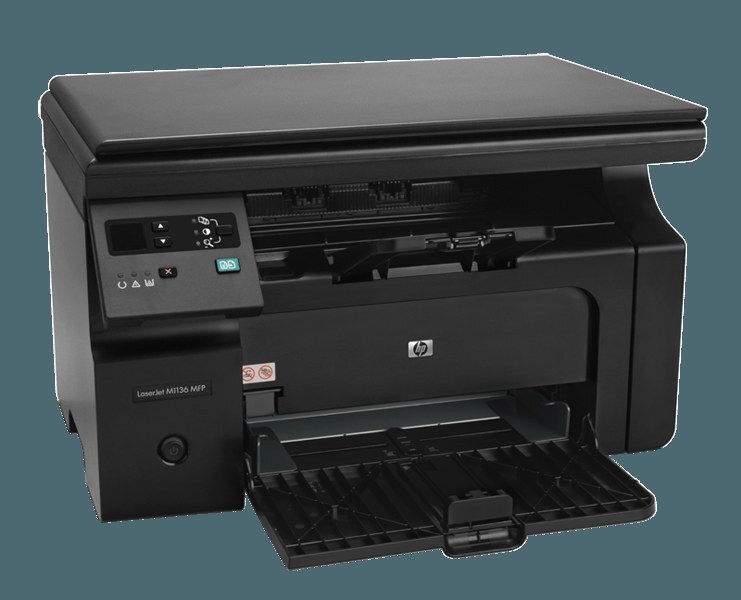
HP's LaserJet Pro M1137 rounded out the Pro M1130 series with an upgraded feature set, keeping the compact mono multifunction format that made the line a small-office staple. It feeds on a single black cartridge, the CE285A — also cataloged as the 85A — and accepts the maximum-yield CE285X (85X), which this page stocks as a 3 pack.
Sitting mid-series, the M1137 is the balanced choice of its line: more capability than the entry machines, none of the top model's premium, and a user base of small offices that print, scan and copy in roughly equal measure. Its single-cartridge design keeps the ownership arithmetic just as balanced — one supply to buy, in whatever pack size matches the office's pace.
Toner Cartridges for LaserJet Pro M1137
The shelf below runs from the longest-life option down to everyday multipacks — every one of them fits this printer.
- CE285X — black — the maximum-yield option, sold as a 3 pack; yield: see product page
- CE285A — black — one cartridge, the baseline buy; yield: see product page
- CE285A MICR — black — micr toner for checks; yield: see product page
- CE285A — black — premium-grade 4 pack; yield: see product page
- CE285A — black — 10 pack for steady offices; yield: see product page
- CE285A — black — 8 pack; yield: see product page
- CE285A — black — 5 pack; yield: see product page
- CE285A — black — 4 pack; yield: see product page
- CE285A — black — 3 pack; yield: see product page
- CE285A — black — 2 pack; yield: see product page
Which cartridge should you buy?
The real decision on this page is yield per cartridge versus cartridges per box. The standard CE285A single suits an office that prints a little every week and dislikes storing spares. The CE285X build carries more toner in each unit, so a busier office changes cartridges less often even before multipacks enter the picture; combining the two ideas — maximum-yield cartridges bought in their 3 pack — gives the longest unattended run this machine can offer. Standard cartridges in the larger boxes, like the 8 pack, win on cost per cartridge instead. Pick the axis your office actually feels: fewer swaps, or cheaper units.
Chip, toner and everyday use
A jam message with no visible paper usually means a fragment, not a sheet. Small torn scraps hide behind rollers or underneath the cartridge, where the sensor can detect them long before your eye does. Power the machine down, remove the cartridge carefully, and inspect the cavity with a flashlight before concluding the warning is false. Clearing a scrap the size of a postage stamp is often all it takes to return the printer to service.
Frequently Asked Questions
Is CE285A the correct cartridge for the LaserJet Pro M1137?
Yes. The M1137 accepts the CE285A — match one of these codes and the cartridge will seat correctly. The CE285X is the maximum-yield version of the same fit.
Are third-party cartridges safe to use in the LaserJet Pro M1137?
Yes, when they come from a reputable maker. A well-built compatible CE285A is engineered to the same dimensions and toner formulation as the original, and the printer treats it like any other cartridge. The compatibles here are backed by a 1-year warranty and 1-year returns.
The M1137 reports a jam but I cannot see any paper — what now?
Look smaller. Torn scraps often hide behind rollers or under the cartridge, and the sensor notices fragments you cannot see at first glance. Remove the CE285A carefully and check the cavity with a flashlight before printing again.
More printers that use the same cartridges
Every machine below runs on this same cartridge, which is why one spare covers so many desks: LaserJet M1212NFMFP; LaserJet M1213; LaserJet M1213MFP; LaserJet M1213NF; LaserJet M1213NFMFP; LaserJet M1214; LaserJet M1214NFH; LaserJet M1216; LaserJet M1216MFP; LaserJet M1216NFH; LaserJet M1216NFHMFP; LaserJet M1217; LaserJet M1217MFP; LaserJet M1217NFW; LaserJet M1217NFW MFP; LaserJet M1217NFWMFP; LaserJet M1219; LaserJet M1219MFP; LaserJet M1219NF; LaserJet M1219NFMFP; LaserJet P1100; LaserJet P1102; LaserJet P1102W; LaserJet Pro M1130; LaserJet Pro M1132; LaserJet Pro M1132MFP; LaserJet Pro M1134; LaserJet Pro M1134MFP; LaserJet Pro M1136; LaserJet Pro M1136MFP; LaserJet Pro M1137MFP; LaserJet Pro M1138; LaserJet Pro M1138MFP; LaserJet Pro M1139; LaserJet Pro M1139MFP; LaserJet Pro M1210; LaserJet Pro M1210MFP; LaserJet Pro M1212; LaserJet Pro M1212F; LaserJet Pro M1212FMFP; LaserJet Pro M1212NF; LaserJet Pro M1212NFMFP; LaserJet Pro M1213; LaserJet Pro M1213MFP; LaserJet Pro M1213NF; LaserJet Pro M1213NFMFP; LaserJet Pro M1214; LaserJet Pro M1214NFH; LaserJet Pro M1216; LaserJet Pro M1216MFP; LaserJet Pro M1216NFH; LaserJet Pro M1216NFHMFP; LaserJet Pro M1217; LaserJet Pro M1217MFP; LaserJet Pro M1217NFW; LaserJet Pro M1217NFWMFP; LaserJet Pro M1219; LaserJet Pro M1219MFP; LaserJet Pro M1219NFMFP; LaserJet Pro P1100; LaserJet Pro P1102; LaserJet Pro P1102W; Laserjet M1212; HP CE285A; LaserJet M1130; LaserJet M1132; LaserJet M1134; LaserJet M1134MFP; LaserJet M1136; LaserJet M1136MFP; LaserJet M1137; LaserJet M1137MFP; LaserJet M1138; LaserJet M1138MFP; LaserJet M1139; LaserJet M1139MFP; LaserJet M1210; LaserJet M1210MFP; LaserJet M1212; LaserJet M1212F; LaserJet M1212FMFP; LaserJet M1212MFP; LaserJet M1212NF