




LaserJet Pro M1217NFWMFP
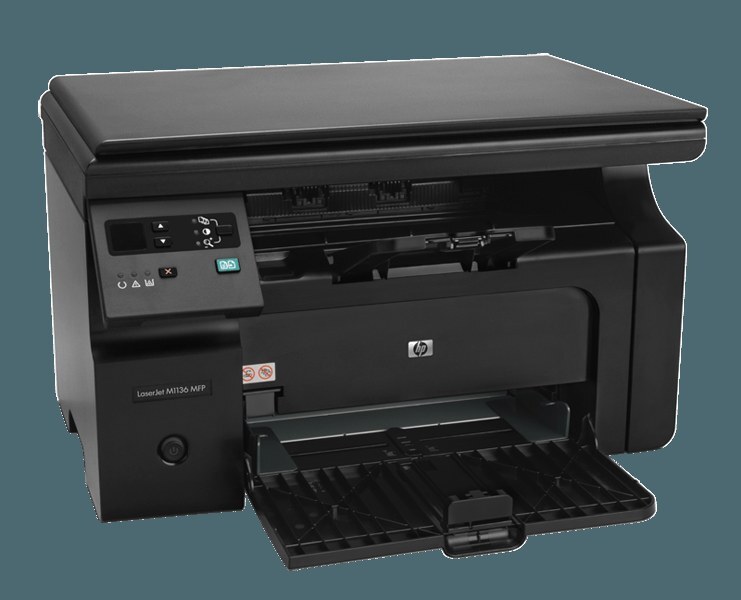
HP's most connected M1217, the LaserJet Pro M1217NFWMFP, is a mono multifunction that prints, scans and copies over Wi-Fi or Ethernet, fax included — and every one of those jobs runs through a single black cartridge. That cartridge is the HP 85A, stocked here in compatible form as the CE285A, with the maximum-yield CE285X (85X) waiting for desks that empty a standard cartridge too quickly.
Think of this model as the early-2010s home-office hub: a household with a genuine paperwork load parks it on the network once, and everyone prints to it from their own machine while scans, copies and the occasional fax pass through the same box. Because the whole office depends on it, its one consumable matters more than its spec sheet — when the toner runs out, four functions stop at once, not just printing.
Toner Cartridges for LaserJet Pro M1217NFWMFP
| Cartridge | Color | Page Yield |
|---|---|---|
| CE285A — Black, single cartridge | Black | See product page |
| CE285A — Black, 2 Pack | Black | See product page |
| CE285A — Black, 3 Pack | Black | See product page |
| CE285A — Black, 4 Pack | Black | See product page |
| CE285A — Black, 5 Pack | Black | See product page |
| CE285A — Black, 8 Pack | Black | See product page |
| CE285A — Black, 10 Pack | Black | See product page |
| CE285A — Premium Quality Black, 4 Pack | Black | See product page |
| CE285A — MICR Black (check printing) | Black | See product page |
| CE285X — Maximum Yield Black, 3 Pack | Black | See product page |
Which cartridge should you buy?
A shared machine argues for capacity. The standard CE285A single suits a quiet week, but a printer serving several people burns through it fast; the multipacks on this page — two, three, four, five, eight or ten cartridges at a time — keep a spare rotation on the shelf so nobody waits on a delivery. If the household prints in bursts and hates mid-job swaps, the maximum-yield CE285X three-pack stretches the interval between changes. One special case: the MICR version of this cartridge carries magnetic toner for printing checks, and it belongs in the tray only for that job. Every compatible cartridge here is covered by a 1-year warranty and 1-year returns.
Chip, toner and everyday use
The printer reads a chip on the cartridge to track toner and confirm the unit belongs in this family, so a cartridge the machine refuses usually just needs reseating: pull it out, rock it gently from side to side to level the toner inside, and slide it back until it seats firmly. Pull the sealing tape fully before the first install, keep one sealed spare in a cool, dry drawer away from sunlight, and treat page-yield figures as estimates built on light text coverage — dense pages finish any cartridge sooner.
Frequently Asked Questions
Which toner does the LaserJet Pro M1217NFWMFP take?
Only the 85A family: the standard CE285A or the maximum-yield CE285X. Match the code printed on the cartridge you pull out before ordering, and the replacement will drop straight in.
Can it receive faxes while nobody is around?
Yes. In the fax settings you can switch on automatic answering with a set number of rings, so incoming faxes land on paper even when the house is empty — one more reason to keep its cartridge from running dry.
Does printing over Wi-Fi change which cartridge I buy?
No. Whether a job arrives by Wi-Fi, Ethernet or a direct cable, the machine prints with the same CE285A-family cartridge; the connection changes the route of the job, never the toner.
What is the MICR cartridge on this page for?
MICR toner is magnetically readable, which banks require on printed checks. It fits this printer like any other cartridge in the family, but it is a specialist supply — ordinary letters and forms want the standard build.
More printers that use the same cartridges
One cartridge feeds a wide family, so a spare bought for this machine also fits the M1130 and M1210 lines and their Pro-badged twins:
HP CE285A, LaserJet M1130, LaserJet M1132, LaserJet M1134, LaserJet M1134MFP, LaserJet M1136, LaserJet M1136MFP, LaserJet M1137, LaserJet M1137MFP, LaserJet M1138, LaserJet M1138MFP, LaserJet M1139, LaserJet M1139MFP, LaserJet M1210, LaserJet M1210MFP, LaserJet M1212, LaserJet M1212F, LaserJet M1212FMFP, LaserJet M1212MFP, LaserJet M1212NF, LaserJet M1212NFMFP, LaserJet M1213, LaserJet M1213MFP, LaserJet M1213NF, LaserJet M1213NFMFP, LaserJet M1214, LaserJet M1214NFH, LaserJet M1216, LaserJet M1216MFP, LaserJet M1216NFH, LaserJet M1216NFHMFP, LaserJet M1217, LaserJet M1217MFP, LaserJet M1217NFW, LaserJet M1217NFW MFP, LaserJet M1217NFWMFP, LaserJet M1219, LaserJet M1219MFP, LaserJet M1219NF, LaserJet M1219NFMFP, LaserJet P1100, LaserJet P1102, LaserJet P1102W, LaserJet Pro M1130, LaserJet Pro M1132, LaserJet Pro M1132MFP, LaserJet Pro M1134, LaserJet Pro M1134MFP, LaserJet Pro M1136, LaserJet Pro M1136MFP, LaserJet Pro M1137, LaserJet Pro M1137MFP, LaserJet Pro M1138, LaserJet Pro M1138MFP, LaserJet Pro M1139, LaserJet Pro M1139MFP, LaserJet Pro M1210, LaserJet Pro M1210MFP, LaserJet Pro M1212, LaserJet Pro M1212F, LaserJet Pro M1212FMFP, LaserJet Pro M1212NF, LaserJet Pro M1212NFMFP, LaserJet Pro M1213, LaserJet Pro M1213MFP, LaserJet Pro M1213NF, LaserJet Pro M1213NFMFP, LaserJet Pro M1214, LaserJet Pro M1214NFH, LaserJet Pro M1216, LaserJet Pro M1216MFP, LaserJet Pro M1216NFH, LaserJet Pro M1216NFHMFP, LaserJet Pro M1217, LaserJet Pro M1217MFP, LaserJet Pro M1217NFW, LaserJet Pro M1219, LaserJet Pro M1219MFP, LaserJet Pro M1219NFMFP, LaserJet Pro P1100, LaserJet Pro P1102, LaserJet Pro P1102W, Laserjet M1212