




LaserJet Enterprise 600 M602DN
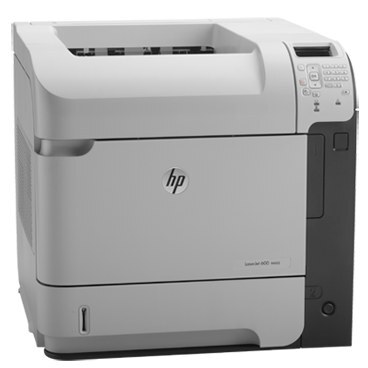
Two letters turn the M602 into a shared resource: the LaserJet Enterprise 600 M602DN pairs Ethernet networking with automatic duplex. Instead of a printer per desk, one early-2010s mono machine serves the workgroup — and prints both sides of the page without being asked twice.
Under the cover it's the 90-series cartridge system: CE390A for standard-yield needs, CE390X when the shared queue burns through toner. Either way, the whole Enterprise 600 family drinks from the same well.
Toner Cartridges for LaserJet Enterprise 600 M602DN
This printer works with the following toner cartridges:
- HP CE390A
- HP CE390X
More HP Printers
- LaserJet 600
- LaserJet Enterprise 600
- LaserJet Enterprise 600 M601
- LaserJet Enterprise 600 M601DN
- LaserJet Enterprise 600 M601N
- LaserJet Enterprise 600 M602
- LaserJet Enterprise 600 M602N
- LaserJet Enterprise 600 M602X
- LaserJet Enterprise 600 M603
- LaserJet Enterprise 600 M603DN
- LaserJet Enterprise 600 M603N
- LaserJet Enterprise 600 M603XH
- LaserJet Enterprise M4555
- LaserJet Enterprise M4555 MFP
- LaserJet Enterprise M4555F
- LaserJet Enterprise M4555F MFP
- LaserJet Enterprise M4555FSKM
- LaserJet Enterprise M4555FSKM MFP
- LaserJet Enterprise M4555H
- LaserJet Enterprise M4555H MFP
- LaserJet M4555
- LaserJet M4555 MFP
- LaserJet M4555F
- LaserJet M4555f MFP
- LaserJet M4555FSKM
- LaserJet M4555FSKM MFP
- LaserJet M4555H
- LaserJet M4555H MFP
- LaserJet M601
- LaserJet M601DN
- LaserJet M601N
- LaserJet M602
- LaserJet M602DN
- LaserJet M602N
- LaserJet M602X
- LaserJet M603
- LaserJet M603DN
- LaserJet M603HX
- LaserJet M603N
- LaserJet M603XH
Frequently Asked Questions
Which toner cartridge does the LaserJet Enterprise 600 M602DN use?
The LaserJet Enterprise 600 M602DN uses the CE390A (standard yield) or the CE390X (high-yield) toner cartridge. Confirm the code printed on your current cartridge matches before ordering a replacement.
Can the LaserJet Enterprise 600 M602DN print on both sides of the page automatically?
Yes — the LaserJet Enterprise 600 M602DN includes automatic duplexing, so you can print double-sided without flipping pages by hand. Select two-sided printing in the LaserJet Enterprise 600 M602DN's print dialog to cut paper use in half.
Can the LaserJet Enterprise 600 M602DN be shared on an office network?
Yes — the LaserJet Enterprise 600 M602DN has Ethernet connectivity, so plug it into your network and install the driver on each workstation. Every computer can then send jobs directly to the LaserJet Enterprise 600 M602DN.