




LaserJet 3330F
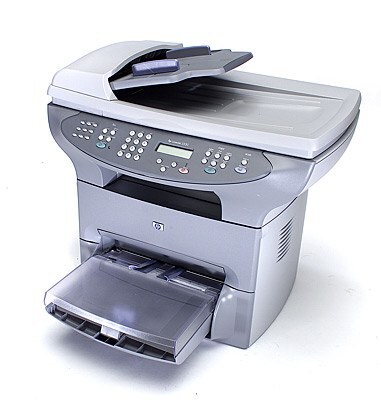
The LaserJet 3330F was the fax-focused configuration of HP's 3330 multifunction — a 2003 four-function all-in-one tuned for offices where faxing still mattered daily. Print, scan, copy and fax share one compact chassis, and one cartridge feeds them all: the C7115A (HP 15A), with the high-yield C7115X (HP 15X) for heavier use. The listings below are compatible builds of those two codes.
A fax-era MFP lives or dies on readiness: a received fax cannot wait for a toner order. That made the 3330F's single-cartridge design a virtue — one spare on the shelf covers printing, copying and faxing alike, and the cartridge it uses is one of the most common laser supplies ever made. The machine's four jobs all draw on the same toner, so keeping it supplied is a one-line shopping list.
Toner Cartridges for LaserJet 3330F
| Cartridge | Color | Page Yield |
|---|---|---|
| C7115A (15A) | Black | See product page |
| C7115X (15X) | Black | See product page |
| LaserJet 3330F cartridge | Black | See product page |
| C7115A MICR | Black | See product page |
| C7115X MICR | Black | See product page |
Multi-packs stocked for this machine: C7115A 2 Pack, C7115A 3 Pack, C7115A 5 Pack, C7115A 10 Pack, C7115A Premium 5 Pack, C7115X 2 Pack, C7115X 3 Pack, C7115X 5 Pack, C7115X 10 Pack.
Which cartridge should you buy?
Both yields fit the 3330F and are physically interchangeable, so let your volume pick. A quiet office that faxes and copies modestly will live comfortably on the standard C7115A. A machine that receives faxes around the clock earns the high-yield C7115X: it lasts longer per cartridge, which on a fax machine also means fewer moments where an incoming page meets an empty slot. Either way, the fax-readiness rule applies — the time to hold a spare is before the current cartridge fades, not after.
Chip, toner and everyday use
Treat the toner-low alert on this machine as an early heads-up, not a stop sign. Reorder when it appears, redistribute the toner in the current cartridge with a gentle rock, and keep printing until quality actually drops. Copies and received faxes draw on the same cartridge as prints from the computer, so a busy fax week shortens a cartridge's life faster than the page counter alone suggests. When the swap comes, it is the same single cartridge for every function — no separate supplies hide anywhere in this chassis.
Frequently Asked Questions
What is the difference between the C7115A and C7115X for the LaserJet 3330F?
Only the yield. Both fit, both are interchangeable, and the X version simply runs longer between changes. Match the choice to how hard the machine works.
Can I use a compatible HP 15A cartridge in the 3330F?
Yes — compatible 15A cartridges are built to the same fit and function as the OEM C7115A, install exactly the same way, and are a straightforward way to spend less on toner for this machine.
What should I do when the 3330F shows a toner-low warning?
Reorder the cartridge, rock the current one to redistribute its toner, and keep printing. The alert is timed early on purpose; the real deadline is when output quality drops.
Do faxes use toner the same way prints do?
Yes — a received fax is a printed page, and it draws from the same C7115A or C7115X cartridge as everything else the machine produces. Heavy fax traffic counts toward cartridge life just like a print job.
More printers that use the same cartridges
One cartridge family covers a long list of HP machines. The personal-laser side of the family: HP C7115A, LASERJET 1001NW, LASERJET 1201NW, LASERJET 1202W, LaserJet 1000, LaserJet 1000, LaserJet 1000W, LaserJet 1005, LaserJet 1005W, LaserJet 1200, LaserJet 1200N, LaserJet 1200SE, LaserJet 1220, LaserJet 1220SE.
And the multifunction side: LaserJet 3080, LaserJet 3300, LaserJet 3300MFP, LaserJet 3300N, LaserJet 3310, LaserJet 3310MFP, LaserJet 3320, LaserJet 3320MFP, LaserJet 3320N, LaserJet 3320NMFP, LaserJet 3330, LaserJet 3330MFP, LaserJet 3380, LaserJet LaserJet 3320.