




LaserJet 1000
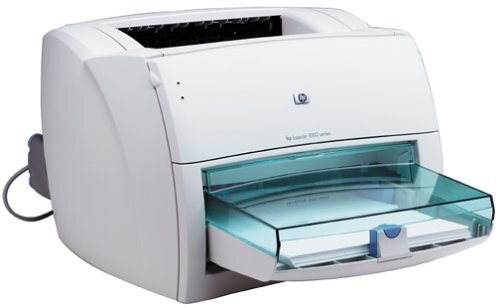
The LaserJet 1000 is the printer that carried laser printing into ordinary homes: launched in 2001, it sold for less than many inkjets of its day and proved that a compact monochrome laser could be a household machine rather than office equipment. It feeds on a single cartridge, the HP 15A (C7115A), and owners who print more can step up to the high-yield HP 15X (C7115X) in the same bay. One slot, two capacities — that is the entire toner story of this machine, and both versions sit on the shelf below in compatible form.
Two decades on, surviving LaserJet 1000 units tend to lead quiet lives: a desk corner at home, a back office, a workshop counter where a plain black-and-white page is all that gets asked of them. There is no color hardware to maintain and no second cartridge to keep track of, so ownership comes down to a cartridge in the slot and a spare within reach. Alongside the two yields, this page carries multi-packs for households that would rather stock up once a year, plus MICR versions of both cartridges for printing checks.
Toner Cartridges for LaserJet 1000
| Cartridge | Color | Page Yield |
|---|---|---|
| C7115A / 15A | Black | See product page |
| C7115A / 15A · 10 Pack | Black | See product page |
| C7115A / 15A · 2 Pack | Black | See product page |
| C7115A / 15A · 3 Pack | Black | See product page |
| C7115A / 15A · 5 Pack | Black | See product page |
| C7115X / 15X · High Yield | Black | See product page |
| C7115A / 15A · MICR | Black (MICR) | See product page |
| C7115X / 15X · High Yield · MICR | Black (MICR) | See product page |
| C7115A / 15A · 5 Pack · Premium | Black | See product page |
| C7115X / 15X · 10 Pack · High Yield | Black | See product page |
| C7115X / 15X · 2 Pack · High Yield | Black | See product page |
| C7115X / 15X · 3 Pack · High Yield | Black | See product page |
| C7115X / 15X · 5 Pack · High Yield | Black | See product page |
| HP Laserjet 1000 Black | Black | See product page |
Which cartridge should you buy?
Start with how much paper actually moves through the machine. A LaserJet 1000 that prints a few letters and school pages a week will take a long time to empty the standard 15A, and the standard cartridge is the sensible buy there. If the printer handles a steady stream of documents — invoices, coursework, a home business — the high-yield 15X earns its place: it holds more toner, so the cost of each page drops and the change-it moment comes around far less often. Multi-packs suit owners who keep this printer as a permanent fixture and never want a low-toner surprise. The MICR listings are a separate decision: choose one only if you print checks, since MICR toner carries the magnetic formulation check readers expect. Every compatible cartridge on this page is covered by a 1-year warranty and 1-year returns.
Chip, toner and everyday use
Changing the cartridge on a LaserJet 1000 is a one-minute job: open the top, lift the old unit out by its handle, peel the sealing tape from the new one and slide it in until it seats. If the printer does not acknowledge the new cartridge at first, take it out and reseat it firmly — contact points on a machine this age sometimes need a second try. Keep spare cartridges sealed, flat and away from sunlight; toner does not dry out like ink, but heat and humidity age the powder. And treat rated yields as estimates worked out at standard test coverage — dense pages with bold headings and graphics empty any cartridge sooner than light text does.
Frequently Asked Questions
What is the difference between the C7115A and the C7115X?
Both cartridges fit the LaserJet 1000 and install identically. The C7115A is the standard-yield HP 15A; the C7115X is the high-yield HP 15X, filled with more toner so it prints more pages before it needs replacing. Nothing on the printer changes when you move between them.
Can the LaserJet 1000 print checks?
Yes, with the right cartridge. This page lists MICR versions of both the 15A and the 15X; MICR toner is formulated so bank readers can scan the magnetic characters along the bottom of a check. For ordinary documents, the regular listings are the better value.
Why do faint copies of the page repeat down my printouts?
That ghosting effect is most often a cartridge issue on this machine, especially when the cartridge is nearing the end of its life. Swap in another 15A to test: if the repeated images vanish, the old cartridge was responsible and the printer itself is fine.
Does the LaserJet 1000 use a separate drum unit?
No separate drum appears anywhere on this page's shelf, and none is needed for normal upkeep: the cartridge is the only supply the LaserJet 1000 asks you to replace. When print quality fades for good, a fresh cartridge is the whole job.
More printers that use the same cartridges
The 15A family is shared with the other compact LaserJets of the same generation, including the HP C7115A, LASERJET 1001NW, LASERJET 1201NW, LASERJET 1202W, LaserJet 1000, LaserJet 1000W, LaserJet 1005, LaserJet 1005W, LaserJet 1200, LaserJet 1200N, LaserJet 1200SE, LaserJet 1220, LaserJet 1220SE, LaserJet 3080, LaserJet 3300, LaserJet 3300MFP, LaserJet 3300N, LaserJet 3310, LaserJet 3310MFP, LaserJet 3320, LaserJet 3320MFP, LaserJet 3320N, LaserJet 3320NMFP, LaserJet 3330, LaserJet 3330F, LaserJet 3330MFP, LaserJet 3380, LaserJet LaserJet 3320.