




LaserJet 3300N
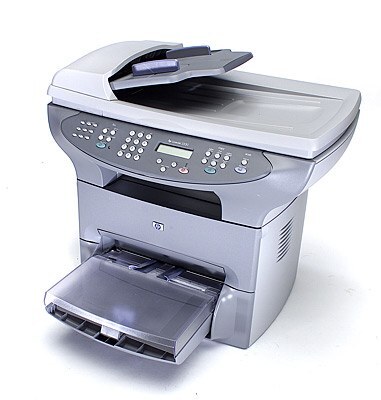
The LaserJet 3300N was the networked configuration of the LaserJet 3300 multifunction line — the early-2000s all-in-one ready to serve print, scan and copy duties to a small workgroup over Ethernet. Its toner options are the C7115A (HP 15A) and the high-yield C7115X (HP 15X).
A networked all-in-one quietly becomes the office's shared infrastructure: the machine everyone prints to, scans from and copies on, whether or not anyone calls it that. The 3300N was built for exactly that role in a small workgroup, and its running costs stay low for a structural reason — one black cartridge serves every function, so there is no color set quietly draining in the background of black-and-white work.
Toner Cartridges for LaserJet 3300N
- C7115A — Black — See product page
- C7115X High Yield — Black — See product page
- C7115A 2 Pack — Black — See product page
- C7115A 3 Pack — Black — See product page
- C7115A 5 Pack — Black — See product page
- C7115A 10 Pack — Black — See product page
- C7115A Premium 5 Pack — Black — See product page
- C7115A MICR — Black (MICR) — See product page
- C7115X High Yield 2 Pack — Black — See product page
- C7115X High Yield 3 Pack — Black — See product page
- C7115X High Yield 5 Pack — Black — See product page
- C7115X High Yield 10 Pack — Black — See product page
- C7115X High Yield MICR — Black (MICR) — See product page
Which cartridge should you buy?
Shared machines deserve the longer cartridge more often than not. The standard fill is the right choice for a 3300N that serves a couple of people lightly, and its multi-packs — 2, 3, 5 and 10 — trim the per-cartridge cost for offices that keep a supply shelf. The high-yield version suits the typical workgroup reality: more pages per cartridge, fewer interruptions, and packs up to ten for quarterly stocking. The Premium 5 pack offers the upgraded build in a bundle; the MICR cartridges, in either yield, are only for a machine that prints checks. Every compatible cartridge on this page is backed by a 1-year warranty and 1-year returns.
Chip, toner and everyday use
The toner-low light on this machine is a suggestion, not a stop order: it will keep printing, often for quite a while. Rock the cartridge gently to coax the remaining toner level, and replace it when print quality — not the light — tells you the cartridge is done. On a shared machine, whoever performs that swap should print a test page afterward, so the next person's job is not the diagnostic. Store the spare sealed near the printer; a workgroup all-in-one that runs dry with no spare on hand stops the whole room, not one desk.
Frequently Asked Questions
What is the difference between the C7115A and the C7115X?
Yield. The first is the standard HP 15A cartridge and the second is the high-yield HP 15X; both are made for this machine. If you print regularly, the high-yield usually means fewer cartridge swaps over time.
Can I keep printing after the toner light comes on?
Yes. The machine keeps printing after the toner-low light appears, often for quite a while. Rock the cartridge gently to use the remaining toner evenly, and replace it when the print quality itself fades.
Does the LaserJet 3300N print in color?
No — it prints black and white only, from a single black cartridge. That is also why its toner costs stay low compared with color lasers.
Why would a workgroup choose the networked version?
Because one Ethernet connection lets the whole team print, scan and copy at a single shared machine, instead of tethering the all-in-one to one person's computer.
More printers that use the same cartridges
These family models run on the same two cartridges:
LaserJet LaserJet 3320, LaserJet 3380, LaserJet 3330MFP, LaserJet 3330F, LaserJet 3330, LaserJet 3320NMFP, LaserJet 3320N, LaserJet 3320MFP, LaserJet 3320, LaserJet 3310MFP, LaserJet 3310, LaserJet 3300MFP, LaserJet 3300, LaserJet 3080.
LaserJet 1220SE, LaserJet 1220, LaserJet 1200SE, LaserJet 1200N, LaserJet 1200, LaserJet 1005W, LaserJet 1005, LaserJet 1000W, LaserJet 1000, LaserJet 1000, LASERJET 1202W, LASERJET 1201NW, LASERJET 1001NW, HP C7115A.