




HL-L8360CDWT
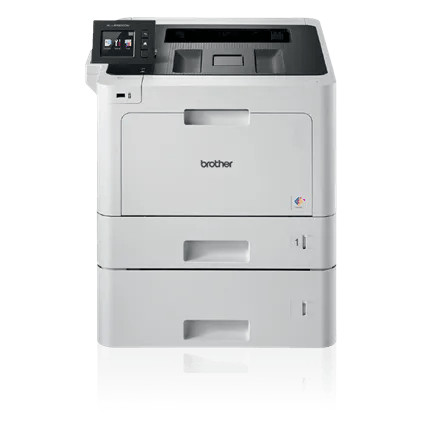
On the Brother HL-L8360CDWT, every slot in the machine answers to its own part number, and this page stocks the first three yield tiers of the ladder. Black starts at TN431BK in the standard tier and climbs through TN433BK to TN436BK. Cyan runs TN431C, TN433C and TN436C; magenta runs TN431M, TN433M and TN436M; yellow runs TN431Y, TN433Y and TN436Y. Behind those slots stand the family roots — TN431, TN433 and TN436 — and one drum pairing rule: the DR431CL drum (about 30,000 pages) under the two lower tiers, the DR433CL (about 50,000 pages) under the super and ultra tiers. Standard yield measures about 3,000 pages in black and 1,800 in color, high yield about 4,500 black and 4,000 color, super high yield about 6,500 pages across all four slots — and the machine's top tier, TN439 ultra high yield, reaches about 9,000 pages.
The T on the end of this model's name marks the extra paper capacity, and machines bought for capacity get used like it: longer runs, bigger batches, fewer pauses. That workload profile is exactly why the per-color codes matter. In a long batch run it is never 'the toner' that runs out — it is one color, at one moment, in the middle of a job — and the fix is a single cartridge with a single code. This page is organized around that moment: find the color, find the tier you run, and the cartridge on the shelf matches the code on the empty one in your hand.
Toner Cartridges for HL-L8360CDWT
- TN431BK — Black, compatible — ~3,000 pages
- TN431C — Cyan, compatible — ~1,800 pages
- TN431M — Magenta, compatible — ~1,800 pages
- TN431Y — Yellow, compatible — ~1,800 pages
- TN433BK — Black, compatible — ~4,500 pages
- TN433C — Cyan, compatible — ~4,000 pages
- TN433M — Magenta, compatible — ~4,000 pages
- TN433Y — Yellow, compatible — ~4,000 pages
- TN436BK — Black, compatible — ~6,500 pages
- TN436C — Cyan, compatible — ~6,500 pages
- TN436M — Magenta, compatible — ~6,500 pages
- TN436Y — Yellow, compatible — ~6,500 pages
- DR431CL — drum unit — ~30,000 pages
Further listings stocked for this printer, including multipacks, color sets and model-specific cartridges:
- TN436 Toner Cartridge Black
- TN436 Toner Cartridge 8 Color set (TN436BK, TN436C, TN436M, TN436Y)
- TN436 Toner Cartridge 6 Color set (TN436C, TN436M, TN436Y)
- TN436 Toner Cartridge 5 Color set (TN436BK, TN436C, TN436M, TN436Y)
- TN436 Toner Cartridge 5 Black (TN436BK)
- TN436 Toner Cartridge 4 Color set (TN436BK, TN436C, TN436M, TN436Y)
- TN436 Toner Cartridge 3 Color set (TN436C, TN436M, TN436Y)
- TN436 Toner Cartridge 3 Black (TN436BK)
- TN436 Toner Cartridge 2 Black (TN436BK)
- TN436 (TN436Y) Toner Cartridge Yellow
- TN436 (TN436Y) Toner Cartridge Yellow
- TN436 (TN436M) Toner Cartridge Magenta
- TN436 (TN436M) Toner Cartridge Magenta
- TN436 (TN436C) Toner Cartridge Cyan
- TN436 (TN436C) Toner Cartridge Cyan
- TN436 (TN436BK, TN436C, TN436Y, TN436M) Toner Cartridge 5 Color Set
- TN436 (TN436BK, TN436C, TN436Y, TN436M) Toner Cartridge 4 Color Set
- TN436 (TN436BK) Toner Cartridge Black 2 Pack
- TN433 Toner Cartridge Black
- TN433 Toner Cartridge 8 Color Set (TN433BK, TN433C, TN433M, TN433Y)
- TN433 Toner Cartridge 6 Color Set (TN433C, TN433M, TN433Y)
- TN433 Toner Cartridge 5 Color Set (TN433BK, TN433C, TN433M, TN433Y)
- TN433 Toner Cartridge 5 Black (TN433BK)
- TN433 Toner Cartridge 4 Color Set (TN433BK, TN433C, TN433M, TN433Y)
- TN433 Toner Cartridge 3 Color Set (TN433C, TN433M, TN433Y)
- TN433 Toner Cartridge 3 Black (TN433BK)
- TN433 Toner Cartridge 2 Black (TN433BK)
- TN433 (TN433Y) Toner Cartridge Yellow
- TN433 (TN433M) Toner Cartridge Magenta
- TN433 (TN433C, TN433M, TN433Y) Toner Cartridge 3 Color Set
- TN433 (TN433C) Toner Cartridge Cyan
- TN433 (TN433BK, TN433C, TN433M, TN433Y) Toner Cartridge 5 Color Set
- TN433 (TN433BK, TN433C, TN433M, TN433Y) Toner Cartridge 4 Color Set
- TN433 (TN433BK) Toner Cartridge Black 2 Pack
- TN431 Toner Cartridge 8 Color Set (TN431BK, TN431C, TN431M, TN431Y)
- TN431 Toner Cartridge 6 Color Set (TN431C, TN431M, TN431Y)
- TN431 Toner Cartridge 5 Color Set (TN431BK, TN431C, TN431M, TN431Y)
- TN431 Toner Cartridge 5 Black (TN431BK)
- TN431 Toner Cartridge 4 Color Set (TN431BK, TN431C, TN431M, TN431Y)
- TN431 Toner Cartridge 3 Color Set (TN431C, TN431M, TN431Y)
- TN431 Toner Cartridge 3 Black (TN431BK)
- TN431 Toner Cartridge 2 Black (TN431BK)
- HL-L8360CDWT Toner Cartridge Yellow (TN433Y)
- HL-L8360CDWT Toner Cartridge Magenta (TN433M)
- HL-L8360CDWT Toner Cartridge Cyan (TN433C)
- HL-L8360CDWT Toner Cartridge Black (TN433BK)
- HL-L8360CDWT Toner Cartridge 4 Color Set (TN433BK, TN433C, TN433M, TN433Y)
- TN436Y High-yield Yellow Genuine OEM Toner Cartridge - 6,500 pages
- TN436M High-yield Magenta Genuine OEM Toner Cartridge - 6,500 pages
- TN436C High-yield Cyan Genuine OEM Toner Cartridge - 6,500 pages
- TN436BK TN436C TN436M TN436Y High-yield Black Cyan Magenta Yellow Genuine OEM Toner Cartridge 4 Color Set - 6,500 pages each
- TN436BK High-yield Black Genuine OEM Toner Cartridge - 6,500 pages
- TN433Y Yellow Genuine OEM Toner Cartridge - 4,000 pages
- TN433M Magenta Genuine OEM Toner Cartridge - 4,000 pages
- TN433C TN433M TN433Y Cyan Magenta Yellow Genuine OEM Toner Cartridge 3 Color Set - 4,000 pages each
- TN433C Cyan Genuine OEM Toner Cartridge - 4,000 pages
- TN433BK TN433C TN433M TN433Y Black Cyan Magenta Yellow Genuine OEM Toner Cartridge 4 Color Set - Black: 4,500 pages, Color: 4,000 pages each
- TN433BK Black Genuine OEM Toner Cartridge 2 Pack - 4,500 pages
- TN433BK Black Genuine OEM Toner Cartridge - 4,500 pages
- TN431Y Yellow Genuine OEM Toner Cartridge - 1,800 pages
- TN431M Magenta Genuine OEM Toner Cartridge - 1,800 pages
- TN431C TN431M TN431Y Cyan Magenta Yellow Genuine OEM Toner Cartridge 3 Color Set - 1,800 pages each
- TN431C Cyan Genuine OEM Toner Cartridge - 1,800 pages
- TN431BK TN431C TN431M TN431Y Black Cyan Magenta Yellow Genuine OEM Toner Cartridge 4 Color Set - Black: 3,000 pages, Color: 1,800 pages each
- TN431BK Black Genuine OEM Toner Cartridge 2 Pack - 3,000 pages
- TN431BK Black Genuine OEM Toner Cartridge - 3,000 pages
Which cartridge should you buy?
Reorder like-for-like unless the pattern of your printing has changed. The code on the cartridge you remove is the safest guide: a TN433C coming out means a cyan high-yield going in. Change tiers deliberately, not accidentally — stepping the black up to TN436 while the colors stay on TN433 is a legitimate, money-saving pattern, since black carries most of the page count in office documents, but drifting tiers color by color only muddies the next reorder. For a machine with this one's capacity, the middle and upper tiers usually fit best: long paper runs deserve long toner runs, and the per-page cost falls as the reservoir grows. Keep the drum pairing in mind when you change tier families — DR431CL below, DR433CL above.
Chip, toner and everyday use
Each cartridge chip talks to the printer individually, which is how the machine can name the exact color that is low instead of stopping the whole unit. Act on the first warning rather than the final stop: a cartridge changed at 'low' never interrupts a batch. When you swap, compare the code on the old cartridge's label with the new box before the seal comes off — with four slots and three stocked tiers, the most common mistake is the right color in the wrong tier. Keep a notebook or a label on the supply drawer listing which tier each slot runs; it turns reordering into copying, not detective work.
Frequently Asked Questions
What toner does the Brother HL-L8360CDWT use?
Four tiers of the same cartridge family: TN431 standard, TN433 high yield, TN436 super high yield and TN439 ultra high yield, each as BK, C, M and Y codes. This page stocks the first three tiers in compatible and genuine Brother listings, over the DR431CL or DR433CL drum depending on tier.
My printer stopped for one color — do I need a full set?
No. Each cartridge is replaced on its own, and the printer resumes once the empty slot is refilled. Full sets are a stocking convenience for the supply drawer, not a requirement of the machine.
What is the difference between the HL-L8360CDWT and the HL-L8360CDW for toner?
None. The T variant adds paper capacity; the cartridge shelf — tiers, codes and drums — is identical, so anything stocked for one model serves the other.
How do I know which tier is installed now?
Read the label on the cartridge itself: the code's number is the tier (431, 433, 436 or 439) and its letter is the color. The printer's toner-level screen also lists each slot by its cartridge code.
More printers that use the same cartridges
These printers draw from the same cartridge shelf, in alphabetical order: HL-L8260CDW, HL-L8360CDW, HL-L9310CDW, HL-L9310CDWT, HL-L9310CDWTT, MFC-L8610CDW, MFC-L8895CDW, MFC-L8900CDW, MFC-L8905CDW, MFC-L9570CDW, MFC-L9570CDWT.