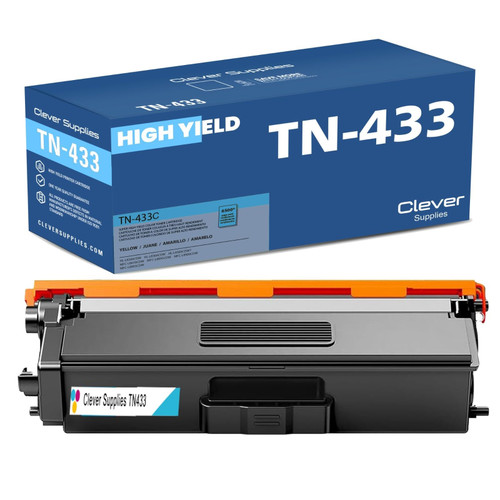
Clever Supplies brand products are made in the USA! Why pay more for cheaper product with a high defective rate? You will end up having to send it back to the manufacturer. Your time is valuable. Get a quality product that you KNOW will work. Purchase the Clever Supplies Compatible for Brother TN433/TN431 (TN433C / TN431C) Cyan and experience the difference! All Clever Supplies brand products are backed by '100% Quality Satisfaction' 1 year warranty against defects in materials and workmanship for all toner products. Free tech support for any problems for all Clever Supplies brand products. The use of Clever Supplies brand replacement laser toner cartridges and supplies does not void printer warranty. Premium Quality Replacement Toner Cartridge is made by ISO9001 Certified Factory to Meet or Exceed OEM Standards. These units are manufactured 100% brand new with all new parts including OPC drums, wiper blades, a smart chip and other internal parts, they are an economical alternative to expensive OEM TN433C / TN431C Compatible Toner Cartridges. The Compatible Toner Cartridges will produce the same amount of page yield as an OEM cartridge would. This is a Compatible for Brother TN433/TN431 Toner Cartridges Cyan guaranteed to perform with Brother Laser Printers. It replaces the original Brother TN433/TN431 Toner Cartridges Cyan. The compatible replacement for TN433C / TN431C. The use of compatible replacement Cartridges and supplies does not void Printer Warranty. Our Compatible for TN433C / TN431C. Cartridge is a replacement for OEM Brother. We offer a 100% Quality Satisfaction Guarantee on our Compatible for TN433C / TN431C Laser Toner Cartridges and supplies. For use in the following printers: HL-L8260CDW, HL-L8360CDW, HL-L8360CDWT, HL-L9310CDW, HL-L9310CDWT, HL-L9310CDWTT, MFC-L8610CDW, MFC-L8900CDW, MFC-L9570CDW, MFC-L9570CDWT.
Frequently Asked Questions
What does the cyan cartridge actually do in my color prints?
Cyan is the backbone of business color: it builds your blues and greens, cools down photographs, and sits underneath most corporate palettes. When cyan fades, prints do not just lose blue — skies go gray, logos shift toward magenta, and charts stop matching the screen. This cartridge restores that channel with up to 4,000 pages at 5% coverage for $32.65, about 0.82 cents per color page.
Which printers take this cyan?
The color laser family on this platform: HL-L8260CDW, HL-L8360CDW, HL-L8360CDWT, HL-L9310CDW, HL-L9310CDWT, HL-L9310CDWTT, MFC-L8610CDW, MFC-L8900CDW and MFC-L9570CDW All of them use this same cyan alongside black, magenta and yellow.
Can I replace only the cyan, or do colors go as a set?
Individually, always. Each color has its own cartridge and its own counter, so you swap the one the printer names. Replacing a half-full magenta because cyan ran out is money in the bin — this listing exists so you never have to.
Why does cyan sometimes run out before magenta and yellow?
Usage, not defect: offices print far more blue-heavy material — links, headers, charts, sky and water in photos — than magenta- or yellow-heavy pages. If your documents lean blue, cyan will consistently be the first color to call for a spare.
How do I know the color will match what I printed before?
The toner formulation is matched to this platform's color calibration, so a page printed after the swap should sit seamlessly next to one printed before it. If a cartridge prints off-color from the first page, the one-year warranty and one-year free returns on our shipping and returns page cover you.
Should I keep a spare cyan on the shelf?
If color output is customer-facing — proposals, listings, menus — yes: at $32.65 a spare costs less than one delayed job. It keeps sealed in its bag, away from light and heat, until the printer asks.
Print quality dropped right after I installed this cyan — what should I try before assuming the cartridge is faulty?
Reseat it. Remove the TN431C, check that its protective coverings are fully off, and slide it back until it clicks firmly into its slot; a cartridge sitting a fraction short of its contact can print weakly or unevenly from the first page. Then print a test page with a solid blue area — skies, charts or a filled box — and judge pages three and four rather than the very first, which can carry the tail of the changeover. If a reseat and a few pages do not settle it, the one-year warranty framework on this cartridge is the next step, not a second purchase.
How can I tell whether cyan is drifting long before it runs out?
Keep one reference page. When this cartridge is fresh, print a page carrying your standard blues and greens — a logo sheet or a recurring chart — date it and file it. Every month or so, print the same file again and compare: cyan fade shows up as skies washing toward gray and greens losing their blue base well before the printer posts a low warning. The dated pair tells you whether output is genuinely shifting and roughly how fast, which turns a surprise color failure into a reorder you saw coming weeks ahead.
Do the MFC models use this cyan for copies as well as prints?
They do. On the MFC-L8610CDW, MFC-L8900CDW and MFC-L9570CDW, a color copy is produced by the same TN431C, TN431M and TN431Y channels as a printed page — the original is scanned, then laid down in toner. An office that copies color handouts or marked-up documents all day can drain cyan at print-room speed without a single color job ever entering the print queue. If cyan calls earlier than your printing explains, the copy glass is the missing volume.
Before a big customer-facing run, how should I check cyan readiness?
Print one page of the actual job first — not a printer test pattern — and inspect the blue-heavy areas under your normal office light. Cyan weakness hides in pale washes and announces itself in saturated blues and greens, so judge the real artwork, not a diagnostic. If that proof page is true, start the run; if the blues are already drifting, swap in the fresh TN431C before the run rather than discovering the fade forty pages in, when the whole batch has to be reprinted anyway.
About This TN431 Cyan Cartridge
Cyan does the quiet heavy lifting in office color, and it is usually the first color to go. This cartridge prints up to 4,000 pages for $32.65 (about 0.82 cents per page), replaces on its own without touching the other colors, and is covered by a one-year warranty with one-year free returns. Pair it with the TN433 black cartridge when the document side needs topping up too, or browse the wider Brother cartridges range for the rest of the set.







 See Compatible Printers
 Read more about our ink!









