




LJ Enterprise 500 Color M551N
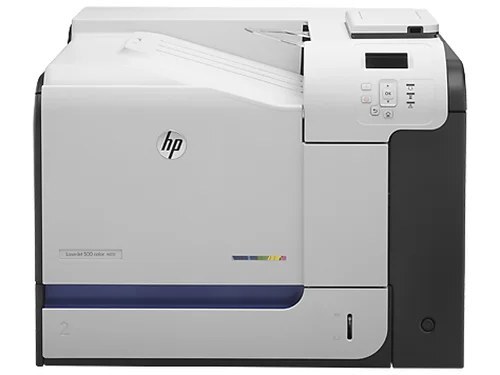
For offices that networked everything but printed single-sided, the LJ Enterprise 500 Color M551N offered the M551's color engine with Ethernet and nothing extra. It accepts HP toner from the family headed by CE400A (507A) black, CE401A cyan, CE402A yellow and CE403A magenta — with the high-yield CE400X (507X) black for busier queues. High-volume shops can load the CE400XX (507XX) black and stretch the color changes with the high-yield colors carried in the 507XX & 507X set below.
The M551N is the honest workhorse of the range: no duplex unit, no wireless, just a networked color engine that shows up in the print dialog of every machine on its segment. Single-sided printing is still the bulk of office output — letters, one-page notices, forms — and this configuration serves it without charging for hardware the office never switches on. Its toner appetite follows the classic pattern: black first, colors in their own time.
Toner Cartridges for LJ Enterprise 500 Color M551N
Single cartridges:
- CE400A — standard black — Black. Yield: see product page.
- CE401A — Cyan. Yield: see product page.
- CE402A — Yellow. Yield: see product page.
- CE403A — Magenta. Yield: see product page.
- CE400X — high-yield black — Black. Yield: see product page.
- CE400XX — extra-capacity black — Black. Yield: see product page.
Four-color sets:
- CE400X / CE401A / CE402A / CE403A — 507X & 507A 4 Color Set — Black, cyan, yellow and magenta. Yield: see product page.
- CE400XX / CE401X / CE402X / CE403X — 507XX & 507X 4 Color Set — Black, cyan, yellow and magenta (all high yield). Yield: see product page.
- 500 Color M551n — 4 Color Set — Black, cyan, yellow and magenta. Yield: see product page.
Which cartridge should you buy?
A networked single-function printer usually serves a defined group, so size the black to that group's habits: the CE400A for a quiet corner, the CE400X for a department's daily driver, the CE400XX where output runs all day. Colors are bought one at a time — CE401A cyan, CE402A yellow, CE403A magenta — and only when the printer asks. The four-color sets make sense at a general refresh: the 507X & 507A set if a high-yield black with standard colors matches your usage, the 507XX & 507X set if you want the CE401X, CE402X and CE403X high-yield colors too.
Chip, toner and everyday use
Keep the M551N's shelf simple: one spare black and whichever color the panel says is lowest. When a fresh cartridge goes in, pull the sealing tape out in one clean motion and push the unit home until it seats — the printer reads its chip at that moment, and a half-seated cartridge is the usual reason a new unit shows as unrecognized. Because this model prints single-sided only, paper use per document is higher than on its duplex siblings; that is a paper-budget point, not a toner one, since toner consumption per printed side is the same.
Frequently Asked Questions
What toner cartridges does the LJ Enterprise 500 Color M551N use?
The HP 507A family: CE400A black with CE401A cyan, CE402A yellow and CE403A magenta. The black slot also takes the high-yield CE400X and the CE400XX as upgrades.
Does the M551N print on both sides of the page?
No — the N configuration is network-only and prints single-sided; two-sided output belongs to the DN models in this range. That is the trade this variant makes for its simpler hardware.
Will a compatible CE400A cartridge work in the M551N?
Yes, the compatible cartridges listed here are built for this family. If one is not recognized, reseat it firmly and confirm the seal was fully removed — chip recognition is the most common cause, as with most third-party cartridges.
Where do the high-yield colors fit in?
CE401X, CE402X and CE403X are the high-yield color versions, available here in the 507XX & 507X four-color set with the CE400XX black — the longest-running combination this printer accepts.
More printers that use the same cartridges
These HP models all take the same 507A-family cartridges:
- LJ Enterprise 500 Color M551DN
- LJ Enterprise 500 Color M551XH
- LJ Enterprise 500 Color M575DN
- LJ Enterprise 500 Color M575F
- LaserJet Enterprise 500 color MFP M575
- LaserJet Enterprise 500 color MFP M575DN
- LaserJet Enterprise 500 color MFP M575F
- LaserJet Enterprise 500 color Printer M551
- LaserJet Enterprise 500 color Printer M551DN
- LaserJet Enterprise 500 color Printer M551N
- LaserJet Enterprise 500 color Printer M551XH
- LaserJet Enterprise 500 color Printer M575
- LaserJet Enterprise 500 color Printer M575DN
- LaserJet Enterprise 500 color Printer M575F
- LaserJet Enterprise MFP M570dn
- LaserJet Enterprise color flow M575C
- LaserJet Enterprise color flow MFP M575C
- LaserJet Pro 500 color M570
- LaserJet Pro 500 color M570DN
- LaserJet Pro 500 color M570DW
- LaserJet Pro 500 color MFP M570
- LaserJet Pro 500 color MFP M570DN
- Color LaserJet 500
- Color LaserJet Enterprise 500
- Color LaserJet Enterprise 500 Color M551dn
- Color LaserJet Enterprise 500 Color M551n MFP
- Color LaserJet Enterprise 500 Color M551xh MFP
- Color LaserJet Enterprise 500 Color M575c
- Color LaserJet Enterprise 500 Color M575dn
- Color LaserJet Enterprise 500 Color M575f MFP
- Color LaserJet Enterprise Flow M575C
- HP 507X & 507A