




LaserJet Enterprise color flow MFP M575C
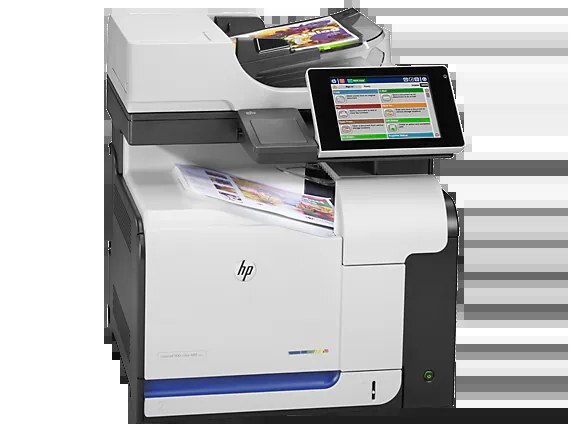
Workflow scanning met color multifunction printing in the LaserJet Enterprise Color Flow MFP M575C, aimed at departments that digitize as much paper as they produce. It accepts HP's 507-family cartridges — black CE400A (507A) or the high-yield CE400X (507X), with CE401A cyan, CE402A yellow and CE403A magenta — and its printing side can step up further, to the CE400XX (507XX) black and to high-yield color cartridges that are sold inside the top set below. All of the listings here are compatible cartridges for those codes.
A flow MFP lives a double life: paper comes in through the scanner all morning and goes back out as prints all afternoon. That makes its toner tiers more than a pricing detail — this is one of the few machines in its class with three black yield steps, so departments can match cartridge capacity to how print-heavy their document workflow really is.
Toner Cartridges for LaserJet Enterprise color flow MFP M575C
| Cartridge | Color | Page Yield |
|---|---|---|
| CE400A | Black (standard yield) | See product page |
| CE400X | Black (high yield) | See product page |
| CE400XX | Black (extra capacity) | See product page |
| CE401A | Cyan | See product page |
| CE402A | Yellow | See product page |
| CE403A | Magenta | See product page |
Sets: HP 507X & 507A 4 Color Set (CE400X/ CE401A/ CE403A/ CE402A) pairs the high-yield black with the standard colors; HP 507XX & 507X 4 Color Set (CE400XX/ CE401X/ CE403X/ CE402X) is the top tier, and it is also where the high-yield CE401X, CE402X and CE403X color cartridges are sold — they are not listed as singles; Color Flow MFP M575c 4 Color Set is the set carrying this model's name.
Which cartridge should you buy?
Decide by how print-heavy your scanning workflow is. A desk that mostly digitizes and prints the occasional copy set is well served by the standard CE400A black and standard colors bought as singles. A department that prints as much as it scans should step up: the CE400X black lowers cost per page, and the CE400XX tier stretches the black slot further still. Colors follow the same ladder — standard CE401A, CE402A and CE403A singles for ordinary use, or the 507XX set when you want the high-yield color builds as well. Whatever the tier, each slot is replaced independently, so there is never a reason to discard a cartridge with toner left in it.
Chip, toner and everyday use
If a new CE400A is not recognized, the field fix is reliable: reseat it firmly, confirm every seal and tab came off before installation, and power the machine off and back on so it re-detects the cartridge. The chip handshake is what reports levels afterward, so a cartridge that is recognized once stays tracked. For cost control on a machine like this, draft mode handles internal prints while full quality is reserved for final copies, and mostly-black printing belongs on the high-yield black tiers where the per-page math is best. Store spare cartridges sealed and flat; a flow MFP's supply shelf turns over fast enough that age is rarely the issue.
Frequently Asked Questions
Can I replace just one cartridge in the M575C?
Yes — the machine tracks each cartridge separately, so swap only the empty one. The four slots take the black of your chosen tier plus CE401A cyan, CE402A yellow and CE403A magenta, or their high-yield counterparts from the top set.
Why won't my M575C recognize a new CE400A cartridge?
Usually a seating or seal problem. Reseat the cartridge firmly, make sure all seals and tabs were removed, then restart the printer so it re-detects the cartridge and its chip.
How can I cut color printing costs on this machine?
Print mostly in black on a high-yield black cartridge, use draft mode for internal documents, and reserve full quality for final copies. The three black tiers exist precisely so heavy printers stop paying standard-yield prices.
Are the high-yield color cartridges sold individually?
On this page, CE401X, CE402X and CE403X come inside the 507XX four-color set rather than as singles. The standard-yield colors are the ones sold individually.
More printers that use the same cartridges
The 507A family also serves the wider Enterprise 500 color line:
LaserJet Pro 500 color MFP M570DN, LaserJet Pro 500 color MFP M570, LaserJet Pro 500 color M570DW, LaserJet Pro 500 color M570DN, LaserJet Pro 500 color M570, LaserJet Enterprise color flow M575C, LaserJet Enterprise MFP M570dn, LaserJet Enterprise 500 color Printer M575F, LaserJet Enterprise 500 color Printer M575DN, LaserJet Enterprise 500 color Printer M575, LaserJet Enterprise 500 color Printer M551XH, LaserJet Enterprise 500 color Printer M551N, LaserJet Enterprise 500 color Printer M551DN, LaserJet Enterprise 500 color Printer M551, LaserJet Enterprise 500 color MFP M575F, LaserJet Enterprise 500 color MFP M575DN, LaserJet Enterprise 500 color MFP M575, LJ Enterprise 500 Color M575F, LJ Enterprise 500 Color M575DN, LJ Enterprise 500 Color M551XH, LJ Enterprise 500 Color M551N, LJ Enterprise 500 Color M551DN, HP 507X & 507A, Color LaserJet Enterprise Flow M575C, Color LaserJet Enterprise 500 Color M575f MFP, Color LaserJet Enterprise 500 Color M575dn, Color LaserJet Enterprise 500 Color M575c, Color LaserJet Enterprise 500 Color M551xh MFP, Color LaserJet Enterprise 500 Color M551n MFP, Color LaserJet Enterprise 500 Color M551dn, Color LaserJet Enterprise 500, Color LaserJet 500