




Color Pro 4301fdwe
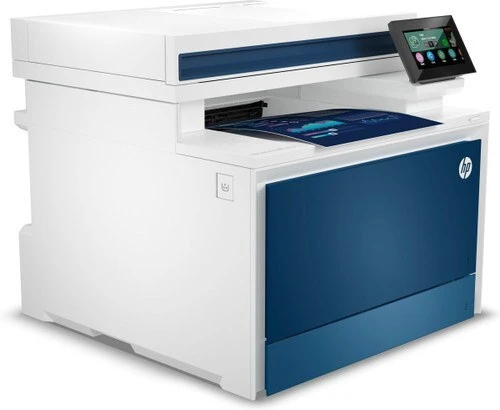
The Color Pro 4301fdwe is the wireless fax configuration of the 4301 line: fax joins duplex printing and Wi-Fi in HP's e-configuration, and the engine runs on the 210 toner family — the W2100A (210A) black alongside W2101A cyan, W2102A yellow and W2103A magenta. For offices that keep the machine busy, every color also exists as a high-yield X cartridge: W2100X (210X) black, W2101X cyan, W2102X yellow and W2103X magenta.
Plenty of offices still run on faxed orders and signed paperwork but no longer want a printer tethered to a network drop. The 4301fdwe answers that: it sits on Wi-Fi wherever the team works, receives and sends faxes, and prints two-sided without coaxing. Its cartridge economy is the family's usual story — black does the heavy lifting, colors follow at their own pace — with the e-configuration's always-on fax role tipping the balance toward longer-running supplies.
Toner Cartridges for Color Pro 4301fdwe
Family-named cartridges are listed first, high-yield ahead of standard; the model-named groups for the whole family follow in alphabetical order.
| Cartridge | Color | Page Yield |
|---|---|---|
| HP 210A (W2100A) Black, 2-pack | Black | See product page |
| HP 210A 4-Color Set | Black, Cyan, Magenta, Yellow | See product page |
| HP 210A (W2100A) Black | Black | See product page |
| HP 210A (W2101A) Cyan | Cyan | See product page |
| HP 210A (W2103A) Magenta | Magenta | See product page |
| HP 210A (W2102A) Yellow | Yellow | See product page |
| HP 210X (W2100X) Black, 2-pack | Black | See product page |
| HP 210X 4-Color Set | Black, Cyan, Magenta, Yellow | See product page |
| HP 210X (W2100X) Black | Black | See product page |
| HP 210X (W2101X) Cyan | Cyan | See product page |
| HP 210X (W2103X) Magenta | Magenta | See product page |
| HP 210X (W2102X) Yellow | Yellow | See product page |
Listings named for each model in the family are gathered below. Same cartridges throughout — the model name on a listing is a label, not a different product inside.
Stocked under the Color Pro 4201dn label: W2102X (Yellow) · W2103X (Magenta) · W2101X (Cyan) · W2100X (Black) · Set of 4 (4201dn) · W2100X (Black, 2-pack) · W2102A (Yellow) · W2103A (Magenta) · W2101A (Cyan) · W2100A (Black) · Set of 4 (4201dn) · W2100A (Black, 2-pack)
Stocked under the Color Pro 4201dne label: W2102X (Yellow) · W2103X (Magenta) · W2101X (Cyan) · W2100X (Black) · Set of 4 (4201dne) · W2100X (Black, 2-pack) · W2102A (Yellow) · W2103A (Magenta) · W2101A (Cyan) · W2100A (Black) · Set of 4 (4201dne) · W2100A (Black, 2-pack)
Stocked under the Color Pro 4201dw label: W2102X (Yellow) · W2103X (Magenta) · W2101X (Cyan) · W2100X (Black) · Set of 4 (4201dw) · W2100X (Black, 2-pack) · W2102A (Yellow) · W2103A (Magenta) · W2101A (Cyan) · W2100A (Black) · Set of 4 (4201dw) · W2100A (Black, 2-pack)
Stocked under the Color Pro 4201dwe MFP label: W2102X (Yellow) · W2103X (Magenta) · W2101X (Cyan) · W2100X (Black) · Set of 4 (4201dwe) · W2100X (Black, 2-pack) · W2102A (Yellow) · W2103A (Magenta) · W2101A (Cyan) · W2100A (Black) · Set of 4 (4201dwe) · W2100A (Black, 2-pack)
Stocked under the Color Pro 4301dw MFP label: W2100A (Black) · Set of 4 (4301dw) · W2100A (Black, 2-pack) · W2102X (Yellow) · W2103X (Magenta) · W2101X (Cyan) · W2100X (Black) · Set of 4 (4301dw) · W2100X (Black, 2-pack) · W2102A (Yellow) · W2103A (Magenta) · W2101A (Cyan)
Stocked under the Color Pro 4301dwe MFP label: W2100A (Black) · Set of 4 (4301dwe) · W2100A (Black, 2-pack) · W2102X (Yellow) · W2103X (Magenta) · W2101X (Cyan) · W2100X (Black) · Set of 4 (4301dwe) · W2100X (Black, 2-pack) · W2102A (Yellow) · W2103A (Magenta) · W2101A (Cyan)
Stocked under the Color Pro 4301fdn MFP label: W2100A (Black) · Set of 4 (4301fdn) · W2100A (Black, 2-pack) · W2102X (Yellow) · W2103X (Magenta) · W2101X (Cyan) · W2100X (Black) · Set of 4 (4301fdn) · W2100X (Black, 2-pack) · W2102A (Yellow) · W2103A (Magenta) · W2101A (Cyan)
Stocked under the Color Pro 4301fdne MFP label: W2100A (Black) · Set of 4 (4301fdne) · W2100A (Black, 2-pack) · W2102X (Yellow) · W2103X (Magenta) · W2101X (Cyan) · W2100X (Black) · Set of 4 (4301fdne) · W2100X (Black, 2-pack) · W2102A (Yellow) · W2103A (Magenta) · W2101A (Cyan)
Stocked under the Color Pro 4301fdw MFP label: W2100A (Black) · Set of 4 (4301fdw) · W2100A (Black, 2-pack) · W2102X (Yellow) · W2103X (Magenta) · W2101X (Cyan) · W2100X (Black) · Set of 4 (4301fdw) · W2100X (Black, 2-pack) · W2102A (Yellow) · W2103A (Magenta) · W2101A (Cyan)
Stocked under the Color Pro 4301fdwe label: W2100A (Black) · Set of 4 (4301fdwe) · W2100A (Black, 2-pack) · W2102X (Yellow) · W2103X (Magenta) · W2101X (Cyan) · W2100X (Black) · Set of 4 (4301fdwe) · W2100X (Black, 2-pack) · W2102A (Yellow) · W2103A (Magenta) · W2101A (Cyan)
Which cartridge should you buy?
Fax traffic is the tiebreaker for this model. An office receiving faxes daily should run the X line, black first of all, because a fax that cannot print is a message lost; the longer cartridges stretch the interval between changes exactly where it matters. Occasional-fax offices can stay on the standard line and simply keep one black spare. Colors are replaced individually as they empty, and the 4-color set is the tidy choice when several colors run low together. All of the compatible cartridges listed here come with a 1-year warranty and 1-year returns.
Chip, toner and everyday use
Firmware deserves a word on this model: updates come from HP's official support page, they can improve reliability, and they should never be started in the middle of an urgent print or fax run. The cartridges themselves are chipped for level reporting; remove the full seal before fitting, and let the printer calibrate before the first job. Rated yields assume about 5% coverage per page. If output fades, a gentle side-to-side rock of the cartridge redistributes the remaining toner and usually restores density until the replacement arrives.
Frequently Asked Questions
Which spare should a fax-heavy 4301fdwe office keep on hand?
A black one — ideally the high-yield W2100X. Incoming faxes are text, so black empties first, and a spare on the shelf means a busy fax day never stalls on an empty cartridge.
Should I update the firmware on my Color Pro 4301fdwe?
Yes, from HP's official support page only, and at a quiet moment rather than mid-job. Updates can fix bugs and improve reliability; the printer should not be printing or receiving a fax while one installs.
Prints from my 4301fdwe are coming out faded — where do I look?
Check that all four cartridges are seated properly and that none has run empty, then run the cleaning cycle from the printer's menu. If only one color looks washed out, that color's cartridge is the one to replace.
More printers that use the same cartridges
The same eight cartridges serve the whole 4201/4301 family; the model pages are:
Color Pro 4201dn; Color Pro 4201dne; Color Pro 4201dw; Color Pro 4201dwe MFP; Color Pro 4301dw MFP; Color Pro 4301dwe MFP; Color Pro 4301fdn MFP; Color Pro 4301fdne MFP; Color Pro 4301fdw MFP; Pro 4201dne