




Color Pro 4301fdne MFP
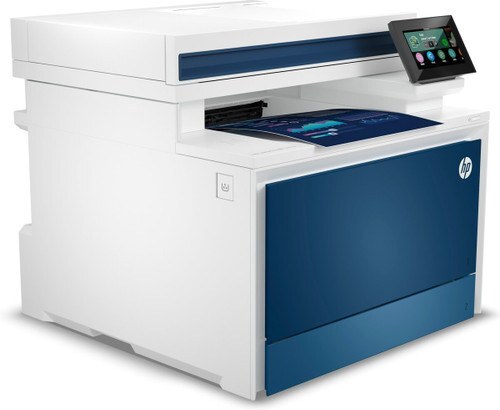
Fax is the extra that defines the Color Pro 4301fdne MFP: it prints, scans and copies in color like the rest of the 4301 line, then adds faxing, duplex printing and an Ethernet connection in HP's e-configuration. Every job it runs — printed page, copy or incoming fax — draws on the same four cartridges: the W2100A (210A) black, the W2101A cyan, the W2102A yellow and the W2103A magenta. Each of the four also comes in a high-yield X version that runs longer between changes: W2100X (210X) black, W2101X cyan, W2102X yellow and W2103X magenta.
An e-configuration machine usually lands in an office that still lives on fax traffic — orders, signed forms and confirmations arriving all day — while also serving as the team's color printer and copier. That mix is hard on the black cartridge in particular, because fax output is almost entirely text. The 4301fdne's wired connection keeps it steady on a shared network, and its running costs are set almost entirely by which tier of this cartridge family the office standardizes on.
Toner Cartridges for Color Pro 4301fdne MFP
The table below covers the cartridges sold under the family name itself; listings named for individual models in this family follow underneath.
| Cartridge | Color | Page Yield |
|---|---|---|
| HP 210A (W2100A) Black, 2-pack | Black | See product page |
| HP 210A 4-Color Set | Black, Cyan, Magenta, Yellow | See product page |
| HP 210A (W2100A) Black | Black | See product page |
| HP 210A (W2101A) Cyan | Cyan | See product page |
| HP 210A (W2103A) Magenta | Magenta | See product page |
| HP 210A (W2102A) Yellow | Yellow | See product page |
| HP 210X (W2100X) Black, 2-pack | Black | See product page |
| HP 210X 4-Color Set | Black, Cyan, Magenta, Yellow | See product page |
| HP 210X (W2100X) Black | Black | See product page |
| HP 210X (W2101X) Cyan | Cyan | See product page |
| HP 210X (W2103X) Magenta | Magenta | See product page |
| HP 210X (W2102X) Yellow | Yellow | See product page |
The same cartridges are also stocked under listings named for the other models that use them. Every group below is the same 210A/210X family — the printer name on the listing is the only difference.
Listings named for the Color Pro 4201dn: W2100A Black (2-pack) · 4-Color Set · W2100A Black · W2101A Cyan · W2103A Magenta · W2102A Yellow · W2100X Black (2-pack) · 4-Color Set · W2100X Black · W2101X Cyan · W2103X Magenta · W2102X Yellow
Listings named for the Color Pro 4201dne: W2100A Black (2-pack) · 4-Color Set · W2100A Black · W2101A Cyan · W2103A Magenta · W2102A Yellow · W2100X Black (2-pack) · 4-Color Set · W2100X Black · W2101X Cyan · W2103X Magenta · W2102X Yellow
Listings named for the Color Pro 4201dw: W2100A Black (2-pack) · 4-Color Set · W2100A Black · W2101A Cyan · W2103A Magenta · W2102A Yellow · W2100X Black (2-pack) · 4-Color Set · W2100X Black · W2101X Cyan · W2103X Magenta · W2102X Yellow
Listings named for the Color Pro 4201dwe MFP: W2100A Black (2-pack) · 4-Color Set · W2100A Black · W2101A Cyan · W2103A Magenta · W2102A Yellow · W2100X Black (2-pack) · 4-Color Set · W2100X Black · W2101X Cyan · W2103X Magenta · W2102X Yellow
Listings named for the Color Pro 4301dw MFP: W2101A Cyan · W2103A Magenta · W2102A Yellow · W2100X Black (2-pack) · 4-Color Set · W2100X Black · W2101X Cyan · W2103X Magenta · W2102X Yellow · W2100A Black (2-pack) · 4-Color Set · W2100A Black
Listings named for the Color Pro 4301dwe MFP: W2101A Cyan · W2103A Magenta · W2102A Yellow · W2100X Black (2-pack) · 4-Color Set · W2100X Black · W2101X Cyan · W2103X Magenta · W2102X Yellow · W2100A Black (2-pack) · 4-Color Set · W2100A Black
Listings named for the Color Pro 4301fdn MFP: W2101A Cyan · W2103A Magenta · W2102A Yellow · W2100X Black (2-pack) · 4-Color Set · W2100X Black · W2101X Cyan · W2103X Magenta · W2102X Yellow · W2100A Black (2-pack) · 4-Color Set · W2100A Black
Listings named for the Color Pro 4301fdne MFP: W2101A Cyan · W2103A Magenta · W2102A Yellow · W2100X Black (2-pack) · 4-Color Set · W2100X Black · W2101X Cyan · W2103X Magenta · W2102X Yellow · W2100A Black (2-pack) · 4-Color Set · W2100A Black
Listings named for the Color Pro 4301fdw MFP: W2101A Cyan · W2103A Magenta · W2102A Yellow · W2100X Black (2-pack) · 4-Color Set · W2100X Black · W2101X Cyan · W2103X Magenta · W2102X Yellow · W2100A Black (2-pack) · 4-Color Set · W2100A Black
Listings named for the Color Pro 4301fdwe: W2101A Cyan · W2103A Magenta · W2102A Yellow · W2100X Black (2-pack) · 4-Color Set · W2100X Black · W2101X Cyan · W2103X Magenta · W2102X Yellow · W2100A Black (2-pack) · 4-Color Set · W2100A Black
Which cartridge should you buy?
For a fax-heavy 4301fdne, the high-yield X line is the practical default: incoming faxes cannot wait for a toner order, and the X cartridges simply run longer before they need attention. The black earns the X upgrade first, since fax pages and everyday documents drain it ahead of the colors. Lighter offices can stay with the standard line and still save by replacing colors one at a time — each cartridge has its own level, so a low yellow never forces a full set change. The black 2-pack is the other sensible stock-up for this model, keeping a spare on the shelf for the day the fax queue is longest. Every compatible cartridge here is covered by a 1-year warranty and 1-year returns.
Chip, toner and everyday use
These cartridges carry the chip the printer expects, so the 4301fdne reads levels and clears its alerts as it should. Pull the sealing strip fully before a cartridge goes in, seat it until it clicks, and let the machine finish its calibration before judging the first pages. Yield figures for this family are estimates at the usual 5% page-coverage basis, and dense fax pages with logos or shaded forms will use toner faster than plain text. Because a fax machine cannot pause politely, keep one sealed spare black within reach rather than in a storeroom across the building.
Frequently Asked Questions
Does the fax on the Color Pro 4301fdne MFP use separate cartridges?
No. Faxing, printing, scanning output and copying all draw from the same four cartridges — W2100A, W2101A, W2102A and W2103A, or their high-yield X counterparts. There is no fax-only supply to stock for this model.
Which cartridge runs out first on a fax-heavy 4301fdne?
Almost always the black. Received faxes are overwhelmingly text pages, so the W2100A — or the longer-running W2100X — empties well ahead of the three colors. Offices that fax all day usually move the black to the X version first and leave the colors standard until their levels say otherwise.
Is there a separate drum unit to replace on this model?
Nothing on this page is a drum: every listing stocked for the 4301fdne is a toner cartridge, standard or high-yield, single or in a set. If a listing outside this family mentions a drum, it belongs to a different printer line.
Why does the toner alert stay on after I fit a new cartridge?
The printer normally clears the alert on its own once the new cartridge is detected. If the message lingers, open and close the toner door or restart the machine to refresh the sensor, and check the cartridge is pushed fully home.
More printers that use the same cartridges
The 4301fdne shares its cartridges with the rest of the 4201/4301 family. Pages for those models:
Color Pro 4201dn, Color Pro 4201dne, Color Pro 4201dw, Color Pro 4201dwe MFP, Color Pro 4301dw MFP, Color Pro 4301dwe MFP, Color Pro 4301fdn MFP, Color Pro 4301fdw MFP, Color Pro 4301fdwe, Pro 4201dne