






 See Compatible Printers
 Read more about our ink!
Hewlett Packard
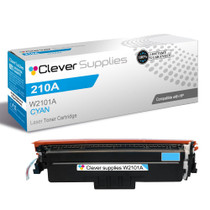
Compatible HP 4301fdn (W2101A) Toner Cartridge Cyan
- Page Yield:
- Color: 1800
- Availability:
- In Stock
- Shipping:
- Free Shipping

Amazon Price:

- Page Yield:
- Color: 1800
- Availability:
- In Stock
- Shipping:
- Free Shipping
- Compatible Printers
- Specifications
- SKU:
- CS-HP-4301fdn-C
- Printer Brand:
- Hewlett Packard
- OEM Number:
- W2101A
- Ink Color:
- Cyan
- Page Yield:
- Color: 1800
- Printer Type:
- Laser Cartridge
- Condition:
- New Compatible
- Description
- Reviews



Experience professional-quality printing with the HP W210A, W2100A Black, W2101A Cyan, W2103A Magenta, and W2102A Yellow toner cartridges. Designed for high performance, each cartridge ensures sharp black text and brilliant color graphics for every print job, whether you're working at home or in the office. Perfectly suited for HP printers, these HP W210A toner cartridges and HP W210A toner cartridges are built to deliver consistent results and smooth operation. Enjoy flawless integration with your printer, reducing downtime and maximizing productivity. Compatible with the HP Color Pro 4201dn, 4201dne, 4201dw, and 4201dwe, this set of cartridges ensures your documents and images always look their best. Whether printing vibrant flyers or everyday reports, you can count on long-lasting performance. Optimized for multifunction printers such as the MFP 4301dw and MFP 4301fdwe, these toner and ink solutions help maintain peak efficiency and print quality. The precision of the W2100A Black, W2101A Cyan, W2103A Magenta, and W2102A Yellow guarantees outstanding results with every page.
Cross-reference: HP W2101A, the 210A cyan toner cartridge (1,800 pages), is the same cartridge Canon sells as Canon Cartridge 069 (black 2,100 pages, colors 1,900 pages each) and Cartridge 069H high capacity (black 7,600 pages, colors 5,500 pages each) for the Canon Color imageCLASS MF751Cdw and MF753Cdw and the Color imageCLASS LBP674Cdw printers (ISO/IEC standard yields).
Frequently Asked Questions
What does the code W2101A tell me about this cartridge?
It tells you the color and the family in one string: a 210A cartridge, cyan version. This page is solely that cyan cartridge, priced at $81.28. When the 4301fdn reports a color by code rather than by name, W2101A is the one to match.
Id badges printed on the 4301fdn have started coming out pink-tinged. Why?
Badge backgrounds and photo panels rely on cyan to stay neutral. With cyan depleted, the printer over-delivers the warm colors, so photographs flush pink and pale blue badge designs turn lilac. A new cyan cartridge corrects the cast at its source.
How far does a rated 1,800 pages go in a front-office setting?
For a Color LaserJet Pro 4301fdn handling sign-in sheets, color notices and badge runs between its fax and copy duties, 1,800 rated pages is a substantial supply. Short, color-light jobs stretch it; long runs of full-color forms shorten it.
Does low cyan interfere with the fax side of the 4301fdn?
No. Faxes send and receive in black, and the scanner that feeds them uses no toner. Cyan matters only when the machine prints or copies in color, so fax traffic can continue uninterrupted while this cartridge is on its way.
Is the cyan changed separately from the other cartridges?
Entirely separately. Each 210A color lifts out of its own position, so the W2101A swap leaves the black, magenta and yellow cartridges in service — no reason to retire any of them early.
What assurance comes with this cartridge?
It is covered by a 1-year warranty with 1-year free returns. Support is reachable Monday–Friday, 9 AM–5 PM CST, and fulfilment runs from IL, PA, GA and CA warehouses to keep transit times down.
Is the cyan for this machine the same one used across the range?
Yes — the W2101A is the shared cyan for the 4201 printers and the 4301 multifunction range alike. A front office running several of these machines keeps one cyan stock for all of them, and the badge and form runs on the 4301fdn draw from exactly the same box as any other model in the group.
The cyan in this machine empties faster than the other colors — what can be done?
That slot can step up on its own. A high-yield version, W2101X, exists for the cyan position, so a machine whose color forms and badge runs burn blue quickly can carry the longer-life unit while black, magenta and yellow stay standard. The swap itself is the same independent change described above.
How should we prepare for a big badge or form run?
Check the cyan level before the run is queued. Badge backgrounds and color forms spend cyan on every sheet, so starting a long run on a low cartridge risks a visible change of tone halfway through the batch. Fitting the fresh W2101A first keeps every badge in the run the same color.
Once the new cyan is in, what happens to the old one?
Box the spent W2101A in the packaging from its replacement and send it out with your toner recycling. In a front-office setting it is worth doing immediately: a boxed empty beside a busy counter machine is tidy, contained, and impossible to confuse with the sealed spare waiting on the shelf.
About This 210A Cyan Cartridge for the 4301fdn
The Color Pro 4301fdn MFP earns its place as an all-rounder — fax, copy, scan and print in one unit — and this page deals with just one of its four toner slots: the cyan. The cartridge is the 210A cyan, W2101A, rated at 1,800 pages and sold singly at $81.28. Nothing about the fit is unique to one printer — Color Pro 4201dn, Color Pro 4201dne, Color Pro 4201dw and Color Pro 4201dwe MFP share it, and Color Pro 4301dw MFP, Color Pro 4301dwe MFP, Color Pro 4301fdne MFP, Color Pro 4301fdw MFP and Color Pro 4301fdwe share it too.
Everything else you might need for the machine sits in our HP compatible collection. For the logistics — when an order ships and how a return is handled — the shipping & returns page is the reference to check. If the other colors follow, their singles are the black W2100A, the yellow W2102A and the magenta W2103A; high-yield W2101X stretches this slot further between swaps, and the 210A four-color set handles the day everything fades at once.
Related Items


Hewlett Packard
Compatible HP 4301fdn (W2101X) Toner Cartridge Cyan



Hewlett Packard
Compatible HP 4201dne (W2101A) Toner Cartridge Cyan


Hewlett Packard
Compatible HP 4301fdwe (W2101A) Toner Cartridge Cyan

Hewlett Packard
Compatible HP 210A (W2101A) Toner Cartridge Cyan