







 See Compatible Printers
 Read more about our ink!
Hewlett Packard
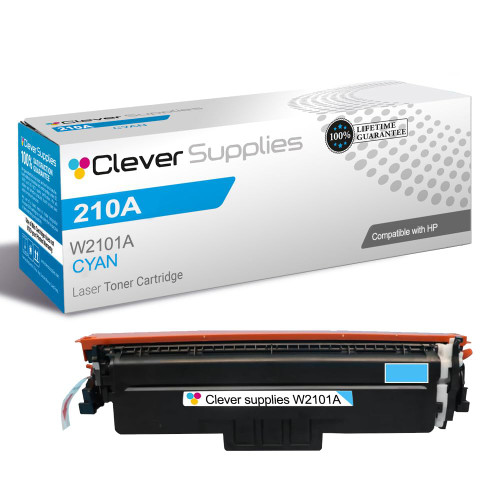
Compatible HP 4201dne (W2101A) Toner Cartridge Cyan
- Page Yield:
- Color: 1800
- Availability:
- In Stock
- Shipping:
- Free Shipping

Amazon Price:

- Page Yield:
- Color: 1800
- Availability:
- In Stock
- Shipping:
- Free Shipping
- Compatible Printers
- Specifications
- SKU:
- CS-HP-4201dne-C
- Printer Brand:
- Hewlett Packard
- OEM Number:
- W2101A
- Ink Color:
- Cyan
- Page Yield:
- Color: 1800
- Printer Type:
- Laser Cartridge
- Condition:
- New Compatible
- Description
- Reviews



Experience professional-quality printing with the HP W210A, W2100A Black, W2101A Cyan, W2103A Magenta, and W2102A Yellow toner cartridges. Designed for high performance, each cartridge ensures sharp black text and brilliant color graphics for every print job, whether you're working at home or in the office. Perfectly suited for HP printers, these HP W210A toner cartridges and HP W210A toner cartridges are built to deliver consistent results and smooth operation. Enjoy flawless integration with your printer, reducing downtime and maximizing productivity. Compatible with the HP Color Pro 4201dn, 4201dne, 4201dw, and 4201dwe, this set of cartridges ensures your documents and images always look their best. Whether printing vibrant flyers or everyday reports, you can count on long-lasting performance. Optimized for multifunction printers such as the MFP 4301dw and MFP 4301fdwe, these toner and ink solutions help maintain peak efficiency and print quality. The precision of the W2100A Black, W2101A Cyan, W2103A Magenta, and W2102A Yellow guarantees outstanding results with every page.
Cross-reference: HP W2101A, the 210A cyan toner cartridge (1,800 pages), is the same cartridge Canon sells as Canon Cartridge 069 (black 2,100 pages, colors 1,900 pages each) and Cartridge 069H high capacity (black 7,600 pages, colors 5,500 pages each) for the Canon Color imageCLASS MF751Cdw and MF753Cdw and the Color imageCLASS LBP674Cdw printers (ISO/IEC standard yields).
Frequently Asked Questions
How do I know this is the cyan and not another color?
The label code settles it: W2101A is cyan in the HP 210A family — the 1 in the code is the cyan position, distinct from yellow and magenta. This listing is a single cyan cartridge, priced at $81.28.
Which printed pieces suffer first when cyan fades?
Anything that has to look polished in a reader's hands: presentation decks, handouts, proposals with charts and branded covers. Cyan carries the blues in those graphics, and tired blues are what make a page look dated before a word is read.
How many pages does this cyan cover?
Its standard rating is 1,800 pages. Slide-heavy printing with full color backgrounds consumes it quickly; reports where color appears in headings and charts sip at it instead, and the cartridge lasts correspondingly longer.
Our greens have started looking dull too — can one cartridge explain that?
It can. Greens are printed by laying cyan over yellow, so a weakening cyan drags greens down with the blues. If greens and blues have faded together while reds still look healthy, replacing this W2101A is the logical first step.
Where exactly does the new cartridge go?
Into the cyan bay of the Color LaserJet Pro 4201dne, after the spent unit has been drawn out and the replacement unpacked, stripped of its protective pieces and tilted gently side to side. It slides in until it seats; forcing it is never necessary.
How quickly can we get help if a print still looks wrong afterwards?
Support hours run Monday–Friday, 9 AM–5 PM CST, and the team can help separate a cartridge problem from a settings problem before you print a full batch on a suspicion.
A client deck is due at the end of the week — when should the cyan be checked?
Check it at the start of the week, not on the morning of the deadline. Presentation pages spend cyan quickly, so a cartridge that looks adequate on Monday can fade halfway through Thursday's print run. If the gauge is low, fit the new W2101A before the deck prints and run one chart page to confirm the blues are back to strength.
Will the first and last pages of a long color run look the same?
With a healthy cartridge, yes; with a tiring one, not quite. Cyan is laid down on every page, so as the supply weakens the later pages of a long run drift first — blues lighten and greens lose depth toward the back of the stack. Renewing the W2101A before a big run keeps the set consistent from cover to appendix.
Should the old cartridge be kept until the replacement has proved itself?
It is a sensible habit. Box the spent W2101A and hold it until a familiar page — a chart or branded cover you know well — has come through the new cartridge looking right. Once the replacement has proved itself on real work, the old unit can go to recycling with no second-guessing.
Is a shelf spare worth keeping if most of our printing is plain text?
Yes, precisely because text work sips cyan so slowly. The spare waits sealed while the installed W2101A covers months of reports, and the day a color proposal or chart-heavy handout lands, the swap takes minutes instead of a wait for delivery. One cartridge on the shelf is cheap insurance for an occasional color deadline.
About This 210A Cyan Cartridge for the 4201dne
For pages that represent the business, blue has to be right. This W2101A cyan from the 210A family, rated at 1,800 pages and priced at $81.28, renews the blue component of color printing on the Color Pro 4201dne, and it is backed by a 1-year warranty and 1-year free returns.
Dispatch is from warehouse stock in IL, PA, GA and CA; see the shipping & returns page for delivery and returns detail, and browse the HP section for everything else this printer takes.
Related Items

Hewlett Packard
Compatible HP 210A (W2101A) Toner Cartridge Cyan


Hewlett Packard
Compatible HP 4301fdn (W2101A) Toner Cartridge Cyan

Hewlett Packard
Compatible HP 4201dn (W2101A) Toner Cartridge Cyan


Hewlett Packard
Compatible HP 4301fdwe (W2101A) Toner Cartridge Cyan