






 See Compatible Printers
 Read more about our ink!
Hewlett Packard
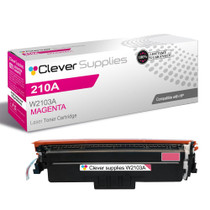
Compatible HP 4201dw (W2103A) Toner Cartridge Magenta
- Page Yield:
- Color: 1800
- Availability:
- In Stock
- Shipping:
- Free Shipping

Amazon Price:

- Page Yield:
- Color: 1800
- Availability:
- In Stock
- Shipping:
- Free Shipping
- Compatible Printers
- Specifications
- SKU:
- CS-HP-4201dw-M
- Printer Brand:
- Hewlett Packard
- OEM Number:
- W2103A
- Ink Color:
- Magenta
- Page Yield:
- Color: 1800
- Printer Type:
- Laser Cartridge
- Condition:
- New Compatible
- Description
- Reviews



Experience professional-quality printing with the HP W210A, W2100A Black, W2101A Cyan, W2103A Magenta, and W2102A Yellow toner cartridges. Designed for high performance, each cartridge ensures sharp black text and brilliant color graphics for every print job, whether you're working at home or in the office. Perfectly suited for HP printers, these HP W210A toner cartridges and HP W210A toner cartridges are built to deliver consistent results and smooth operation. Enjoy flawless integration with your printer, reducing downtime and maximizing productivity. Compatible with the HP Color Pro 4201dn, 4201dne, 4201dw, and 4201dwe, this set of cartridges ensures your documents and images always look their best. Whether printing vibrant flyers or everyday reports, you can count on long-lasting performance. Optimized for multifunction printers such as the MFP 4301dw and MFP 4301fdwe, these toner and ink solutions help maintain peak efficiency and print quality. The precision of the W2100A Black, W2101A Cyan, W2103A Magenta, and W2102A Yellow guarantees outstanding results with every page.
Cross-reference: HP W2103A, the 210A magenta toner cartridge (1,800 pages), is the same cartridge Canon sells as Canon Cartridge 069 (black 2,100 pages, colors 1,900 pages each) and Cartridge 069H high capacity (black 7,600 pages, colors 5,500 pages each) for the Canon Color imageCLASS MF751Cdw and MF753Cdw and the Color imageCLASS LBP674Cdw printers (ISO/IEC standard yields).
Frequently Asked Questions
How can I be certain this listing is the magenta cartridge?
Look for W2103A on the box. In the 210A numbering, the 03 ending belongs to magenta, and this page offers that one cartridge for $81.28 — no black, cyan or yellow unit is bundled into the purchase.
Which printed colors suffer first as magenta fades?
Anything warm. Reds turn rusty, pinks wash toward gray, and skin tones in printed photographs take on an odd, flat cast. Company reds — a logo, a sale banner, a warning stripe — are usually where owners notice the decline earliest.
What yield figure belongs to the magenta position?
W2103A carries a rating of 1,800 pages. Photo-rich and design-heavy printing leans hard on magenta and will reach the end sooner; documents that use red only for an occasional heading will see the cartridge last considerably longer.
Is there a quick home check before I blame the cartridge?
Print a page carrying a strong red block and inspect it under good light. If the red looks streaked or tired while blue and yellow elements on the same sheet stay lively, the magenta supply is the prime suspect and replacement is the honest fix.
Do I need to change anything else at the same time?
Nothing obliges you to. Slots are independent, so a healthy black or cyan can stay exactly where it is. Replace the magenta, run your red test page again, and only look wider if the weakness stubbornly remains.
What support follows this cartridge after purchase?
A 1-year warranty with 1-year free returns stands behind it, and our team answers Monday to Friday, 9 AM–5 PM CST. If a fresh magenta disappoints straight out of the box, that combination of cover and contact makes it simple to put right.
Is it sensible to keep a spare magenta ready for this printer?
It is, and the cartridge stores gracefully. Keep the W2103A sealed in its box, flat, in a cool cupboard away from heat sources and sunlit windows, and it will wait without complaint until the day the reds start to tire. Because company reds are usually the first thing to fade, having the replacement already on the shelf keeps a tired logo from lingering on outgoing documents.
When the other colors eventually fade too, is the four-color set a better buy than singles?
It depends on timing. If only magenta is low, this single W2103A is the economical answer, because the other slots keep whatever life they still have. The 210A four-color set earns its place when all four cartridges are nearing the end together and you would rather do one clean sweep. Check the level of each slot before deciding which route to take.
How can we be sure the swap actually fixed the reds, rather than just hoping?
Keep one print from the old cartridge — the tired red block page you used for the home check — and print the identical page again after fitting the new W2103A. Lay the two sheets side by side under the same light. A healthy magenta makes the comparison unarguable: the new red should be solid and even where the old one was streaked and rusty.
What is the tidy way to get rid of the old magenta cartridge?
Let the new cartridge's packaging do the work: the spent W2103A goes straight into the empty carton, which contains any loose dust and keeps it off hands and desks. From there it can leave with a cartridge recycling collection or ordinary commercial waste. Avoid shaking the old unit or leaving it open on a shelf, where it only gathers dust of its own.
About This 210A Magenta Cartridge for the 4201dw
Magenta is the warmth supply of the Color LaserJet Pro 4201dw. When it fades, output does not stop — it just loses its cheer, and reds that should command attention begin to apologise. One fresh W2103A brings that warmth back to the Color LaserJet Pro 4201dw in a single, uncomplicated change. It is a platform cartridge rather than a one-printer part — Color Pro 4201dn, Color Pro 4201dne and Color Pro 4201dwe MFP accept it, as do Color Pro 4301dw MFP, Color Pro 4301dwe MFP, Color Pro 4301fdn MFP, Color Pro 4301fdne MFP, Color Pro 4301fdw MFP and Color Pro 4301fdwe.
Parcels leave warehouses spread across IL, PA, GA and CA. The shipping & returns page holds the delivery and returns detail, while the HP shelves carry the companion colors for this printer, each on its own page, for whenever they are wanted. Separate pages carry the black W2100A, the cyan W2101A and the yellow W2102A; the upgrade path for this bay is high-yield W2103X, with the 210A four-color set there for a clean sweep of all four.
Related Items


Hewlett Packard
Compatible HP 4301fdw (W2103A) Toner Cartridge Magenta



Hewlett Packard
Compatible HP 4301fdwe (W2103A) Toner Cartridge Magenta


Hewlett Packard
Compatible HP 4201dwe (W2103A) Toner Cartridge Magenta

Hewlett Packard
Compatible HP 4201dn (W2103A) Toner Cartridge Magenta