







 See Compatible Printers
 Read more about our ink!
Hewlett Packard
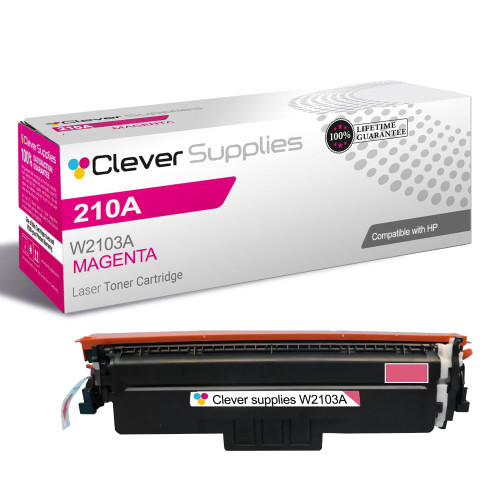
Compatible HP 4301dwe (W2103A) Toner Cartridge Magenta

Amazon Price:

- Page Yield:
- Color: 1800
- Availability:
- In Stock
- Shipping:
- Free Shipping
- Compatible Printers
- Specifications
- SKU:
- CS-HP-4301dwe-M
- Printer Brand:
- Hewlett Packard
- OEM Number:
- W2103A
- Ink Color:
- Magenta
- Page Yield:
- Color: 1800
- Printer Type:
- Laser Cartridge
- Condition:
- New Compatible
- Description
- Reviews



Experience professional-quality printing with the HP W210A, W2100A Black, W2101A Cyan, W2103A Magenta, and W2102A Yellow toner cartridges. Designed for high performance, each cartridge ensures sharp black text and brilliant color graphics for every print job, whether you're working at home or in the office. Perfectly suited for HP printers, these HP W210A toner cartridges and HP W210A toner cartridges are built to deliver consistent results and smooth operation. Enjoy flawless integration with your printer, reducing downtime and maximizing productivity. Compatible with the HP Color Pro 4201dn, 4201dne, 4201dw, and 4201dwe, this set of cartridges ensures your documents and images always look their best. Whether printing vibrant flyers or everyday reports, you can count on long-lasting performance. Optimized for multifunction printers such as the MFP 4301dw and MFP 4301fdwe, these toner and ink solutions help maintain peak efficiency and print quality. The precision of the W2100A Black, W2101A Cyan, W2103A Magenta, and W2102A Yellow guarantees outstanding results with every page.
Cross-reference: HP W2103A, the 210A magenta toner cartridge (1,800 pages), is the same cartridge Canon sells as Canon Cartridge 069 (black 2,100 pages, colors 1,900 pages each) and Cartridge 069H high capacity (black 7,600 pages, colors 5,500 pages each) for the Canon Color imageCLASS MF751Cdw and MF753Cdw and the Color imageCLASS LBP674Cdw printers (ISO/IEC standard yields).
Frequently Asked Questions
What am I actually buying under code W2103A?
One magenta cartridge from the 210A family, priced at $81.28. Magenta is sometimes listed as the red cartridge by staff reordering in a hurry — W2103A removes the guesswork, because that code belongs to magenta and to no other slot in the printer.
Restaurant menus from the 4301dwe have lost their appetite appeal. Is magenta involved?
Very likely. Reds, berries, cooked meats and warm wood tones all lean on magenta, so as it fades food photography turns gray-brown and unappetising even though the text stays crisp. Restoring magenta brings the warmth back to exactly those images.
How long will 1,800 pages of magenta last us?
That rating suits a Color LaserJet Pro 4301dwe doing mixed color work — letters, flyers, the occasional menu reprint. If your output is dominated by red-heavy artwork, budget for a shorter life; if color is an accent rather than the page, expect longer.
Can we keep receiving faxes while magenta is out?
Yes. Incoming faxes on this MFP print with black toner, and scanning needs no toner at all. Magenta only gates color output, so the machine stays useful for everyday admin while you wait for this cartridge to arrive.
Is there any setting to change after fitting magenta?
No settings work is part of a routine swap. Remove the spent W2103A, fit this cartridge, and print a test page to watch the reds return. The cyan, yellow and black cartridges need no attention during the job.
What if the cartridge arrives damaged?
It is covered by a 1-year warranty with 1-year free returns. Raise it with support Monday–Friday, 9 AM–5 PM CST and the returns process will be walked through with you. Stock is held in IL, PA, GA and CA, which keeps replacement turnaround short.
We reprint the full menu every season. How should magenta be planned around that job?
Check the level before the reprint, not during it. A full menu run is the heaviest magenta work the 4301dwe ever does, because the food photography draws on the W2103A page after page. If the cartridge is already part-worn, order the replacement in advance and either fit it before the run or keep it beside the machine, so the new menus never come out gray-brown.
Is keeping a spare magenta worth it for a single-printer business?
For a business whose printed pages help sell the food, yes. A faded menu cannot be handed out while you wait on a delivery, and the W2103A gives its warning quietly, in photographs that slowly lose their appeal. One sealed spare in the cupboard turns a cartridge change into a pause of a few minutes instead of an embarrassing few days of dull menus.
Why does magenta run out on this machine while black seems to last and last?
Because the two cartridges do different jobs. Black prints the menu's words, prices and everyday paperwork, spread thinly across everything; the W2103A is spent in concentrated bursts wherever food photography, berries and warm wood tones appear. A week of menu and flyer work can empty magenta while black barely notices the same pages, so their replacement dates naturally drift apart.
What should we do with the old magenta once the new one is printing well?
Box it and let it go. The spent W2103A goes into the new cartridge's carton or a sealed bag, which keeps loose toner dust contained and away from work surfaces, and from there into a recycling collection or normal commercial waste. An empty cartridge kept just in case only risks being refitted by mistake when the next change comes around.
About This 210A Magenta Cartridge for the 4301dwe
For the Color Pro 4301dwe MFP, magenta is the difference between color that sells and color that merely informs. This page covers the 210A magenta cartridge, W2103A, rated at 1,800 pages and priced at $81.28 for a single cartridge.
Rather than a long specification list, the useful facts are these: it serves one slot in one printer platform, it is part of our HP compatible range, and the delivery and returns terms that apply to it are published in full under shipping & returns.
Related Items


Hewlett Packard
Compatible HP 4301dwe (W2103X) Toner Cartridge Magenta



Hewlett Packard
Compatible HP 210A (W2103A) Toner Cartridge Magenta


Hewlett Packard
Compatible HP 4301fdn (W2103A) Toner Cartridge Magenta


Hewlett Packard
Compatible HP 4301fdwe (W2103A) Toner Cartridge Magenta