







 See Compatible Printers
 Read more about our ink!
Hewlett Packard
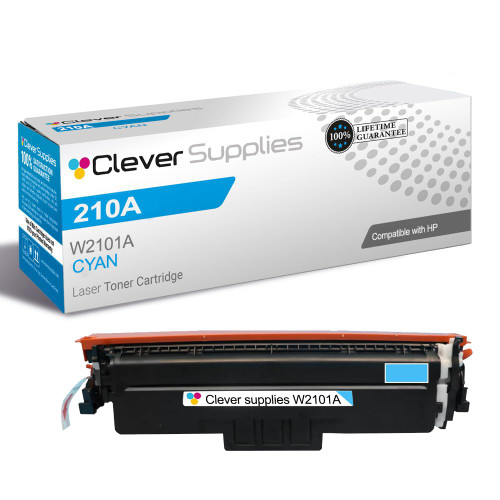
Compatible HP 4201dwe (W2101A) Toner Cartridge Cyan
- Page Yield:
- Color: 1800
- Availability:
- In Stock
- Shipping:
- Free Shipping

Amazon Price:

- Page Yield:
- Color: 1800
- Availability:
- In Stock
- Shipping:
- Free Shipping
- Compatible Printers
- Specifications
- SKU:
- CS-HP-4201dwe-C
- Printer Brand:
- Hewlett Packard
- OEM Number:
- W2101A
- Ink Color:
- Cyan
- Page Yield:
- Color: 1800
- Printer Type:
- Laser Cartridge
- Condition:
- New Compatible
- Description
- Reviews



Experience professional-quality printing with the HP W210A, W2100A Black, W2101A Cyan, W2103A Magenta, and W2102A Yellow toner cartridges. Designed for high performance, each cartridge ensures sharp black text and brilliant color graphics for every print job, whether you're working at home or in the office. Perfectly suited for HP printers, these HP W210A toner cartridges and HP W210A toner cartridges are built to deliver consistent results and smooth operation. Enjoy flawless integration with your printer, reducing downtime and maximizing productivity. Compatible with the HP Color Pro 4201dn, 4201dne, 4201dw, and 4201dwe, this set of cartridges ensures your documents and images always look their best. Whether printing vibrant flyers or everyday reports, you can count on long-lasting performance. Optimized for multifunction printers such as the MFP 4301dw and MFP 4301fdwe, these toner and ink solutions help maintain peak efficiency and print quality. The precision of the W2100A Black, W2101A Cyan, W2103A Magenta, and W2102A Yellow guarantees outstanding results with every page.
Cross-reference: HP W2101A, the 210A cyan toner cartridge (1,800 pages), is the same cartridge Canon sells as Canon Cartridge 069 (black 2,100 pages, colors 1,900 pages each) and Cartridge 069H high capacity (black 7,600 pages, colors 5,500 pages each) for the Canon Color imageCLASS MF751Cdw and MF753Cdw and the Color imageCLASS LBP674Cdw printers (ISO/IEC standard yields).
Frequently Asked Questions
What role does this particular cartridge play in my printer's palette?
It is the cyan supply, coded W2101A in the 210A family, sold singly at $81.28. Cyan builds every blue your printer makes — from a corporate logo's calm navy to the bright header bar on a client report.
Why do printed blues drift before other colors give trouble?
Blue elements are frequent and memorable: logos, hyperlinks printed on paper, chart segments. The eye knows the intended shade, so a weakening cyan announces itself the moment those familiar blues turn thin or greyish.
What does the 1,800-page rating mean for a reports-heavy desk?
W2101A is rated at 1,800 pages under standard coverage. A desk printing chart-filled reports draws cyan steadily and will see that allowance used at a fair pace; text-only workflows barely sip it, letting one cartridge serve for a long season.
How can I verify the new cyan has fixed the problem?
Reprint the exact page that first looked wrong — the same logo sheet or report cover. Blues should match their on-screen intent again, evenly across the page, without banding from one side to the other.
Is it wasteful to replace cyan while other colors still work?
Not at all; the bays live independent lives. Keeping a strong magenta in place while renewing cyan is ordinary, economical maintenance, and the printer expects colors to be changed at different times.
What help exists if blues stay wrong after fitting?
Talk to us Monday through Friday, 9 AM to 5 PM CST — we will help separate a cartridge issue from a document issue. The unit also carries a 1-year warranty with 1-year free returns, so a faulty one is never your financial problem.
How should a spare cyan be stored in a small office?
Keep the W2101A sealed in its carton, upright, in a cool dry cupboard away from sunlight and heat sources. Sealed, it simply waits — no settling routine or periodic attention is needed. Store it where the printer's other supplies live, so whoever finds the cyan low also finds its replacement within arm's reach.
If we keep two spares, does the order they are used in matter?
Use the older one first. Toner cartridges wait patiently, but rotating stock — fitting the W2101A that has been on the shelf longest — keeps every unit in reasonable circulation and avoids one box sitting forgotten for years. A small date note on each carton when it arrives makes that rotation effortless.
A client report run is scheduled — when is the right moment to swap?
Before the run starts, not during it. Header bars and charts appear on every page of a report, so a cyan that fades mid-run leaves the first half of the document looking different from the second. If the gauge is low, fit the fresh W2101A first and let the whole run print at one consistent standard.
What should be done with the empty cartridge afterwards?
Box the spent W2101A in the new cartridge's packaging and send it through your usual toner recycling channel. Keeping it contained protects the desk area from loose dust, and having the empty out of the printer's vicinity prevents it being picked up and refitted by mistake during a busy morning.
About This 210A Cyan Cartridge for the 4201dwe
A Color LaserJet Pro 4201dwe speaks in blue more often than its owner realises: branding, charts, headings and printed links all lean on cyan. This single W2101A returns that voice to the Color LaserJet Pro 4201dwe when time and use have thinned it.
Stock ships from IL, PA, GA and CA locations, with the full picture on the shipping & returns page. The remaining colors for this printer are shelved under HP for their own eventual renewal.
Related Items

Hewlett Packard
Compatible HP 210A (W2101A) Toner Cartridge Cyan


Hewlett Packard
Compatible HP 4201dn (W2101A) Toner Cartridge Cyan


Hewlett Packard
Compatible HP 4301fdwe (W2101A) Toner Cartridge Cyan

Hewlett Packard
Compatible HP 4301fdw (W2101A) Toner Cartridge Cyan