






 See Compatible Printers
 Read more about our ink!
Hewlett Packard
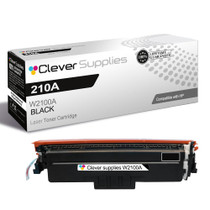
Compatible HP 4301fdn (W2100A) Toner Cartridge Black
- Page Yield:
- Black: 2000
- Availability:
- In Stock
- Shipping:
- Free Shipping

Amazon Price:

- Page Yield:
- Black: 2000
- Availability:
- In Stock
- Shipping:
- Free Shipping
- Compatible Printers
- Specifications
- SKU:
- CS-HP-4301fdn-BK
- Printer Brand:
- Hewlett Packard
- OEM Number:
- W2100A
- Ink Color:
- Black
- Page Yield:
- Black: 2000
- Printer Type:
- Laser Cartridge
- Condition:
- New Compatible
- Description
- Reviews



Experience professional-quality printing with the HP W210A, W2100A Black, W2101A Cyan, W2103A Magenta, and W2102A Yellow toner cartridges. Designed for high performance, each cartridge ensures sharp black text and brilliant color graphics for every print job, whether you're working at home or in the office. Perfectly suited for HP printers, these HP W210A toner cartridges and HP W210A toner cartridges are built to deliver consistent results and smooth operation. Enjoy flawless integration with your printer, reducing downtime and maximizing productivity. Compatible with the HP Color Pro 4201dn, 4201dne, 4201dw, and 4201dwe, this set of cartridges ensures your documents and images always look their best. Whether printing vibrant flyers or everyday reports, you can count on long-lasting performance. Optimized for multifunction printers such as the MFP 4301dw and MFP 4301fdwe, these toner and ink solutions help maintain peak efficiency and print quality. The precision of the W2100A Black, W2101A Cyan, W2103A Magenta, and W2102A Yellow guarantees outstanding results with every page.
Cross-reference: HP W2100A, the 210A black toner cartridge (2,000 pages), is the same cartridge Canon sells as Canon Cartridge 069 (black 2,100 pages, colors 1,900 pages each) and Cartridge 069H high capacity (black 7,600 pages, colors 5,500 pages each) for the Canon Color imageCLASS MF751Cdw and MF753Cdw and the Color imageCLASS LBP674Cdw printers (ISO/IEC standard yields).
Frequently Asked Questions
Incoming faxes are printing pale — is that really a toner problem?
Almost always, yes. A fax prints through the same toner path as everything else, so a fading W2100A shows up first on light fax pages. The cartridge is the HP 210A black rated at 2,000 pages; rock it gently and print a test page — if the test page is pale too, the unit is spent.
Does copying use toner at the same rate as printing?
It does — a copy is a print, as far as the cartridge is concerned. Offices that treat the fdn as a copier first and a printer second often find black running out sooner than expected, because walk-up copies never appear in anyone's print queue estimate.
How does the 2,000-page rating behave on an MFP workload?
The rating assumes five per cent coverage on printed pages. Faxes and plain copies sit near that figure, so the rating is a fair guide for this machine; dense forms and shaded documents pull it down somewhat. Either way, the gauge on the panel reports the real level as you go.
What is the fastest way to confirm this is the right cartridge?
Read the label on the cartridge already in the machine. If it says W2100A, this unit is the direct replacement — same family, same fit, no adaptation. The code check takes ten seconds and removes every doubt before you order.
What cover comes with this $81.28 cartridge?
A 1-year warranty protects it, and 1-year free returns apply if the unit arrives damaged or fails early. We ship from warehouses in Illinois, Pennsylvania, Georgia and California, and support is available Monday through Friday, 9 AM to 5 PM CST. The shipping and returns page sets out the terms in full.
Will scanning documents wear the cartridge out?
No. Scanning only reads the page; it lays down no toner at all. Only printing and copying draw on the W2100A, so a scan-heavy archive project can run all week without touching the level — the copies of those scans are what count.
What preparation does this single cartridge need before it goes in?
Very little: unpack the W2100A, pull the seal strip, and rock the unit gently from side to side a few times so the powder sits evenly along its length. That thirty-second routine is why the first pages come out at full density instead of patchy. Then slide it in until it seats, close the door, and print one test page to confirm the fdn is back at strength.
Does double-sided printing make the cartridge last longer?
It saves paper, not toner. A duplex sheet carries two printed pages, and the W2100A spends toner on both of them, so the 2,000-page rating counts pages imaged rather than sheets used. An office that duplexes everything will halve its paper bill while the cartridge empties on roughly the same schedule — plan the spare by page count, not by reams.
What does the end of this cartridge look like, week by week?
The decline is gradual and honest. First the panel gauge thins, then large areas of light gray — a fax cover sheet, a shaded form — start to look washed while ordinary text still holds. Rocking the unit buys back some density for a short stretch. When even plain letters gray after a rock, the W2100A has nothing left to redistribute and replacement is due.
With no spare on the shelf, how should the low warning be used?
As an ordering window, not an alarm. The warning arrives while usable toner remains, and this machine's fax-and-copy diet sits near the rating's assumptions, so output stays readable for a while after it appears. Order the next W2100A the same day, keep printing in the meantime, and the swap becomes a planned minute instead of a scramble when a pale fax lands.
About This W2100A Black Cartridge
For the Color LaserJet Pro 4301fdn, where faxes, copies and prints all draw on one black supply, this W2100A delivers its 2,000 rated pages of even, readable output. It is the standard-yield black the machine was specified with, at $81.28, ready to drop in and get the multifunction back to full strength.
The machines sharing this bay span both ranges — Color Pro 4201dn, Pro 4201dne, Color Pro 4201dw and Color Pro 4201dwe MFP and Color Pro 4301dw MFP, Color Pro 4301dwe MFP, Color Pro 4301fdn MFP, Color Pro 4301fdne MFP, Color Pro 4301fdw MFP and Color Pro 4301fdwe — and any of them will run it. Color on this platform comes from the cyan W2101A, the yellow W2102A and the magenta W2103A; the high-yield W2100X stretches the black channel further between orders, and the 210A four-color set replaces the whole row in one box.
Related Items


Hewlett Packard
Compatible HP 4301fdn (W2100A) Toner Cartridge 2 Black



Hewlett Packard
Compatible HP 4301fdne (W2100A) Toner Cartridge Black


Hewlett Packard
Compatible HP 4301dwe (W2100A) Toner Cartridge Black

Hewlett Packard
Compatible HP 4301fdw (W2100A) Toner Cartridge Black