






 See Compatible Printers
 Read more about our ink!
Hewlett Packard
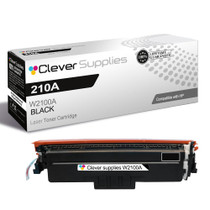
Compatible HP 4301fdw (W2100A) Toner Cartridge Black
- Page Yield:
- Black: 2000
- Availability:
- In Stock
- Shipping:
- Free Shipping

Amazon Price:

- Page Yield:
- Black: 2000
- Availability:
- In Stock
- Shipping:
- Free Shipping
- Compatible Printers
- Specifications
- SKU:
- CS-HP-4301fdw-BK
- Printer Brand:
- Hewlett Packard
- OEM Number:
- W2100A
- Ink Color:
- Black
- Page Yield:
- Black: 2000
- Printer Type:
- Laser Cartridge
- Condition:
- New Compatible
- Description
- Reviews



Experience professional-quality printing with the HP W210A, W2100A Black, W2101A Cyan, W2103A Magenta, and W2102A Yellow toner cartridges. Designed for high performance, each cartridge ensures sharp black text and brilliant color graphics for every print job, whether you're working at home or in the office. Perfectly suited for HP printers, these HP W210A toner cartridges and HP W210A toner cartridges are built to deliver consistent results and smooth operation. Enjoy flawless integration with your printer, reducing downtime and maximizing productivity. Compatible with the HP Color Pro 4201dn, 4201dne, 4201dw, and 4201dwe, this set of cartridges ensures your documents and images always look their best. Whether printing vibrant flyers or everyday reports, you can count on long-lasting performance. Optimized for multifunction printers such as the MFP 4301dw and MFP 4301fdwe, these toner and ink solutions help maintain peak efficiency and print quality. The precision of the W2100A Black, W2101A Cyan, W2103A Magenta, and W2102A Yellow guarantees outstanding results with every page.
Cross-reference: HP W2100A, the 210A black toner cartridge (2,000 pages), is the same cartridge Canon sells as Canon Cartridge 069 (black 2,100 pages, colors 1,900 pages each) and Cartridge 069H high capacity (black 7,600 pages, colors 5,500 pages each) for the Canon Color imageCLASS MF751Cdw and MF753Cdw and the Color imageCLASS LBP674Cdw printers (ISO/IEC standard yields).
Frequently Asked Questions
Why does black seem to run out faster on our wireless fdw?
Because wireless removes friction: every laptop, phone and tablet in range can send work, and all of it draws on the same W2100A — the HP 210A black rated at 2,000 pages. The cartridge is not underperforming; the printer is simply being fed by more people than a wired machine would be.
How do I verify this is the correct cartridge before ordering?
Pull the current unit and read its label. W2100A printed there means this cartridge is the direct match for the fdw's black bay. A ten-second check on the code is more reliable than any model-name guesswork.
What does the 2,000-page rating assume?
Five per cent coverage per page — ordinary text territory. Printouts from phones often carry photos and graphics at far higher coverage, so a wireless-heavy household or office should expect the real figure to land under the rating and plan the spare accordingly.
Copies look fine but prints are fading — what gives?
That combination usually means the cartridge still has life and the print path from one device is the problem — a draft-mode or toner-save setting on that computer. Print the machine's own test page: if it is dense, check the sending device's settings before blaming the W2100A.
What cover comes with the $81.28 price?
A 1-year warranty protects the cartridge, and 1-year free returns apply if it arrives damaged or fails early. Orders ship from warehouses in Illinois, Pennsylvania, Georgia and California, and support is available Monday through Friday, 9 AM to 5 PM CST. The shipping and returns page carries the complete terms.
How long does a swap take mid-flow?
About a minute, with no tools and no network reconfiguration — the wireless settings live in the printer, not the cartridge. Open the door, exchange the units, close it, and queued jobs from every device resume on the fresh cartridge.
Owning just this single, when is the right moment to order the next one?
When the panel warning first appears. The notice precedes any visible fading, and the W2100A keeps producing dense pages for a stretch afterward, so an order placed that day lands comfortably inside the window. Waiting for the first gray page wastes the warning's whole purpose — on a wireless machine fed by the whole office, the remaining pages can vanish faster than anyone at the panel expects.
How far can rocking a fading cartridge be pushed?
Rocking redistributes the powder that remains; it creates nothing. One gentle rock that restores density for a run of pages is the cartridge spending its last reserve sensibly. When the gray returns within a few pages of the second rock, the W2100A is empty in every way that matters — further rocking only delays a swap that takes a minute, and risks a pale page reaching a client.
Where does a single spare belong in an office where the printer serves everyone?
In a fixed, labeled spot by the fdw itself, sealed and flat. A lone W2100A in a shared cupboard tends to migrate, get buried, or be mistaken for someone else's stock. Its own marked place solves all three: whoever the wireless queue belongs to that day can find the cartridge in seconds, and an empty spot is itself the reorder signal for the next single.
After a mid-queue swap, how should the waiting jobs be handled?
Let the machine's own test page go first. Once the door closes, the fdw reads the fresh W2100A level by itself; a dense panel test page confirms the new unit before the accumulated queue from every laptop and phone in range is released onto it. If that page is clean, the queued work simply resumes — no settings, on any device, need to change for a toner swap.
About This W2100A Black Cartridge
Suited to the Color LaserJet Pro 4301fdw, where print jobs arrive from every corner of the building, this W2100A provides a rated 2,000 pages of dense black at $81.28. It is the standard cartridge the machine specifies, ready for the shared workload a wireless multifunction attracts.
It fits far more than the one machine in its name. Color Pro 4201dn, Pro 4201dne, Color Pro 4201dw and Color Pro 4201dwe MFP take it, and so do Color Pro 4301dw MFP, Color Pro 4301dwe MFP, Color Pro 4301fdn MFP, Color Pro 4301fdne MFP, Color Pro 4301fdw MFP and Color Pro 4301fdwe. Text is only half of what this machine does: the cyan W2101A, the yellow W2102A and the magenta W2103A handle the color, the high-yield W2100X stretches the black channel further between orders, and the 210A four-color set resets the full set.
Related Items


Hewlett Packard
Compatible HP 4301fdw (W2100A) Toner Cartridge 2 Black



Hewlett Packard
Compatible HP 4301fdw (W2100X) Toner Cartridge Black

Hewlett Packard
Compatible HP 4201dne (W2100A) Toner Cartridge Black


Hewlett Packard
Compatible HP 4301dw (W2100A) Toner Cartridge Black