




Color Pro 4301fdw MFP
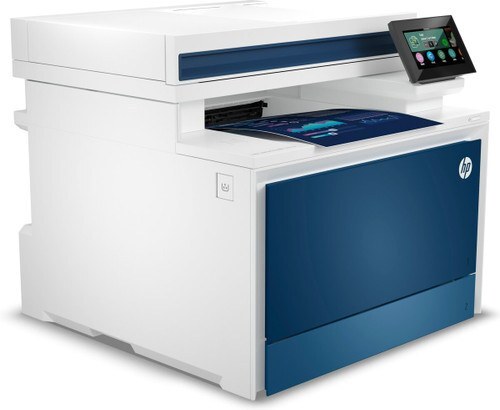
HP aimed the Color Pro 4301fdw MFP at modern small offices when it launched this 2023-era color multifunction, and its toner shelf is the 210 family: the W2100A (210A) black, W2101A cyan, W2102A yellow and W2103A magenta at standard yield, with a longer-running X twin for each one — W2100X (210X) black, W2101X cyan, W2102X yellow and W2103X magenta.
This is the shared machine a small team prints to all day without thinking about it — proposals with color charts one hour, plain invoices the next. Wireless placement means it sits where the work is rather than where the cabling dictates, and because several people rely on it, a cartridge that runs dry mid-afternoon is a team problem, not a personal one. Choosing the tier that matches the office's real volume is what keeps it invisible in the best way.
Toner Cartridges for Color Pro 4301fdw MFP
The family-named cartridges come first below, high-yield line ahead of the standard line; model-named listings for the whole family follow.
| Cartridge | Color | Page Yield |
|---|---|---|
| HP 210X (W2100X) Black, 2-pack | Black | See product page |
| HP 210X 4-Color Set | Black, Cyan, Magenta, Yellow | See product page |
| HP 210X (W2100X) Black | Black | See product page |
| HP 210X (W2101X) Cyan | Cyan | See product page |
| HP 210X (W2103X) Magenta | Magenta | See product page |
| HP 210X (W2102X) Yellow | Yellow | See product page |
| HP 210A (W2100A) Black, 2-pack | Black | See product page |
| HP 210A 4-Color Set | Black, Cyan, Magenta, Yellow | See product page |
| HP 210A (W2100A) Black | Black | See product page |
| HP 210A (W2101A) Cyan | Cyan | See product page |
| HP 210A (W2103A) Magenta | Magenta | See product page |
| HP 210A (W2102A) Yellow | Yellow | See product page |
Each printer in this family also has its own named listings on the shelf. They are the same cartridges — only the name on the listing changes — gathered here group by group.
Under the Color Pro 4301fdwe name: Black 2-pack — W2100X · 4-Color Set — 4301fdwe · Black — W2100X · Cyan — W2101X · Magenta — W2103X · Yellow — W2102X · Cyan — W2101A · Magenta — W2103A · Yellow — W2102A · Black 2-pack — W2100A · 4-Color Set — 4301fdwe · Black — W2100A
Under the Color Pro 4301fdw MFP name: Black 2-pack — W2100X · 4-Color Set — 4301fdw · Black — W2100X · Cyan — W2101X · Magenta — W2103X · Yellow — W2102X · Cyan — W2101A · Magenta — W2103A · Yellow — W2102A · Black 2-pack — W2100A · 4-Color Set — 4301fdw · Black — W2100A
Under the Color Pro 4301fdne MFP name: Black 2-pack — W2100X · 4-Color Set — 4301fdne · Black — W2100X · Cyan — W2101X · Magenta — W2103X · Yellow — W2102X · Cyan — W2101A · Magenta — W2103A · Yellow — W2102A · Black 2-pack — W2100A · 4-Color Set — 4301fdne · Black — W2100A
Under the Color Pro 4301fdn MFP name: Black 2-pack — W2100X · 4-Color Set — 4301fdn · Black — W2100X · Cyan — W2101X · Magenta — W2103X · Yellow — W2102X · Cyan — W2101A · Magenta — W2103A · Yellow — W2102A · Black 2-pack — W2100A · 4-Color Set — 4301fdn · Black — W2100A
Under the Color Pro 4301dwe MFP name: Black 2-pack — W2100X · 4-Color Set — 4301dwe · Black — W2100X · Cyan — W2101X · Magenta — W2103X · Yellow — W2102X · Cyan — W2101A · Magenta — W2103A · Yellow — W2102A · Black 2-pack — W2100A · 4-Color Set — 4301dwe · Black — W2100A
Under the Color Pro 4301dw MFP name: Black 2-pack — W2100X · 4-Color Set — 4301dw · Black — W2100X · Cyan — W2101X · Magenta — W2103X · Yellow — W2102X · Cyan — W2101A · Magenta — W2103A · Yellow — W2102A · Black 2-pack — W2100A · 4-Color Set — 4301dw · Black — W2100A
Under the Color Pro 4201dwe MFP name: Black 2-pack — W2100X · 4-Color Set — 4201dwe · Black — W2100X · Cyan — W2101X · Magenta — W2103X · Yellow — W2102X · Black 2-pack — W2100A · 4-Color Set — 4201dwe · Black — W2100A · Cyan — W2101A · Magenta — W2103A · Yellow — W2102A
Under the Color Pro 4201dw name: Black 2-pack — W2100X · 4-Color Set — 4201dw · Black — W2100X · Cyan — W2101X · Magenta — W2103X · Yellow — W2102X · Black 2-pack — W2100A · 4-Color Set — 4201dw · Black — W2100A · Cyan — W2101A · Magenta — W2103A · Yellow — W2102A
Under the Color Pro 4201dne name: Black 2-pack — W2100X · 4-Color Set — 4201dne · Black — W2100X · Cyan — W2101X · Magenta — W2103X · Yellow — W2102X · Black 2-pack — W2100A · 4-Color Set — 4201dne · Black — W2100A · Cyan — W2101A · Magenta — W2103A · Yellow — W2102A
Under the Color Pro 4201dn name: Black 2-pack — W2100X · 4-Color Set — 4201dn · Black — W2100X · Cyan — W2101X · Magenta — W2103X · Yellow — W2102X · Black 2-pack — W2100A · 4-Color Set — 4201dn · Black — W2100A · Cyan — W2101A · Magenta — W2103A · Yellow — W2102A
Which cartridge should you buy?
A shared 4301fdw rewards the high-yield X line: fewer changes, fewer interruptions, and a lower cost per page across a busy month. Standard-yield cartridges still make sense where the machine mostly idles — a two-person office printing a handful of pages a day may never feel the difference. Colors can be swapped individually as each one empties, so there is no need to retire a set early; the black, predictably, is the one to watch and the one worth keeping as a 2-pack spare. Whichever tier you pick, the compatible cartridges on this page carry a 1-year warranty with 1-year returns.
Chip, toner and everyday use
Cartridge chips in this family report levels to the printer, which is how the 4301fdw warns the office before a color actually fails. Fit a new cartridge with the seal removed completely and press it in until it seats; a half-seated cartridge is the usual cause of a recognition complaint. Page-yield ratings assume roughly 5% coverage, so presentation decks and full-color flyers will cycle cartridges faster than letters do. Store spares sealed, flat and out of direct sunlight, and rotate stock so the oldest box is used first.
Frequently Asked Questions
Which toner cartridges does the Color Pro 4301fdw MFP take?
Eight codes cover it: W2100A, W2101A, W2102A and W2103A at standard yield, and W2100X, W2101X, W2102X and W2103X in the high-yield line. Match the code printed on the cartridge you are replacing before ordering.
Can I replace just one color in the 4301fdw?
Yes. Each of the four cartridges is independent, so when the yellow runs low you change the yellow alone. The others keep working, and the printer reports every level separately.
Should a small office buy standard or high-yield for this printer?
Offices that print every day usually come out ahead on the X line because it needs changing less often and costs less per page. Very light users can stay with the standard line — the fit is identical, only the toner fill differs.
The 4301fdw does not seem to recognize a new cartridge — what now?
Take the cartridge out, confirm the sealing strip is fully removed, and reseat it firmly. If the message persists, restarting the printer refreshes the sensor in most cases.
More printers that use the same cartridges
These sibling models run on exactly the same eight cartridges:
Pro 4201dne, Color Pro 4301fdwe, Color Pro 4301fdne MFP, Color Pro 4301fdn MFP, Color Pro 4301dwe MFP, Color Pro 4301dw MFP, Color Pro 4201dwe MFP, Color Pro 4201dw, Color Pro 4201dne, Color Pro 4201dn