




Color LaserJet Pro M277
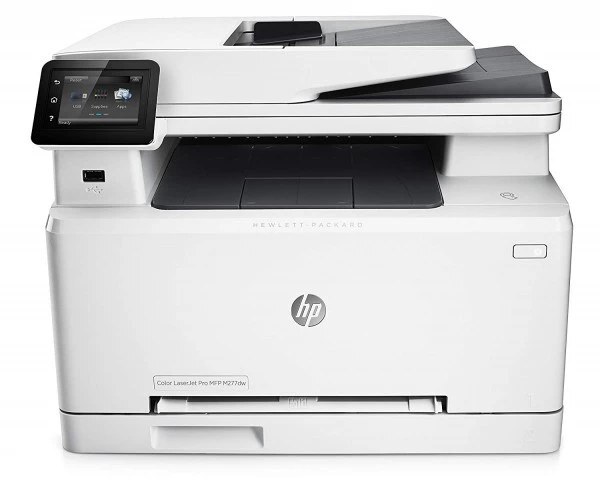
Color documents were the entire assignment for the Color LaserJet Pro M277, a mid-2010s Pro printer that does one job — color — for desks that had moved past black and white. No scanner, no fax, no detours: charts, proposals and presentations come off this machine, and four cartridges share the work. The standard shelf is the 201A set — CF400A black, CF401A cyan, CF402A yellow and CF403A magenta — and wherever one color runs heavy, that slot alone can graduate to its high-yield twin from the 201X range: CF400X, CF401X, CF402X or CF403X.
A single-function printer sounds like a limitation until you watch one work: there is no scanner lid to lift, no copy queue blocking a print job, nothing between a document on screen and a finished color page in the tray. Desks that live in spreadsheets, slide decks and client PDFs tend to keep this model for years, because the one thing it does is the thing they need every single day — and because its cartridges are shared with a wide family of sibling machines, refills are never an obscure special order.
Toner Cartridges for Color LaserJet Pro M277
- CF400X high-yield black — black
- CF401X high-yield cyan — cyan
- CF402X high-yield yellow — yellow
- CF403X high-yield magenta — magenta
- CF400A black — black
- CF403A magenta — magenta
- CF401A cyan — cyan
- CF402A yellow — yellow
- CF400A black (alternate listing) — black
- CF403A magenta (alternate listing) — magenta
Stocking up instead: 201A black, 2 pack; 201A black, 3 pack; 201A 3 color set (cyan, magenta, yellow); 201A 4 color set (black, cyan, magenta, yellow); 201A black, 5 pack; 201A 5 color set (2 black + CMY); 201A 6 color set (2 x CMY); 201A 8 color set (2 x BCMY); 201X high-yield 3 color set (CMY); 201X high-yield 4 color set (BCMY); 201X high-yield 5 color set (2 black + CMY); 201X high-yield 6 color set (2 x CMY); 201X high-yield 8 color set (2 x BCMY); 201X black, 2 pack; 201X black, 3 pack; 201X black, 5 pack; 201A black, 5 pack (alternate listing).
Which cartridge should you buy?
Buy for the pages you actually print. A text-light, graphics-heavy desk drains the three colors long before black, so high-yield X versions of cyan, magenta or yellow earn their keep while a standard black sits comfortably for months. Flip the mix — reports and contracts with an occasional chart — and the black slot becomes the worker: the CF400X stretches its interval between orders. Sets make sense at a full refresh, but the everyday saving is in replacing single colors as they empty rather than retiring the set early. Compatible cartridges here are covered by a 1-year warranty and 1-year returns.
Chip, toner and everyday use
These cartridges are recognized by chip as soon as they click into place, so the only installation step that ever causes trouble is a sealing strip left half-pulled — draw it straight out in one motion before the cartridge goes in. Store spares upright, still sealed, somewhere cool and out of direct sun; a cartridge that waits six months in its box prints like a fresh one. If a page comes out streaky after a swap, lift the cartridge out and tilt it gently a few times to redistribute the toner, then print a test page before assuming anything is wrong.
Frequently Asked Questions
Which cartridge codes fit the Pro M277?
Eight codes cover this printer: the standard CF400A, CF401A, CF402A and CF403A, plus their high-yield CF400X, CF401X, CF402X and CF403X editions. Match the code printed on the cartridge you are replacing and the new one seats in the same slot.
Can standard and high-yield cartridges be mixed in one machine?
Yes. Each slot accepts either fill independently, so a high-yield black alongside standard-yield colors is a perfectly ordinary configuration. Nothing in the printer requires the four cartridges to match tiers.
Only one color has run out — should I change the others too?
Change only the empty one. The printer meters every slot separately, and the remaining cartridges keep whatever toner they hold. Pulling them early is the most common way offices waste money on color printing.
My pages have started to look faded. What should I check first?
Confirm the black cartridge is not simply running low, set the driver quality to normal or best instead of a draft mode, and make sure the paper is fresh and dry. If output stays uneven, run the printer's built-in cleaning page from its maintenance menu.
More printers that use the same cartridges
The 201 family is shared widely; every printer in this list pours from the same four cartridges:
- LaserJet Pro MFP M277dw
- LaserJet Pro MFP M277
- LaserJet Pro M277n
- LaserJet Pro M277dw
- LaserJet Pro M277
- LaserJet Pro M252dw
- LaserJet Pro M252
- HP 201X
- HP 201A
- Color LaserJet Pro MFP M277N
- Color LaserJet Pro MFP M277DW
- Color LaserJet Pro MFP M277
- Color LaserJet Pro M277N
- Color LaserJet Pro M277DW
- Color LaserJet Pro M252N
- Color LaserJet Pro M252DW
- Color LaserJet Pro M252
- Color LaserJet MFP M277DW
- Color LaserJet M277DW
- Color LaserJet M277
- Color LaserJet M252DW
- Color LaserJet M252