




Color LaserJet Pro M252DW
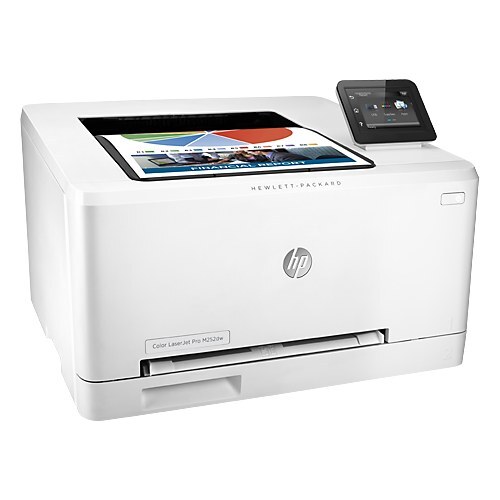
In its DW configuration, the Color LaserJet Pro M252DW drops the two compromises of the base model: no network cable tethering it to one corner of the office, and no single-sided habit wasting half of every sheet. This mid-2010s small-office color printer connects over Wi-Fi and duplexes automatically. Inside, the running gear is the familiar four-slot 201A arrangement — CF400A black, CF401A cyan, CF402A yellow, CF403A magenta — with high-yield 201X counterparts (CF400X through CF403X) waiting for the months when color volume climbs.
Cutting the cable sounds like a small thing until the printer moves to the middle of the room and three more people start using it. The M252DW's natural home is a small office that shares one color printer among several desks — big enough to matter, small enough that a single cartridge shelf still covers everyone. Two-sided printing as the default keeps the paper budget honest, and the shared machine stays fed from one set of codes that every user can learn to recognize on sight.
Toner Cartridges for Color LaserJet Pro M252DW
| Cartridge | Color | Page Yield |
|---|---|---|
| CF403A magenta (alternate listing) | Magenta | See product page |
| CF400A black (alternate listing) | Black | See product page |
| CF402A yellow | Yellow | See product page |
| CF401A cyan | Cyan | See product page |
| CF403A magenta | Magenta | See product page |
| CF400A black | Black | See product page |
| CF403X high-yield magenta | Magenta | See product page |
| CF402X high-yield yellow | Yellow | See product page |
| CF401X high-yield cyan | Cyan | See product page |
| CF400X high-yield black | Black | See product page |
- 201A black, 2 pack — black
- 201A black, 3 pack — black
- 201A 3 color set (cyan, magenta, yellow) — set
- 201A 4 color set (black, cyan, magenta, yellow) — set
- 201A black, 5 pack — black
- 201A 5 color set (2 black + CMY) — set
- 201A 6 color set (2 x CMY) — set
- 201A 8 color set (2 x BCMY) — set
- 201X high-yield 3 color set (CMY) — set
- 201X high-yield 4 color set (BCMY) — set
- 201X high-yield 5 color set (2 black + CMY) — set
- 201X high-yield 6 color set (2 x CMY) — set
- 201X high-yield 8 color set (2 x BCMY) — set
- 201X black, 2 pack — black
- 201X black, 3 pack — black
- 201X black, 5 pack — black
- 201A black, 5 pack (alternate listing) — black
- 201X black, 5 pack (alternate listing) — black
Which cartridge should you buy?
On a shared machine, colors drain unevenly, and the pattern in color-heavy offices is consistent: cyan and yellow usually empty first, because graphics, charts and highlighted documents lean on them. The efficient response is targeted — move those two slots to CF401X and CF402X while black and magenta stay standard, rather than upgrading the full set out of habit. Black earns its X upgrade when document volume, not color, leads the month. Every compatible cartridge sold here is backed by a 1-year warranty and 1-year returns.
Chip, toner and everyday use
A sensible way to move a shared printer to compatible cartridges is the one-cartridge trial: run a single compatible black through your normal documents and judge the output against what the office already accepts. Installation itself is the usual routine — seal out, cartridge clicked home, and the chip reports in. Store both the printer and its spares in a climate-controlled room rather than a cold garage; temperature swings and humidity are unkind to machines and to toner alike, and a shared printer's downtime is everyone's downtime.
Frequently Asked Questions
Can I use CF400A toner in the Pro M252DW?
Yes — CF400A is this printer's standard black, and the CF400X is its high-yield edition. The full correct list is the standard set, CF400A through CF403A, or the high-yield set, CF400X through CF403X; check the code on your current cartridge to confirm.
Is it okay to store the printer itself in a cold garage?
It is not ideal. Temperature swings and humidity can affect both the machine and any cartridge installed in it, so a climate-controlled room is the safer home for the printer and its spares alike.
Should I test one compatible cartridge before switching the office over?
That is a sensible approach. Run one compatible CF400A on your typical documents; if the output meets the office standard, the printer will happily run compatibles in every slot from then on.
When should a cartridge actually be replaced on this model?
A low-toner warning is a heads-up, not a deadline — printing usually continues well past it. Replace the cartridge when output visibly fades or streaks, and keep the warned color's spare ready so the swap takes a minute.
More printers that use the same cartridges
Offices standardize on a cartridge, not a printer; these models all standardized on the same one:
Color LaserJet Pro M277, Color LaserJet Pro M277DW, Color LaserJet Pro M277N, Color LaserJet Pro MFP M277, Color LaserJet Pro MFP M277DW, Color LaserJet Pro MFP M277N, HP 201A, HP 201X, LaserJet Pro M252, LaserJet Pro M252dw, LaserJet Pro M277, LaserJet Pro M277dw, LaserJet Pro M277n, LaserJet Pro MFP M277, LaserJet Pro MFP M277dw, Color LaserJet M252, Color LaserJet M252DW, Color LaserJet M277, Color LaserJet M277DW, Color LaserJet MFP M277DW, Color LaserJet Pro M252, Color LaserJet Pro M252N.