




Color LaserJet MFP M277DW
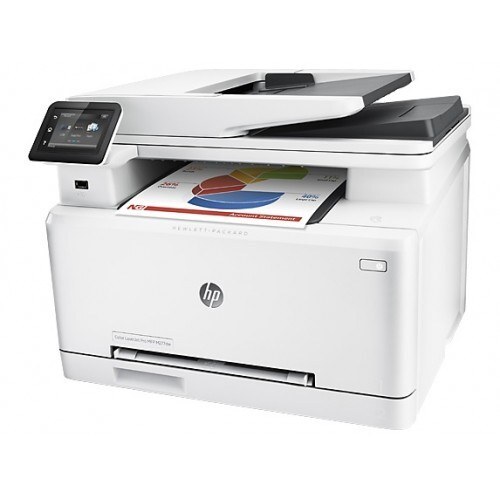
Every color function, no cables: the Color LaserJet MFP M277DW is the mid-2010s color multifunction — print, scan, copy — with Wi-Fi and automatic duplex built in, so color documents move wirelessly and land double-sided without a second thought. Each color gets its own cartridge from the 201A range — CF400A black, then CF401A, CF402A and CF403A — with X-marked high-yield versions for heavier use: the 201X line's CF400X black, CF401X cyan, CF402X yellow and CF403X magenta, each outlasting its standard counterpart by a wide margin.
This is the fullest configuration of its platform, and fullness shows in consumption. A multifunction that the whole office can reach from any desk, that copies at the lid and prints from the queue, spends toner through every door it owns. Offices that chose this model chose convenience deliberately; its cartridge plan should be equally deliberate rather than a series of surprises.
Toner Cartridges for Color LaserJet MFP M277DW
| Cartridge | Color | Page Yield |
|---|---|---|
| CF400A standard-yield black | Black | See product page |
| CF400A black, alternate listing | Black | See product page |
| CF400A black 2 pack | Black | See product page |
| CF400A black 3 pack | Black | See product page |
| CF400A black 5 pack | Black | See product page |
| CF400A 5 black, alternate listing | Black | See product page |
| CF400X high-yield black | Black | See product page |
| CF400X black 2 pack | Black | See product page |
| CF400X black 3 pack | Black | See product page |
| CF400X black 5 pack | Black | See product page |
| CF400X 5 black, alternate listing | Black | See product page |
| CF401A cyan | Cyan | See product page |
| CF402A yellow | Yellow | See product page |
| CF403A magenta | Magenta | See product page |
| CF403A magenta, alternate listing | Magenta | See product page |
| 201A 3 color set (CF401A, CF402A, CF403A) | Cyan, yellow, magenta | See product page |
| 201A 4 color set (CF400A, CF401A, CF402A, CF403A) | All four colors | See product page |
| 201A 5 color set, 2 black and CMY | All four colors | See product page |
| 201A 6 color set, 2 x CMY | Cyan, yellow, magenta | See product page |
| 201A 8 color set, 2 x BCMY | All four colors | See product page |
| CF401X high-yield cyan | Cyan | See product page |
| CF402X high-yield yellow | Yellow | See product page |
| CF403X high-yield magenta | Magenta | See product page |
| 201X 3 color set (CF401X, CF402X, CF403X) | Cyan, yellow, magenta | See product page |
| 201X 4 color set (CF400X, CF401X, CF402X, CF403X) | All four colors | See product page |
| 201X 5 color set, 2 black and CMY | All four colors | See product page |
| 201X 6 color set, 2 x CMY | Cyan, yellow, magenta | See product page |
| 201X 8 color set, 2 x BCMY | All four colors | See product page |
Which cartridge should you buy?
Default to high-yield everywhere; this machine's usage profile argues for it. Print, copy and wireless walk-up traffic stack on the same four slots, and the X fills answer with longer runs and lower cost per page in every color. Keep the routine simple: watch the gauges, swap the flagged slot with its single, and reach for a BCMY set — standard or X — only when several slots bottom out together after a heavy stretch. Black multipacks earn their place where reports dominate the queue. Every cartridge listed is a compatible unit with a 1-year warranty and 1-year returns.
Chip, toner and everyday use
The chip in each cartridge feeds the supplies gauges — the only consumption record that captures copies as well as prints, so trust it over paper counts. Duplexing saves paper but not toner: a two-sided page carries the same coverage as two one-sided ones. When output from one slot turns faint, a gentle side-to-side rock of that cartridge levels the remaining toner for a final run of respectable pages. Seat replacements until they click, seals fully removed, and store the on-deck set sealed and flat within reach of the machine.
Frequently Asked Questions
Does the MFP M277DW take the same cartridges as the print-only M277DW?
Yes — the multifunction and print-only branches of this platform share one cartridge shelf, standard and high-yield alike. Scanning and copying hardware sits on top of the same four slots, so a cartridge stocked for one machine serves the other.
Why do the colors drop faster here than on our old printer?
Because this machine spends color three ways: queued prints, walk-up copies and the color content in scanned-to-print workflows. The old printer only ever printed. The gauges tell the true story — a color that looks mysteriously thirsty is usually the one the copier favors.
Should I run standard yield in colors we rarely use?
That is a sensible split. Tiers mix freely across slots, so a magenta that only stirs during the holiday mailer can stay standard while black and cyan ride high-yield. Upgrade each slot when its own history says so, not before.
A copied page shows a pale stripe down one side. Which cartridge?
A stripe in the color that dominates that band of the page points at that slot's cartridge running dry or sitting poorly. Reseat it first; if the stripe survives, swap it — stripes that follow one color across different originals are the cartridge confessing, not the scanner.
More printers that use the same cartridges
The platform relatives below all feed from this same shelf:
- LaserJet Pro MFP M277dw
- LaserJet Pro MFP M277
- LaserJet Pro M277n
- LaserJet Pro M277dw
- LaserJet Pro M277
- LaserJet Pro M252dw
- LaserJet Pro M252
- HP 201X
- HP 201A
- Color LaserJet Pro MFP M277N
- Color LaserJet Pro MFP M277DW
- Color LaserJet Pro MFP M277
- Color LaserJet Pro M277N
- Color LaserJet Pro M277DW
- Color LaserJet Pro M277
- Color LaserJet Pro M252N
- Color LaserJet Pro M252DW
- Color LaserJet Pro M252
- Color LaserJet M277DW
- Color LaserJet M277
- Color LaserJet M252DW
- Color LaserJet M252