




Color LaserJet M277
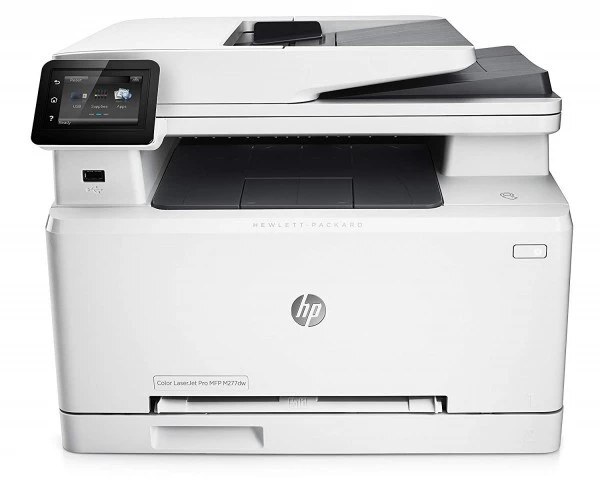
Steady color for a workgroup is the Color LaserJet M277's brief: a single-function, mid-2010s color printer aimed at teams whose documents need more than black and white — presentations, proposals and marketing drafts, without multifunction extras bolted on. It feeds from the 201A shelf at standard yield — CF400A black, CF401A cyan, CF402A yellow, CF403A magenta — and from the high-yield 201X shelf when team volume climbs: CF400X black alongside CF401X, CF402X and CF403X. Black and each color ride in separate cartridges, replaced as individually as they are used.
A team printer lives a different life from a personal one. Several authors feed it, color arrives in project-shaped waves, and the cartridge that empties first is rarely the one anyone predicted. The M277 asks for no scanning or copying compromises — it is a print-only machine — so its whole maintenance story is these four slots, their levels, and how the team chooses to stock them.
Toner Cartridges for Color LaserJet M277
| Cartridge | Color | Page Yield |
|---|---|---|
| CF400A black 2 pack | Black | See product page |
| CF400A black 3 pack | Black | See product page |
| CF400A black 5 pack | Black | See product page |
| 201A 3 color set (CF401A, CF402A, CF403A) | Cyan, yellow, magenta | See product page |
| 201A 4 color set (CF400A, CF401A, CF402A, CF403A) | All four colors | See product page |
| 201A 5 color set, 2 black and CMY | All four colors | See product page |
| 201A 6 color set, 2 x CMY | Cyan, yellow, magenta | See product page |
| 201A 8 color set, 2 x BCMY | All four colors | See product page |
| CF400X black 2 pack | Black | See product page |
| CF400X black 3 pack | Black | See product page |
| CF400X black 5 pack | Black | See product page |
| 201X 3 color set (CF401X, CF402X, CF403X) | Cyan, yellow, magenta | See product page |
| 201X 4 color set (CF400X, CF401X, CF402X, CF403X) | All four colors | See product page |
| 201X 5 color set, 2 black and CMY | All four colors | See product page |
| 201X 6 color set, 2 x CMY | Cyan, yellow, magenta | See product page |
| 201X 8 color set, 2 x BCMY | All four colors | See product page |
| CF400A standard-yield black | Black | See product page |
| CF400A black, alternate listing | Black | See product page |
| CF401A cyan | Cyan | See product page |
| CF402A yellow | Yellow | See product page |
| CF403A magenta | Magenta | See product page |
| CF403A magenta, alternate listing | Magenta | See product page |
| CF400A 5 black, alternate listing | Black | See product page |
| CF400X high-yield black | Black | See product page |
| CF401X high-yield cyan | Cyan | See product page |
| CF402X high-yield yellow | Yellow | See product page |
| CF403X high-yield magenta | Magenta | See product page |
| CF400X 5 black, alternate listing | Black | See product page |
Which cartridge should you buy?
Workgroups should think in two moves. Day to day, replace the single cartridge the supplies screen flags — colors deplete unevenly, and swapping one slot never requires touching the other three. Strategically, a team that prints color every week belongs on the high-yield tier: the X cartridges run far longer between changes and bring cost per page down across all four slots. The staged sets — three colors together, four together, or doubled — fit planned restocks before a heavy season, while the black multipacks cover the text traffic that dominates even a color printer's queue. All are compatible cartridges with a 1-year warranty and 1-year returns behind them.
Chip, toner and everyday use
Level reporting runs through the chip on each cartridge, and the four gauges are worth checking before a big team deadline rather than during it. Seat replacements firmly until they click, having pulled the seal tape clear; a cartridge left half-seated is the usual suspect behind a suddenly pale color. Remember that yield ratings assume about 5 percent coverage — a slide deck at full bleed can spend in fifty pages what a memo spends in five hundred. Spares keep best sealed, flat and at room temperature, stocked oldest-first so nothing ages at the back of the cabinet.
Frequently Asked Questions
Is the Color LaserJet M277 a multifunction printer?
No — despite sitting in a family full of MFPs, this model is print-only, which is exactly why some teams chose it. There is no scanner to maintain and no copy function consuming color in the background; every cartridge page goes to documents the team deliberately printed.
What is the difference between the standard and X cartridges here?
Physical fit is identical; capacity is not. The X line carries more toner per cartridge, so it runs longer between swaps and works out cheaper per page. A team can run standard fills in lightly used colors and X fills in heavy ones — the slots accept the mix freely.
A color looks wrong on our prints. Which cartridge is at fault?
Print the supplies status page and look for the slot reporting low or empty — a missing hue almost always traces to its own cartridge. If all four report healthy levels, reseat the cartridge for the offending color; contact problems there can mute a color long before the toner itself is gone.
Should a workgroup stock full sets or single cartridges?
Singles for the everyday rhythm, since colors fade one at a time — but one full set on the shelf is cheap insurance before a proposal run or a trade-show deadline, when two slots emptying in the same week stops being unlikely. The set sizes above run from three colors up to doubled full sets.
More printers that use the same cartridges
The wider family sharing this printer's cartridge shelf:
LaserJet Pro MFP M277dw, LaserJet Pro MFP M277, LaserJet Pro M277n, LaserJet Pro M277dw, LaserJet Pro M277, LaserJet Pro M252dw, LaserJet Pro M252, HP 201X, HP 201A, Color LaserJet Pro MFP M277N, Color LaserJet Pro MFP M277DW, Color LaserJet Pro MFP M277, Color LaserJet Pro M277N, Color LaserJet Pro M277DW, Color LaserJet Pro M277, Color LaserJet Pro M252N, Color LaserJet Pro M252DW, Color LaserJet Pro M252, Color LaserJet MFP M277DW, Color LaserJet M277DW, Color LaserJet M252DW, Color LaserJet M252.