




LaserJet Pro MFP M277
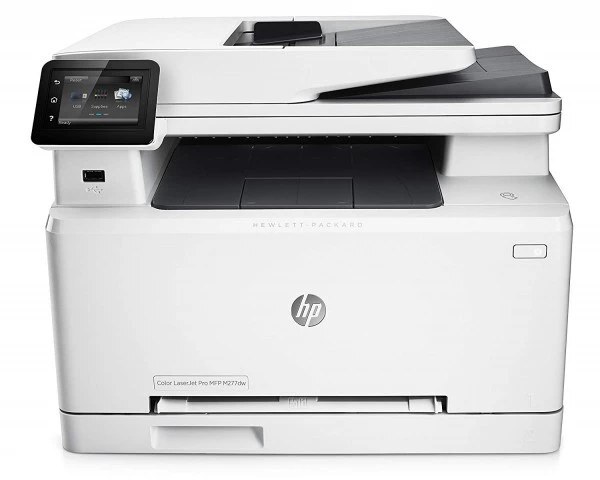
One box for the whole paperwork cycle: the LaserJet Pro MFP M277 is a color multifunction — print, scan and copy — for small offices that need color without a fleet of devices. It runs on the HP 201A/201X set: CF400A black plus CF401A, CF402A, CF403A color, each with a high-yield X version.
We carry the complete 201A/201X family for the MFP M277 as genuine OEM and compatible cartridges. Reorder by color as each runs low — black first, usually — and fast Clever Supplies shipping keeps the multifunction multifunctional. Black has its own high-yield option in the CF400X, a 201X cartridge rated near 2,800 pages for the MFP M277.
Toner Cartridges for LaserJet Pro MFP M277
This printer works with the following toner cartridges:
- HP CF400A
- HP CF401A
- HP CF402A
- HP CF403A
- HP CF400X
- HP CF401X
- HP CF402X
- HP CF403X
More HP Printers
- Color LaserJet M252
- Color LaserJet M252DW
- Color LaserJet M277
- Color LaserJet M277DW
- Color LaserJet MFP M277DW
- Color LaserJet Pro M252
- Color LaserJet Pro M252DW
- Color LaserJet Pro M252N
- Color LaserJet Pro M277
- Color LaserJet Pro M277DW
- Color LaserJet Pro M277N
- Color LaserJet Pro MFP M277
- Color LaserJet Pro MFP M277DW
- Color LaserJet Pro MFP M277N
- LaserJet Pro M252
- LaserJet Pro M252dw
- LaserJet Pro M277
- LaserJet Pro M277dw
- LaserJet Pro M277n
- LaserJet Pro MFP M277dw
Frequently Asked Questions
How do I avoid buying the wrong toner for the LaserJet Pro MFP M277?
HP built the LaserJet Pro MFP M277 around CF400A, CF401A, CF402A, CF403A, CF400X, CF401X, CF402X, and CF403X, so stick to those codes for a proper fit.
Why do pages from the LaserJet Pro MFP M277 have vertical lines?
Repeating vertical lines on the LaserJet Pro MFP M277's pages often come from the CF400A cartridge's drum or from debris on the LaserJet Pro MFP M277's rollers; try a fresh CF400A, and if the lines continue, inspect the paper path for stuck toner.
Where do scanned files from the LaserJet Pro MFP M277 go?
That depends on your scan settings — the software that drives the LaserJet Pro MFP M277 lets you pick the destination folder and file format (such as PDF) before the LaserJet Pro MFP M277 starts scanning.