






 See Compatible Printers
 Read more about our ink!
Hewlett Packard
Compatible HP 85A (CE285A) Toner Cartridge Black
- Page Yield:
- 1600 Each
- Availability:
- In Stock
- Shipping:
- Calculated at Checkout

Amazon Price:

- Page Yield:
- 1600 Each
- Availability:
- In Stock
- Shipping:
- Calculated at Checkout
- Compatible Printers
- Laserjet M1212
- Laserjet M1212NF
- Laserjet M1217
- Laserjet M1217NFW MFP
- Laserjet P1102
- Laserjet P1102W
- Laserjet M1130
- Laserjet M1132
- Laserjet M1134
- Laserjet M1134MFP
- Laserjet M1136
- Laserjet M1136MFP
- Laserjet M1137
- Laserjet M1137MFP
- Laserjet M1138
- Laserjet M1138MFP
- Laserjet M1139
- Laserjet M1139MFP
- Laserjet M1210
- Laserjet M1210MFP
- Laserjet M1212F
- Laserjet M1212FMFP
- Laserjet M1212MFP
- Laserjet M1212NFMFP
- Laserjet M1213
- HP CE285A
- LaserJet M1213MFP
- LaserJet M1213NF
- LaserJet M1213NFMFP
- LaserJet M1214
- LaserJet M1214NFH
- LaserJet M1216
- LaserJet M1216MFP
- LaserJet M1216NFH
- LaserJet M1216NFHMFP
- LaserJet M1217MFP
- LaserJet M1217NFW
- LaserJet M1217NFWMFP
- LaserJet M1219
- LaserJet M1219MFP
- LaserJet M1219NF
- LaserJet M1219NFMFP
- LaserJet P1100
- LaserJet Pro M1130
- LaserJet Pro M1132
- LaserJet Pro M1132MFP
- LaserJet Pro M1134
- LaserJet Pro M1134MFP
- LaserJet Pro M1136
- LaserJet Pro M1136MFP
- LaserJet Pro M1137
- LaserJet Pro M1137MFP
- LaserJet Pro M1138
- LaserJet Pro M1138MFP
- LaserJet Pro M1139
- LaserJet Pro M1139MFP
- LaserJet Pro M1210
- LaserJet Pro M1210MFP
- LaserJet Pro M1212
- LaserJet Pro M1212F
- LaserJet Pro M1212FMFP
- LaserJet Pro M1212NF
- LaserJet Pro M1212NFMFP
- LaserJet Pro M1213
- LaserJet Pro M1213MFP
- LaserJet Pro M1213NF
- LaserJet Pro M1213NFMFP
- LaserJet Pro M1214
- LaserJet Pro M1214NFH
- LaserJet Pro M1216
- LaserJet Pro M1216MFP
- LaserJet Pro M1216NFH
- LaserJet Pro M1216NFHMFP
- LaserJet Pro M1217
- LaserJet Pro M1217MFP
- LaserJet Pro M1217NFW
- LaserJet Pro M1217NFWMFP
- LaserJet Pro M1219
- LaserJet Pro M1219MFP
- LaserJet Pro M1219NFMFP
- LaserJet Pro P1100
- LaserJet Pro P1102
- LaserJet Pro P1102W
- Laserjet M1212
- Specifications
- SKU:
- CS-HP-CE285A-Black-1
- Printer Brand:
- Hewlett Packard
- OEM Number:
- CE285A
- Ink Color:
- Black
- Page Yield:
- 1600 Each
- Printer Type:
- Laser Cartridge
- Condition:
- New Compatible
- Description
- Reviews



When it comes to reliable black printing, the HP 85A toner cartridge is a top choice for various LaserJet series printers, including M1212, M1212Nf, M1217, M1217Nfw Mfp, P1102, P1102W, M1130, M1132, M1134, M1134Mfp, M1136, M1136Mfp, M1137, M1137Mfp, M1138, M1138Mfp, M1139, M1139Mfp, M1210, M1210Mfp, M1212F, M1212Fmfp, M1212Mfp, M1212Nfmfp, M1213, and Laserjet Pro Series printers. The CE285A Black cartridge ensures high-quality prints with sharp text and clear graphics. With the HP 85A toner cartridge, you can expect consistent performance and longevity, making it suitable for both home and office use. Whether you're printing documents, reports, or presentations, this cartridge delivers professional-quality prints every time. Its high-yield capacity helps minimize the frequency of cartridge replacements, ensuring uninterrupted printing workflows. Compatibility is essential, and the HP 85A cartridge is specifically designed to work seamlessly with HP printers. Whether you're using a LaserJet M1212 or M1130 series model, you can rely on this cartridge to deliver exceptional print quality and reliability. Installation is quick and easy, ensuring minimal downtime and maximum productivity in your printing tasks. In conclusion, the HP 85A toner cartridge offers reliable black printing performance for a variety of LaserJet series printers. Whether you're printing at home or in the office, this cartridge delivers consistent quality and longevity, making it an essential component of your printing setup.
Cross-reference: HP CE285A, the 85A standard-yield toner cartridge (1,600 pages), is the same cartridge Canon sells as Canon Cartridge 125 for the Canon imageCLASS MF3010 and MF3010 VP and the Color imageCLASS LBP6000 and LBP6030w printers. Canon rates Cartridge 125 at 1,600 pages (ISO/IEC standard).
Frequently Asked Questions
My printer still has the cartridge it came with. Is this the same thing?
It is the full-size version of it. Printers in this compact class commonly ship with a smaller starter cartridge to get you printing out of the box, and that starter is what runs out first. This CE285A is the standard replacement, rated at the full 1,600 pages, so your second cartridge should noticeably outlast the one the machine arrived with.
Where do I find the code to check before ordering?
Open the printer's access door and look at the label on the cartridge inside — the part number is printed on it. You are looking for CE285A (the family name is 85A). The printers taking it include the Laserjet M1212 and the P1102 line; if the label on your empty matches the code, no further checking is needed.
The printer sat unused for months and now pages come out smudged. Will a new cartridge fix that?
Often, yes. Toner that has sat undisturbed for a long season can cake and distribute unevenly, and the cartridge's internal surfaces do not love damp storage either. Before you order, try removing the old cartridge and rocking it gently side to side, then print a few test pages. If the smudging and patchiness persist, a fresh cartridge is the correct next step — and it rules the cartridge in or out cheaply.
I have never changed one of these. How hard is it?
It is designed for first-timers. With the printer on, open the top door, pull the old cartridge up and out by its handle, take the new one from its bag, pull the orange sealing strip straight out of the side, rock it gently, and lower it into the bay until it seats. Close the door and print a test page. No tools, no menus, nothing to configure.
What do I do with the empty cartridge?
Bag it so loose toner cannot mark anything, and recycle it rather than binning it where you can — many office-supply stores and municipal schemes accept spent toner cartridges. Keep the empty out of the printer only once the replacement is in hand, so the machine is never sitting open and gathering dust.
And if the new one misbehaves?
It is backed by a 1-year warranty with 1-year free returns under our shipping and returns terms, and our team is reachable Monday through Friday, 9 AM to 5 PM CST. Warehouses in Illinois, Pennsylvania, Georgia and California handle dispatch, so help — and any replacement — comes from within the US.
Where should a sealed spare CE285A live in a home office?
Flat, in a cool, dark drawer, away from radiators, sunny windowsills and damp cupboards. Toner is a dry powder and keeps well for many months in those conditions; heat is what ages a stored cartridge, not the calendar. Keep it in its sealed bag until the day it is needed, and store it near the printer rather than in a garage or attic where temperatures swing.
Our printer runs only a few pages a week. Does the fitted cartridge suffer from sitting idle?
Only mildly. Toner inside a little-used cartridge can settle, so before an important run — a contract, a set of forms — print one test page first and check it. If the print looks patchy, take the cartridge out and rock it gently side to side to loosen the powder, then test again. Regular small jobs actually suit the CE285A well; long damp storage is the real enemy.
How can I make sure I reorder the right cartridge next time?
Keep the evidence with the printer. Save the end flap of the box, or take a photo of the label on the cartridge you removed: you want the code CE285A in view, with 85A as the family name. Reordering from that code — rather than from the printer's model name or a half-remembered description — removes the one mistake that can happen with this purchase.
Pages are fading evenly across the whole sheet. Is that the cartridge finishing?
An even, overall grayness is the classic signature of a CE285A at the end of its toner: the whole page lightens together because there is simply little powder left to distribute. That differs from a fault, which usually shows as a pale strip down one side or repeating marks. If the fade is uniform, rocking the cartridge may buy a few pages, but plan the replacement.
About This 85A (CE285A) Black Toner Cartridge
Written for the second cartridge your printer will ever use: this is the standard CE285A replacement — family name 85A — rated at 1,600 pages and priced at $26.75, in compatible form for HP's compact LaserJet platform.
If your machine has been asleep in a spare room, or the starter cartridge that shipped with it has finally faded, this is the like-for-like refill in the HP compatible range: full capacity, a swap a beginner can do in a minute, and nothing about the printer to relearn.
Related Items


Hewlett Packard
Compatible HP 85A (CE285A) Toner Cartridge Black



Hewlett Packard
Compatible HP 85A (CE285A) Toner Cartridge Black

Hewlett Packard
CS Compatible Replacement for HP CE285A Toner Cartridge Black/ HP 85A
/>
Hewlett Packard
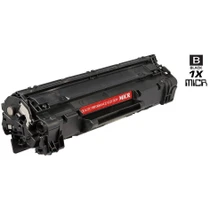
CS Compatible Replacement for HP CE285A Toner Cartridge MICR Black/ HP 85A
/>