




MFC-L2700DW
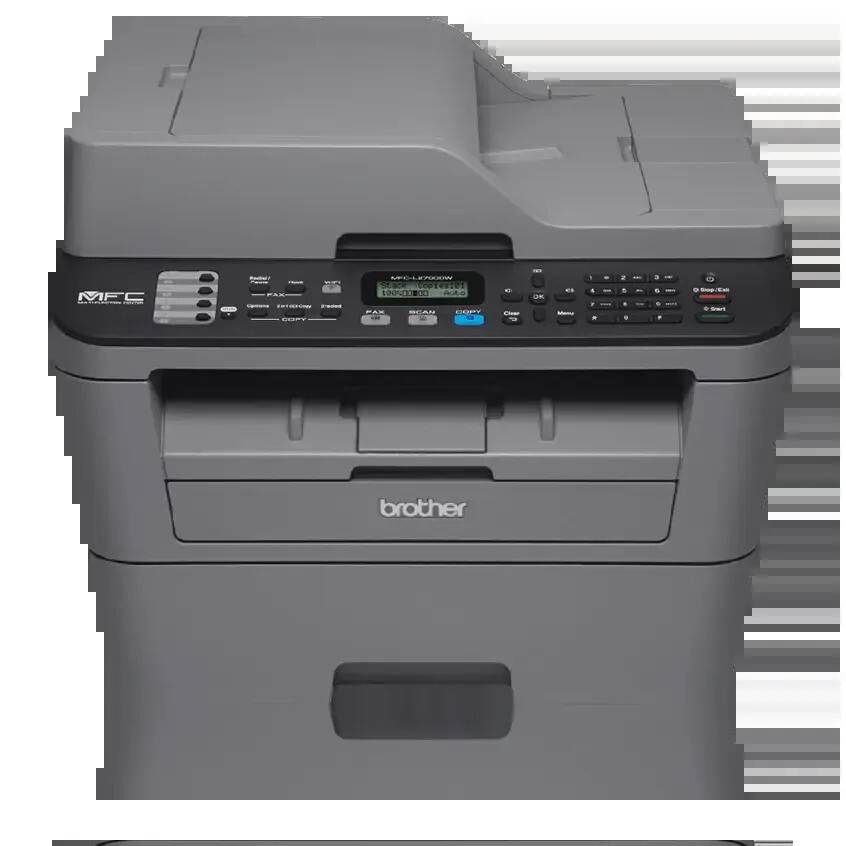
Everything on this page feeds one machine: the Brother MFC-L2700DW, a monochrome laser all-in-one that workplaces lean on for faxing and copying through the whole day. Its standard cartridge is the TN630 (also written TN-630), rated at about 1,200 pages, and the same slot takes the high-yield TN660 (TN-660) at about 2,600 pages when the standard cartridge starts feeling short. Above both sits the TN660J, the jumbo-yield member of the family, and every toner on this page prints through the separate DR630 drum unit, rated at about 12,000 pages.
A shared all-in-one sets the buying rhythm here. When one machine handles the whole office's incoming faxes and walk-up copies, an empty cartridge is never one person's problem — it stalls everyone. That is why this shelf runs from single cartridges to five-packs and toner-and-drum bundles: the right stock level means the machine is refilled from the supply drawer, not from a delivery van two days later.
Toner Cartridges for MFC-L2700DW
Drum units for this model:
- DR630 Drum — drum, See product page
- DR630 Drum Unit 2 Cartridge Set — drum, See product page
- DR630 Drum Unit 3 Cartridge Set — drum, See product page
- DR630 Drum Unit 4 Cartridge Set — drum, See product page
- DR630 Drum Unit 5 Cartridge Set — drum, See product page
- DR630-TN630 Black Drum and Toner Set — drum, ~12,000 pages
- DR630-TN660 Black Drum and Toner Set — drum, ~12,000 pages
- TN660-DR630 Black Drum and Toner Set — drum, ~2,600 pages
- TN660-DR630 Black Drum and Toner Set — drum, ~2,600 pages
- Genuine DR630 Black Genuine OEM Drum Unit - 12,000 pages — drum, 12,000 pages
- Genuine DR630 Black Genuine OEM Drum Unit 3 Pack - 12,000 pages — drum, 12,000 pages
- Genuine DR630 Black Genuine OEM Drum Unit 2 Pack - 12,000 pages — drum, 12,000 pages
- Genuine TN660 and DR630 Genuine OEM Toner and Drum Unit Set - Toner: 2,600 pages, Drum: 12,000 pages — drum, 2,600 pages
Which cartridge should you buy?
Start with print volume. The TN630 covers a lightly used machine honestly, but the TN660 more than doubles its page count — about 2,600 pages against about 1,200 — so the cost per page lands lower and swaps come less than half as often; for most shared machines it is the sensible default. The TN660J stretches the interval further still for the desks that fax and copy all day. Whichever toner you choose, watch the drum separately: the DR630 is rated at about 12,000 pages, roughly one drum for every four to five high-yield toners, and the toner-and-drum sets on this page exist for the day both come due together. Genuine Brother cartridges and premium compatibles are both stocked; the compatibles carry a 1-year warranty and 1-year returns.
Chip, toner and everyday use
Each cartridge carries a chip the machine reads to track the toner level, and the counter only resets when a fresh cartridge is seated properly — push the new cartridge in until it clicks, then let the MFC-L2700DW finish its start-up routine before sending a long fax run. When pages start to fade evenly, lift the cartridge out and rock it gently from side to side; redistributing the toner inside often restores solid blacks for the pages that remain. Page ratings assume about 5% coverage, so dense forms and logos drain a cartridge sooner than plain letters do. Keep one spare on the shelf — a shared machine never runs dry at a convenient moment.
Frequently Asked Questions
What toner does the Brother MFC-L2700DW use?
It takes the TN630 standard-yield black cartridge (about 1,200 pages) or the TN660 high-yield black cartridge (about 2,600 pages), with the TN660J as a jumbo option, and all of them work through the DR630 drum unit (about 12,000 pages). Genuine Brother and compatible cartridges are both listed on this page.
Is the DR630 drum included when I buy toner?
No — the drum is a separate unit with its own much longer life. Toner cartridges slot into the DR630, and you replace only the toner until the drum reaches the end of its roughly 12,000-page cycle; the combined toner-and-drum sets above are there for when both are due.
My MFC-L2700DW still shows a low-toner message with a new cartridge fitted. Why?
The machine reads the level from the cartridge chip, so a cartridge that is not fully seated can leave the old reading in place. Open the front cover, slide the toner-and-drum assembly out and back in until it seats firmly, and let the machine complete its start-up; the message should clear once the new chip is read.
Can I fit a TN630 now and a TN660 later?
Yes. Both cartridges fit the same slot and work with the same DR630 drum, so you can start on a standard cartridge and move up to the high-yield version at the next change — nothing else on the machine needs to change.
More printers that use the same cartridges
The TN630 and TN660 family is shared across a long run of Brother machines — if your office also runs one of these, the same cartridges cover it:
Brother-TN630, Brother-TN660, DCP-L2500D, DCP-L2520, DCP-L2520DW, DCP-L2540, DCP-L2540DN, DCP-L2540DW, DCP-L2560DW, DCP-L3510CDW, DCP-L3550CDW, HL-3210CW, HL-3230CDN, HL-3230CDW, HL-3270CDW, HL-3290CDW, HL-L2300, HL-L2300D, HL-L2305W, HL-L2315DW, HL-L2320, HL-L2320D, HL-L2340, HL-L2340DW, HL-L2360DW, HL-L2361, HL-L2361DW, HL-L2365, HL-L2365DW, HL-L2380, HL-L2380DW, HL-L2560, HL-L2560DW, HL-L2560DWR, HL-L2660, HL-L2660DW, HL-L3210CW, HL-L3230CDN, HL-L3230CDW, HL-L3270CDW, HL-L3290CDW, MFC-L2680W, MFC-L2685DW, MFC-L2700, MFC-L2705, MFC-L2705DW, MFC-L2707DW, MFC-L2720, MFC-L2720DW, MFC-L2740DW, MFC-L3710CW, MFC-L3730CDW, MFC-L3750CDW, MFC-L3770CD, MFC-L3770CDW, MFC-Z5000.