




LaserJet M1536NF
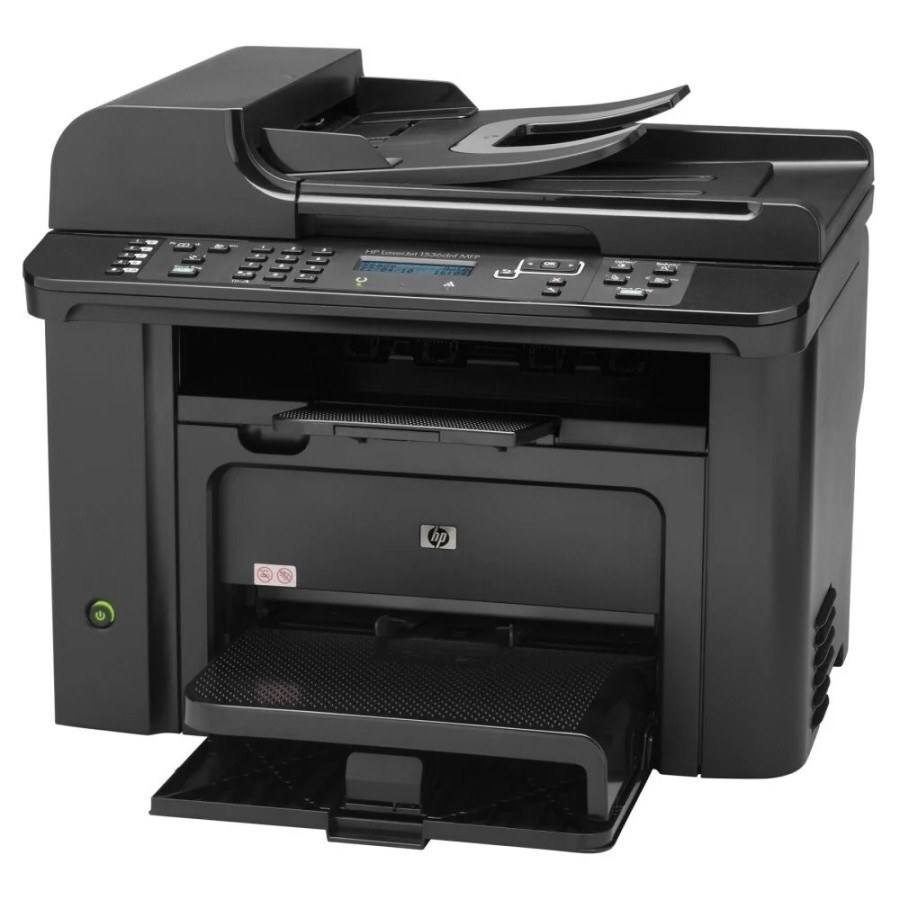
The LaserJet M1536NF packed networking and fax into the compact M1536 chassis, giving a small office a connected four-function mono multifunction. Four functions, one appetite: the machine prints, scans, copies and faxes through the black CE278A, the cartridge HP labels the 78A. A maximum-yield compatible alternative, the CE278X or 78X, is stocked for heavier monthly volumes, and the twin listing sold under the CE278D code rounds out the page for buyers who order cartridges two at a time.
Combination machines earn their desk space by replacing a printer, a scanner, a copier and a fax in one footprint, and the M1536NF's buyers were offices that still lived on paper workflows in both directions — documents arriving by fax, leaving by print. That two-way traffic means toner use is only partly predictable from print counts alone. The single-cartridge design is the saving grace: whatever the mix of work, there is exactly one supply to watch, one code to reorder, and no second consumable hiding in the machine.
Toner Cartridges for LaserJet M1536NF
The full shelf for this model, largest packs first:
- CE278A — Ten-cartridge pack. Color: Black. Page yield: see product page.
- CE278A — Eight-cartridge pack. Color: Black. Page yield: see product page.
- CE278A — Five-cartridge pack. Color: Black. Page yield: see product page.
- CE278A — Premium-quality build, Five-cartridge pack. Color: Black. Page yield: see product page.
- CE278A — Four-cartridge pack. Color: Black. Page yield: see product page.
- CE278X — Maximum-yield fill, Four-cartridge pack. Color: Black. Page yield: see product page.
- CE278A — Three-cartridge pack. Color: Black. Page yield: see product page.
- CE278A — Three black cartridges in one listing. Color: Black. Page yield: see product page.
- CE278A — Three black cartridges in one listing. Color: Black. Page yield: see product page.
- CE278A — Two-cartridge pack. Color: Black. Page yield: see product page.
- CE278D — Two black cartridges in one listing. Color: Black. Page yield: see product page.
- CE278A — Standard fill, single cartridge. Color: Black. Page yield: see product page.
- CE278A — MICR version, for printing checks. Color: Black. Page yield: see product page.
- CE278X — Maximum-yield fill. Color: Black. Page yield: see product page.
- CE278A — Listed under the 78A name. Color: Black. Page yield: see product page.
- CE278A — Listed under the 78A name. Color: Black. Page yield: see product page.
- CE278A — MICR version, for printing checks. Color: Black. Page yield: see product page.
- CE278A — Listed under the P1566 name. Color: Black. Page yield: see product page.
- CE278A — Listed under the M1536D name. Color: Black. Page yield: see product page.
- CE278A — Listed under the M1536F name. Color: Black. Page yield: see product page.
- CE278A — Listed under the P1606DN name. Color: Black. Page yield: see product page.
- CE278A — Listed under the 78A name. Color: Black. Page yield: see product page.
- CE278A — Listed under the 78A name. Color: Black. Page yield: see product page.
- CE278A — Listed under the 78A name. Color: Black. Page yield: see product page.
- CE278A — Listed under the 78A name. Color: Black. Page yield: see product page.
- CE278D — Listed under the 78A name. Color: Black. Page yield: see product page.
Which cartridge should you buy?
Decide by volume. A standard CE278A covers a small office whose M1536NF prints a few dozen pages a day and receives the odd fax. Step up to the maximum-yield CE278X when the machine is the office's only printer and the fax line stays busy; the bigger fill costs fewer interruptions across the year. The packs between two and ten cartridges trade a lower per-cartridge effort against shelf space, and the premium five-pack is the top build tier of the standard fill. MICR is a specialty build for checks and nothing else. Compatible cartridges here carry a one-year warranty and one-year returns.
Chip, toner and everyday use
A four-function machine leans on its cartridge chip for level reporting across print and fax alike, so a cartridge that is not recognized should come out and go back in firmly before anything else is tried. Leave the orange sealing tape fully removed and any protective clip off a new unit, and store the spare in its sealed bag — a cartridge sitting open on top of a warm multifunction ages faster than one kept flat in a drawer. Faded output near the end of a cartridge responds to the usual gentle rocking to redistribute toner.
Frequently Asked Questions
What toner does the LaserJet M1536NF use?
One black cartridge does everything: the CE278A, with the maximum-yield CE278X as the longer-running option. Printing, copying and incoming faxes all draw from it.
What is the CE278D listing on this page?
It is a twin listing — two black cartridges sold under the CE278D code, aimed at buyers who restock in pairs. It fits this machine the same way the standard cartridge does.
How is the premium five-pack different from the regular five-pack?
Both hold five standard-fill cartridges of this family; the premium listing is the higher build tier of the same cartridge. Choose it if build tier matters to you, the standard pack if it does not — the fitting is identical.
How should a spare cartridge be stored next to a busy MFP?
Keep it sealed in its bag, flat, in a cool dry drawer rather than on top of the machine where heat builds up. A CE278A stored that way is ready the day the installed one fades.
More printers that use the same cartridges
These sibling models run on the same cartridge family as the M1536NF: HP CE278A, LaserJet M1530, LaserJet M1530, LaserJet M1530MFP, LASERJET M1536, LaserJet M1536, LaserJet M1536D, LaserJet M1536DN, LaserJet M1536DNF, LaserJet M1536DNF MFP, LaserJet M1536F, LaserJet M1536N, LaserJet P1560, LaserJet P1566, LaserJet P1606, LaserJet P1606DN, LaserJet Pro M1536, LaserJet Pro M1536DNF, LaserJet Pro P1566, LaserJet Pro P1606, LaserJet Pro P1606dn.