




LaserJet M1536F
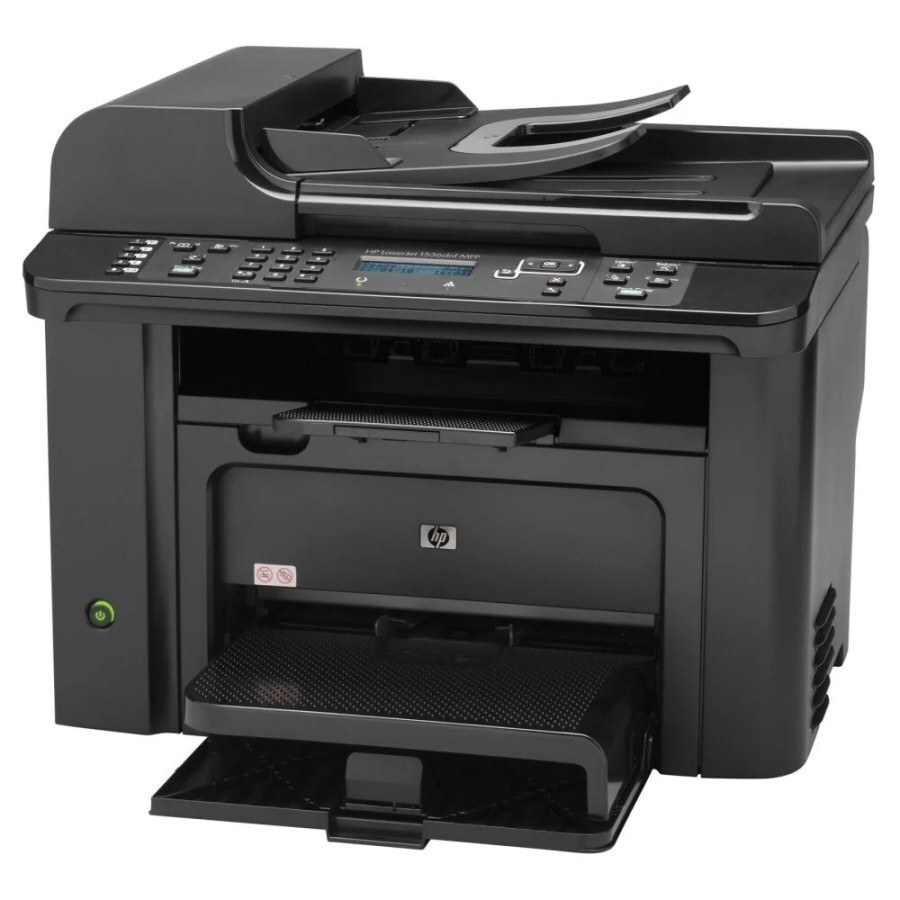
The LaserJet M1536F is the fax-equipped member of HP's M1536 multifunction line — a monochrome machine that prints, scans, copies and faxes for small businesses that still keep a phone line for documents. Every one of those jobs draws on a single black cartridge, the CE278A, the cartridge HP sells under the 78A name. Where the machine works hard, it also accepts the maximum-yield CE278X, the 78X build that stretches the interval between swaps, and a twin listing under the CE278D code covers buyers who keep two cartridges in rotation.
Fax traffic changes the rhythm of toner use. A plain printer waits for someone to send it a job, but the M1536F also wakes whenever the phone line rings, and every received order form, contract or signed page comes out of the same cartridge as the office's own printouts. That background drain catches people out: the cartridge rarely empties on a job anyone remembers printing. A spare on the shelf, and a glance at the toner gauge whenever a long fax lands, keep this machine from running dry mid-document.
Toner Cartridges for LaserJet M1536F
One cartridge family feeds this machine, and it is sold here in standard, maximum-yield, MICR and multi-pack forms:
| Cartridge | Version | Color | Page Yield |
|---|---|---|---|
| CE278A | Standard fill, single cartridge | Black | See product page |
| CE278A | A box of ten cartridges | Black | See product page |
| CE278A | A box of two cartridges | Black | See product page |
| CE278A | A box of three cartridges | Black | See product page |
| CE278A | A box of five cartridges | Black | See product page |
| CE278A | A box of four cartridges | Black | See product page |
| CE278A | A box of eight cartridges | Black | See product page |
| CE278A | MICR build for check printing | Black | See product page |
| CE278X | Maximum-yield fill, four cartridges in one box | Black | See product page |
| CE278X | Maximum-yield fill | Black | See product page |
| CE278A | Premium-quality build in a box of five | Black | See product page |
| CE278A | Listed under the 78A name | Black | See product page |
| CE278A | Listed under the 78A name | Black | See product page |
| CE278A | MICR build for check printing | Black | See product page |
| CE278A | Listed under the P1566 name | Black | See product page |
| CE278A | Three black cartridges in one listing | Black | See product page |
| CE278A | Three black cartridges in one listing | Black | See product page |
| CE278A | Listed under the M1536D name | Black | See product page |
| CE278A | Listed under the M1536F name | Black | See product page |
| CE278A | Listed under the P1606DN name | Black | See product page |
| CE278A | Listed under the 78A name | Black | See product page |
| CE278A | Listed under the 78A name | Black | See product page |
| CE278A | Listed under the 78A name | Black | See product page |
| CE278A | Listed under the 78A name | Black | See product page |
| CE278D | Listed under the 78A name | Black | See product page |
| CE278D | Two black cartridges in one listing | Black | See product page |
Which cartridge should you buy?
Start with the standard CE278A if the M1536F handles a modest daily mix of printing and faxing; it is the straightforward replacement and the reference point for everything else on this page. Busier fax desks should look at the maximum-yield CE278X, which carries a larger fill and simply asks for attention less often. The two, three, four, five, eight and ten-cartridge packs suit offices that reorder rarely and prefer a shelf stock over repeat orders, while the premium five-pack is the higher build tier of the standard cartridge. Choose the MICR version only if this machine prints checks. Every compatible cartridge here is covered by a one-year warranty and one-year returns.
Chip, toner and everyday use
Each cartridge carries a chip that the printer reads to confirm the type and report the toner level, so start any recognition problem by sliding the cartridge out and seating it again until it clicks. Pull the sealing tape fully clear before the first install, and keep the protective cover on a spare until the moment it goes in. When output starts to fade, lifting the cartridge out and rocking it gently side to side redistributes the toner and usually evens the print back up for a while. Store spares flat, sealed and away from heat and direct light.
Frequently Asked Questions
Which toner cartridge does the LaserJet M1536F use?
It uses the black CE278A cartridge for printing, copying and received faxes alike — one consumable covers all four functions. The maximum-yield CE278X fits the same slot. Match the code on the cartridge you remove before ordering.
Does the fax function need its own cartridge?
No. Faxes the M1536F receives are printed with the same CE278A cartridge as everything else, which is why a busy fax line can drain a cartridge faster than printing alone would suggest.
Is there a longer-running option than the standard cartridge?
Yes — the CE278X is the maximum-yield build of this cartridge family, made for machines that print and receive faxes all day. It installs exactly like the standard cartridge and needs no setting change.
What is the MICR listing on this page for?
The CE278A MICR cartridge prints the magnetic characters along the bottom of checks so bank reading equipment can process them. For letters, invoices and faxes it offers nothing extra, so ordinary offices should stay with the standard cartridge.
More printers that use the same cartridges
The same cartridge family also serves these related HP models: HP CE278A, LASERJET M1536, LaserJet M1530, LaserJet M1530, LaserJet M1530MFP, LaserJet M1536, LaserJet M1536D, LaserJet M1536DN, LaserJet M1536DNF, LaserJet M1536DNF MFP, LaserJet M1536N, LaserJet M1536NF, LaserJet P1560, LaserJet P1566, LaserJet P1606, LaserJet P1606DN, LaserJet Pro M1536, LaserJet Pro M1536DNF, LaserJet Pro P1566, LaserJet Pro P1606, LaserJet Pro P1606dn.