




LaserJet P1566
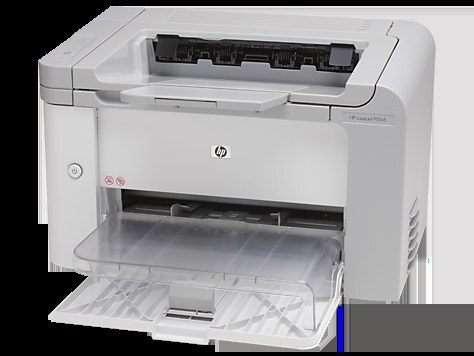
HP's LaserJet P1566 followed the P1560 as a compact mono printer for desks and dorm rooms, delivering quick black-and-white pages without fuss — a personal machine, not a shared one. It prints from a single black cartridge, the CE278A, which HP sells as the 78A. Owners who would rather change toner less often can step up to the maximum-yield CE278X, the 78X build of the same family, and a paired listing under the CE278D code sits on this page for anyone ordering two at once.
A personal printer sets its own pace. There is no queue, no shared workload, just one person's letters, coursework, forms and the occasional long document — which makes the P1566 gentle on cartridges compared with an office machine. The flip side of light, irregular use is that a cartridge can sit partly used for a long time, so how the spare is stored matters more here than outright capacity. Buy the size that matches your real pace, not the busiest month you can remember.
Toner Cartridges for LaserJet P1566
This page sells the one cartridge the P1566 needs, in every fill and pack size stocked:
| Cartridge | Version | Color | Page Yield |
|---|---|---|---|
| CE278A | Standard fill, single cartridge | Black | See product page |
| CE278A | Ten-cartridge pack | Black | See product page |
| CE278A | Two-cartridge pack | Black | See product page |
| CE278A | Three-cartridge pack | Black | See product page |
| CE278A | Five-cartridge pack | Black | See product page |
| CE278A | Four-cartridge pack | Black | See product page |
| CE278A | Eight-cartridge pack | Black | See product page |
| CE278A | MICR version, for printing checks | Black | See product page |
| CE278X | Maximum-yield fill, Four-cartridge pack | Black | See product page |
| CE278X | Maximum-yield fill | Black | See product page |
| CE278A | Premium-quality build, Five-cartridge pack | Black | See product page |
| CE278A | Listed under the 78A name | Black | See product page |
| CE278A | Listed under the 78A name | Black | See product page |
| CE278A | MICR version, for printing checks | Black | See product page |
| CE278A | Listed under the P1566 name | Black | See product page |
| CE278A | Three black cartridges in one listing | Black | See product page |
| CE278A | Three black cartridges in one listing | Black | See product page |
| CE278A | Listed under the M1536D name | Black | See product page |
| CE278A | Listed under the M1536F name | Black | See product page |
| CE278A | Listed under the P1606DN name | Black | See product page |
| CE278A | Listed under the 78A name | Black | See product page |
| CE278A | Listed under the 78A name | Black | See product page |
| CE278A | Listed under the 78A name | Black | See product page |
| CE278A | Listed under the 78A name | Black | See product page |
| CE278D | Listed under the 78A name | Black | See product page |
| CE278D | Two black cartridges in one listing | Black | See product page |
Which cartridge should you buy?
Most P1566 owners belong on the standard CE278A: it is the direct replacement, and at personal-printer volumes a single cartridge lasts a long while. The maximum-yield CE278X makes sense if you print in bursts — a thesis, a tax season, a home business's paperwork — and dislike mid-job swaps. Multi-packs mainly serve small offices that run several printers from this family off one shelf. The MICR build is for check printing only, and the premium five-pack is the standard cartridge's higher build tier. Whichever compatible cartridge you pick, it is backed by a one-year warranty and one-year returns.
Chip, toner and everyday use
Personal machines sit idle between jobs, so treat the cartridge kindly: keep the printer's cover closed against dust, and leave a spare sealed in its packaging in the same room rather than in a damp basement or a hot attic. If the first pages after a quiet spell look uneven, take the cartridge out and rock it gently from side to side to level the toner, then print a few pages to let it settle. A cartridge the printer refuses to recognize usually just needs reseating — slide it out and push it home until it clicks.
Frequently Asked Questions
Which toner cartridge fits the LaserJet P1566?
The black CE278A is the cartridge made for this printer. The maximum-yield CE278X fits the same slot when you want a longer run between changes. Always match the code on the cartridge you remove.
Does the P1566 use a separate drum unit?
No separate drum is sold for this printer on this page — every listing here is a complete cartridge, so a swap replaces the whole unit in one step and there is nothing else to order.
My P1566 sat unused for months. Will the cartridge still print?
Usually, yes. Toner does not dry out the way ink does; if the first pages look light, rock the CE278A gently side to side to redistribute the toner and print a few test pages.
How do I clear a paper jam in the P1566?
Switch the printer off, open the paper-path covers, and ease the stuck sheet out slowly in the direction the paper travels so it does not tear. Reload the tray, close everything up, and the job can be sent again.
More printers that use the same cartridges
The P1566 shares its cartridge family with these HP models: HP CE278A, LASERJET M1536, LaserJet M1530, LaserJet M1530, LaserJet M1530MFP, LaserJet M1536, LaserJet M1536D, LaserJet M1536DN, LaserJet M1536DNF, LaserJet M1536DNF MFP, LaserJet M1536F.
The family continues with LaserJet M1536N, LaserJet M1536NF, LaserJet P1560, LaserJet P1606, LaserJet P1606DN, LaserJet Pro M1536, LaserJet Pro M1536DNF, LaserJet Pro P1566, LaserJet Pro P1606, LaserJet Pro P1606dn.