






 See Compatible Printers
 Read more about our ink!
Hewlett Packard
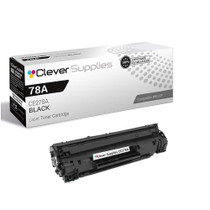
Compatible HP 78A (CE278A) Toner Cartridge Black
- Page Yield:
- 2,100 Pages
- Availability:
- In Stock
- Shipping:
- Calculated at Checkout

Amazon Price:

- Page Yield:
- 2,100 Pages
- Availability:
- In Stock
- Shipping:
- Calculated at Checkout
- Compatible Printers
- Specifications
- SKU:
- CS-HP-CE278A-Black-N
- Printer Brand:
- Hewlett Packard
- OEM Number:
- CE278A
- Ink Color:
- Black
- Page Yield:
- 2,100 Pages
- Printer Type:
- Laser Cartridge
- Condition:
- New Compatible
- Description
- Reviews

/> 

The HP 78A LaserJet Series includes a variety of printers such as the LaserJet M1536, LaserJet M1536D, LaserJet M1536DN, LaserJet M1536DNF MFP, LaserJet M1536F, LaserJet M1536N, LaserJet M1536NF, LaserJet P1566, LaserJet P1606, LaserJet P1606DN, LaserJet M1530, LaserJet M1530MFP, LaserJet M1536DNF, LaserJet Pro M1536, LaserJet Pro M1536DNF, LaserJet Pro P1566, and LaserJet Pro P1606 models, among others. These printers are renowned for their reliability and efficiency in various printing environments. Compatible with these printers is the CE278A Black cartridge, recognized as the HP 78A toner cartridge and toner cartridge. This cartridge ensures consistent and high-quality prints, whether it's for documents, reports, or presentations. The LaserJet M1536 and LaserJet P1606 series printers are designed to meet the demands of small offices and home use, offering fast printing speeds and reliable performance. The LaserJet Pro M1536 and LaserJet Pro P1606 models cater to professional printing needs, providing enhanced features for efficiency and productivity. With the HP 78A cartridge, users can expect sharp and clear text output, making it ideal for printing professional documents and correspondence. The cartridge delivers reliable performance and consistent print quality, ensuring that every printout meets expectations. Investing in the HP 78A LaserJet Series printers and cartridges ensures reliable printing solutions that meet the demands of everyday printing tasks. With their durable construction and consistent performance, these printers are a valuable addition to any workspace.
Cross-reference: HP CE278A, the 78A standard-yield toner cartridge (2,100 pages), is the same cartridge Canon sells under two numbers: Canon Cartridge 126 for the Color imageCLASS LBP6200d, and Canon Cartridge 128 (3500B001AA) for the imageCLASS MF4450, MF4570dn, MF4570dw, MF4770n, MF4880dw, MF4890dw, D530 and D550 and the FAXPHONE L100 and L190. Canon rates both Cartridge 126 and Cartridge 128 at 2,100 pages (ISO/IEC standard).
Frequently Asked Questions
My prints have slowly lost their sharpness. Can a new cartridge fix that?
Often, yes — and this platform makes it likely. The CE278A is an all-in-one cartridge: the imaging drum lives inside it alongside the toner, so fitting this fresh CE278A (HP 78A), at $26.60, renews both the toner supply and the surface that forms the image. Tired, gray-looking text is frequently the old cartridge asking to retire.
Which part number identifies this cartridge?
CE278A, known in short as the 78A. It is the single black supply for the LaserJet M1536 series, the P1566 and the P1606dn. Checking that number on the outgoing cartridge's label is the surest way to confirm you are ordering its replacement.
How many pages does it deliver?
The standard rating is 2,100 pages of typical black text. Real results vary with page density — heavy reports consume faster, short documents slower — but the rating is the consistent measure across this cartridge family.
What does fitting involve?
Open the machine, lift out the old cartridge, unpack the new one and remove its protective pieces, then rock it gently side to side so the toner lies level. Slide it into the bay until it seats, close the machine, and print a page to see the difference.
Should a spare be kept once this one is fitted?
It is a practical habit on this platform: a sealed cartridge stored flat in a dry drawer is ready the day output fades again, and there is no expiry routine to keep track of in the meantime.
What if the new cartridge does not restore quality?
Then the cause likely sits elsewhere in the machine, and the purchase is protected regardless: a 1-year warranty and 1-year free returns, with support available Monday–Friday, 9 AM–5 PM CST to help work through the possibilities.
How do I tell low toner from a worn drum when output deteriorates?
The distinction matters less here than on many printers, because the CE278A contains both. Fading that improves after rocking the cartridge side to side points to toner distribution; gray, lifeless text and repeating marks that rocking does not shift point to the drum surface. Either way, one fresh cartridge renews both suspects at once, which is why a change is the practical first step.
Can a cartridge sit in a little-used machine for months without harm?
Yes. A fitted CE278A waiting in an M1536, P1566 or P1606dn that prints only occasionally is under no deadline; toner does not dry out in the cartridge. The first print after a long idle spell may benefit from removing the cartridge and rocking it gently to re-level powder that has settled, after which output should return to normal.
What should I do with the spent cartridge?
Once its replacement is installed and proven on a familiar page, place the old CE278A in the new unit's packaging. That keeps stray toner off hands and shelves and the drum safe from knocks while the empty awaits collection with your normal recycling or waste. The cartridge is never opened at any point in its life, disposal included.
When quality drops, what order should checks go in?
Start free: remove the cartridge, rock it slowly side to side, refit, and reprint the page that disappointed you. If the improvement is real but short-lived, the CE278A is near its end and the rating has effectively been delivered. If nothing changes at all, note that a fresh cartridge also renews the drum — so a change still tests the most likely causes in one step.
About This HP 78A (CE278A) Cartridge
One CE278A (78A) black cartridge at $26.60, rated at 2,100 pages, for the LaserJet M1536 family, the P1566 and the P1606dn. Because the imaging drum is built into the cartridge, each change is also a quiet refresh of the machine's print quality — the reason these compact LaserJets keep producing crisp text year after year.
Orders go out from the nearest of our IL, PA, GA and CA warehouses. See the shipping & returns page for delivery and returns information, and the HP listings for the rest of the range.
Related Items


Hewlett Packard
Compatible HP 78A (CE278A) Toner Cartridge Black
/>



Hewlett Packard
Compatible HP 78A (CE278A) Toner Cartridge Black
/>


Hewlett Packard
Compatible HP 78A (CE278A) Toner Cartridge Black
/>

Hewlett Packard
Compatible HP 78A (CE278A) Toner Cartridge Black
/>