




LASERJET M1536
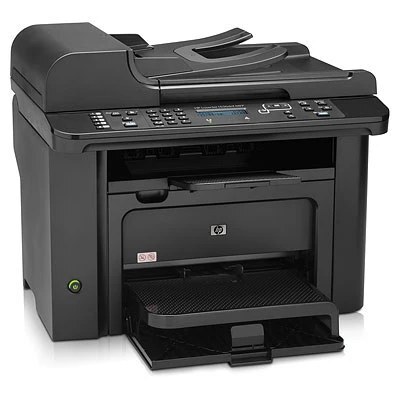
A compact mono workhorse from 2011, the LaserJet M1536 is the small-office LaserJet that earned its keep on reliability rather than features. It prints with a single black cartridge, the HP 78A: the standard build is order code CE278A, and a second black variant, the CE278D, is also listed for this family. The cartridges on this page are compatible replacements for those codes, covered by a 1-year warranty and 1-year returns — keeping a 2011 printer fed should not be complicated.
One cartridge, one decision: that is the whole appeal of this machine in a small office. There are no colors to balance and no set to complete, so the M1536 asks only that the right black cartridge be on hand when the current one fades. It prints, and its multifunction siblings scan and copy, on the same single supply. For a small team that shares one machine for invoices, letters and forms, the running cost of the M1536 is simply the cost of how often that one cartridge changes.
Toner Cartridges for LASERJET M1536
| Cartridge | Color | Page Yield |
|---|---|---|
| CE278A Black | Black | See product page |
| CE278D Black | Black | See product page |
The same CE278A fit is also sold under listings named for this machine's closest variants: the M1536D listing and the M1536F listing. Whichever listing you choose, check the code on the cartridge you are replacing before you order.
Which cartridge should you buy?
Match the code first. If the cartridge coming out of your M1536 reads CE278A, the standard listing above is its direct replacement and the right default for everyday small-office printing. The CE278D is a separate black variant sold for this family; order it when the D code is what your machine has been running. One honest note: the family's maximum-yield build, the CE278X, is documented for these printers but is not stocked on this page, so the choice here is between the two black listings shown. Heavy users can still stretch the interval between orders by keeping a sealed spare ready instead of waiting for the fade.
Chip, toner and everyday use
The cartridge's chip lets the M1536 report its level, and a fresh unit should be recognized as soon as it clicks into place. Pull the seal straight out before installing, and if prints fade near the end of a cartridge, rock it gently side to side to redistribute the toner and finish the job. For the jobs beyond plain paper, feed envelopes or label sheets through the manual tray and choose the right media size in the print dialog, then print one sheet first to check the alignment. And if the machine ever develops a quirk, firmware updates should come only from HP's official support site; restart the printer afterward and reprint a test page.
Frequently Asked Questions
Which toner cartridges work with the LASERJET M1536?
The M1536 uses the CE278A black cartridge, the standard build of the HP 78A family; a CE278D black variant is also listed for this family. Match the code printed on your current cartridge before ordering so you get the right fit.
Is there a high-yield cartridge for the LASERJET M1536?
The family's maximum-yield build is the CE278X, but it is not stocked on this page. The listings sold here are the CE278A and the CE278D; keeping a spare of the one your machine uses is the practical way to avoid downtime.
Can the LASERJET M1536 print envelopes or labels?
Yes — feed envelopes or label sheets through the manual tray and select the matching media size in the print dialog. Print a single sheet first to check alignment before running the whole batch.
Should I update the firmware on my LASERJET M1536?
Keeping the firmware current can resolve quirks, but download updates only from HP's official support site. Restart the printer after installing and print a test page to confirm everything still works.
More printers that use the same cartridges
The same 78A cartridge also feeds the other models in this family: HP CE278A, LaserJet M1530, LaserJet M1530, LaserJet M1530MFP, LaserJet M1536, LaserJet M1536D, LaserJet M1536DN, LaserJet M1536DNF, LaserJet M1536DNF MFP, LaserJet M1536F, LaserJet M1536N, LaserJet M1536NF, LaserJet P1560, LaserJet P1566, LaserJet P1606, LaserJet P1606DN, LaserJet Pro M1536, LaserJet Pro M1536DNF, LaserJet Pro P1566, LaserJet Pro P1606, LaserJet Pro P1606dn