




LaserJet Pro 100 color MFP M177FW
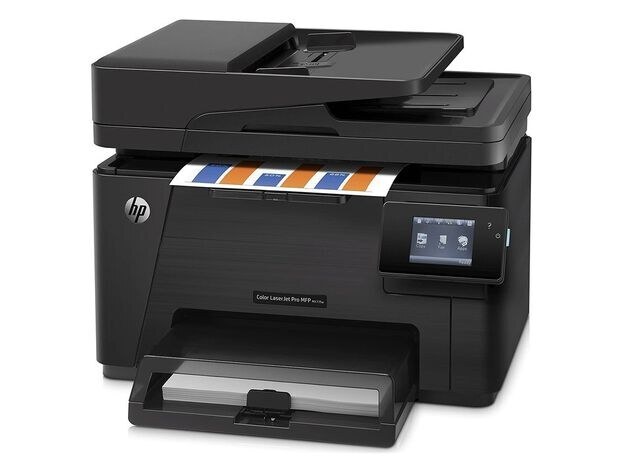
HP aimed the LaserJet Pro 100 Color MFP M177FW squarely at home offices and micro businesses when it launched this 2013-era color all-in-one, and it remains the fully equipped configuration of its line. The cartridge set is the shared one across the family: a CF350A for black, joined by the CF351A cyan, the CF352A yellow and the CF353A magenta. Together the four form the HP 130A series, and this page stocks them as compatible cartridges in singles, multipacks and full sets.
The appeal of this particular model was always practical rather than flashy — solid color output at a sensible running cost, in a machine a two-person office can keep beside the desk that handles its paperwork. Signed forms, client letters and the odd scanned contract all pass over the same four cartridges, so keeping the M177FW fed is less about chasing the cheapest single box and more about never letting a client deadline wait on a toner delivery.
Toner Cartridges for LaserJet Pro 100 color MFP M177FW
The shelf for this model, colors listed first and black and the two full sets after:
- CF353A Magenta — Magenta — See product page
- CF352A Yellow — Yellow — See product page
- CF351A Cyan — Cyan — See product page
- CF350A Black — Black — See product page
- 130A 4 Color Set (CF350A CF351A CF352A CF353A) — Black + 3 colors — See product page
- Pro 100 color MFP M177FW 4 Color Set — Black + 3 colors — See product page
The same four codes also appear under the family’s model-named listings — FW-specific black packs and sets, plus the shared 130A multipacks:
130A (CF350A CF351A CF352A CF353A) — 4 Color Set; 130A (CF350A CF351A CF352A CF353A) — 4 Color Set; 130A (CF350A CF351A CF352A CF353A) — 4 Color Set; 130A (CF350A CF351A CF352A CF353A) — 4 Color Set; 130A (CF350A CF351A CF352A CF353A) — 5 Color Set; M177FW (CF350A) — 2 Black; M177FW (CF350A CF351A CF352A CF353A) — 4 Color Set; M177FW (CF351A CF352A CF353A) — 6 Color Set; M177FW (CF350A) — Black; PRO 100 COLOR MFP M177FW (CF350A) — 2 Black; PRO 100 COLOR MFP M177FW (CF350A CF351A CF352A CF353A) — 4 Color Set; PRO 100 COLOR MFP M177FW (CF350A CF351A CF352A CF353A) — 8 Color Set; PRO 100 COLOR MFP M177FW (CF350A) — Black; PRO MFP M177FW (CF350A) — 2 Black; PRO MFP M177FW (CF350A) — 3 Black; PRO MFP M177FW (CF350A CF351A CF352A CF353A) — 5 Color Set; PRO MFP M177FW (CF350A) — Black; M177fw (CF350A CF351A CF352A CF353A) — 4 Color Set; M177fw (CF350A CF351A CF352A CF353A) — 4 Color Set; 130A (CF350A) — 2 Black; 130A (CF350A) — 3 Black.
Which cartridge should you buy?
Buy against the slot that is actually empty. The M177FW tracks its four cartridges independently, and in a paperwork-heavy micro business the black CF350A almost always empties first — the two- and three-black packs on this page exist for exactly that pattern. Colors move slower and unevenly, so replace a faded cyan, yellow or magenta as a single and leave the healthy slots alone. The exception is the full refresh: when the machine has run a long while and two or more slots report low together, a four-color set replaces everything in one pass and the counters restart together. Whichever route you take, the compatible cartridges here are covered by a 1-year warranty and 1-year returns.
Chip, toner and everyday use
A new cartridge that the M177FW refuses to recognize is usually a fitting problem, not a dead chip. Take it back out, confirm every strip of packing material and the protective seal came away, seat it firmly, and restart the printer so it re-reads the chip on a clean boot. Store unopened spares flat in a cool drawer rather than a garage shelf, and remember that quoted yields assume ordinary text pages — a month of full-color flyers will empty a color cartridge far sooner than the same count of letters.
Frequently Asked Questions
Which toner cartridges work with the LaserJet Pro 100 color MFP M177FW?
The CF350A black and the CF351A, CF352A and CF353A colors — the HP 130A set. Check the code on the cartridge you remove before ordering and the replacement will match the slot.
My M177FW does not recognize the new CF350A. What should I check?
Reseat the cartridge firmly, make sure the packing strips and protective seal were fully removed, and restart the machine. If it still refuses the cartridge, a damaged chip or a code that does not belong to this model is the usual cause.
Where do I get drivers for the M177FW?
From HP’s support website — search the full model name and choose the package that matches your operating system. A fresh driver install resolves many setup and communication problems on a machine of this generation.
One color ran out. Do I have to replace all four cartridges?
No. Each slot is independent, so a spent magenta can be swapped on its own while the other three keep working. Singles for every color are on this page for precisely that situation.
More printers that use the same cartridges
These sibling models run on the identical 130A cartridge family:
LaserJet Pro 100 color MFP M177, LaserJet Pro 100 color MFP M176, HP 130A, Color LaserJet Pro MFP M177FW, Color LaserJet Pro MFP M177, Color LaserJet Pro MFP M176, Color LaserJet Pro M176N, Color LaserJet Pro M176, Color LaserJet M177FW, Color LaserJet M177, Color LaserJet M176.