





 See Compatible Printers
 Read more about our ink!
Hewlett Packard
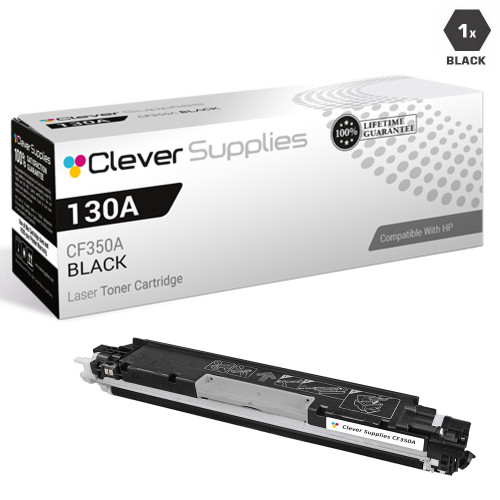
CS Compatible Replacement for HP CF350A Toner Cartridge Black/ HP 130A Toner

Amazon Price:

- Page Yield:
- 1,300 Pages
- Availability:
- In Stock
- Shipping:
- Calculated at Checkout
- Compatible Printers
- Color LaserJet Pro MFP M176n
- Color LaserJet Pro MFP M177fw
- LaserJet Pro MFP M176n
- LaserJet Pro MFP M177fw
- LaserJet Pro Pro MFP M176n
- LaserJet Pro Pro MFP M177fwi>
- Specifications
- SKU:
- HEWCF350A-COM
- Printer Brand:
- Hewlett Packard
- OEM Number:
- CF350A
- Ink Color:
- Black
- Page Yield:
- 1,300 Pages
- Printer Type:
- Laser Cartridge
- Condition:
- New Compatible
- Description
- Yields up to 1300 pages
- Manufactured specifically for HP printers Compatible HP toner cartridges offer fast hassle-free printing
- HP 130A (CF350A) Black toner cartridges deliver consistent yields and provide high-quality results
- Streamline your printing needs with the time-saving reliability of compatible HP LaserJet toner cartridges
- Reviews

/> 

HP 130A (CF350A) Black Compatible Toner Cartridge produces superior quality and consistency for a wide array of printing needs
HP 130A (CF350A) Toner cartridge in Black color provides outstanding print quality for your important documents projects and presentations. Toner cartridge offers high reliability and performance.
Features:
Frequently Asked Questions
How do I know this is the right cartridge if I only have a part number?
Check the number on the cartridge you are removing or on your last order. If it reads CF350A — the same cartridge HP also sells under the shorter 130A name — this is the black cartridge you need. The two names describe one cartridge, not two versions, so an invoice, a box label, or a printer menu showing either code points to this listing.
Which printers does this CF350A fit?
It is the black cartridge for the Color LaserJet Pro MFP M176 and M177 family, including the LaserJet Pro MFP M177fw. If your machine carries one of those model names on its front panel, the black slot takes this cartridge; the three color slots take the matching 130A colors, which are separate listings.
How many pages should I expect from it?
The rated yield is about 1,300 pages per cartridge at standard coverage. On a shared MFP, remember that walk-up copies and incoming faxes draw from the same black cartridge as computer print jobs, so a fax-heavy week shortens the interval between changes even when nobody printed much.
Does this listing include the color cartridges too?
No. This is the single black CF350A cartridge at $38.80. The cyan, magenta, and yellow 130A cartridges are bought separately, and they rarely run out at the same time as the black — most offices replace black two or three times for every color change.
What if the new cartridge prints light or streaky at first?
Remove it and rock it gently side to side five or six times to redistribute the toner, then reseat it until it clicks. If output is still uneven after a few pages, contact us during support hours — every cartridge is covered by a 1-year warranty and 1-year free returns, so a genuine dud is replaced or refunded rather than argued over.
How fast will my order arrive?
Orders ship from whichever of our four warehouses — IL, PA, GA, or CA — is closest to you, which keeps most deliveries short. Full details are on our shipping & returns page, and support is available Monday–Friday, 9 AM–5 PM CST if anything about the order needs a human.
What does the CF350A cost per page at its rated yield?
At $38.80 for a cartridge rated around 1,300 pages, the arithmetic lands near three cents per black page. Remember that the figure already has to cover everything the black slot does on an MFP — computer print jobs, walk-up copies and received faxes all draw from the same CF350A — so a fax-heavy month spends the cartridge without anyone printing much at all.
Our letters are fading, but the occasional color page still looks fine. Is it really the black?
Very likely, yes. Text documents, forms, copies and faxes are black-only work on this family, so a tiring CF350A announces itself in exactly those pages. Color output leans on the three color cartridges, which live separate lives and can look perfectly healthy while the black is nearly done. When paperwork fades but color holds up, check the black gauge before anything else.
If a small office keeps just one spare cartridge, why should it be the black?
Because the black slot empties first and most often — most offices change the CF350A two or three times for every color change. A sealed black on the shelf covers the stoppage most likely to interrupt a workday. Keep it in its packaging, flat and out of direct sunlight, and it will wait quietly until the morning the machine asks for it.
What should I do with the empty cartridge so it does not cause confusion later?
Bag the spent CF350A in the packaging the fresh cartridge came out of, and store it apart from any sealed stock. An unmarked empty left in the supply drawer tends to be rediscovered months later and fitted in good faith, costing someone a confusing ten minutes. Boxed and set aside, it can leave with your next used-supply drop-off. All twelve offers in this family — five set configurations, the four singles and the three black packs — are compared side by side in our Best HP 130A (CF350–CF353) Toner Cartridges guide.
About This CF350A Black Cartridge
This listing exists for the buyer who orders by number rather than by model: the requisition says CF350A, the shelf tag says 130A, and both mean the black cartridge for the M176/M177 family of color MFPs. It prints, copies, and faxes in black only — scanning on these machines uses no toner at all — and it installs in the black slot in under a minute with no tools. Buy it as the single replacement for a machine that has run its black down while its colors still have life.
Related Items


Hewlett Packard
Compatible HP 130A (CF350A) Toner Cartridge 3 Black



Hewlett Packard
Compatible HP 130A (CF350A) Toner Cartridge 2 Black

Hewlett Packard
CS Compatible Replacement for HP CF351A Toner Cartridge Cyan/ HP 130A Toner
/>

Hewlett Packard
CS Compatible Replacement for HP CF353A Toner Cartridge Magenta/ HP 130A Toner
/>