







 See Compatible Printers
 Read more about our ink!
Hewlett Packard
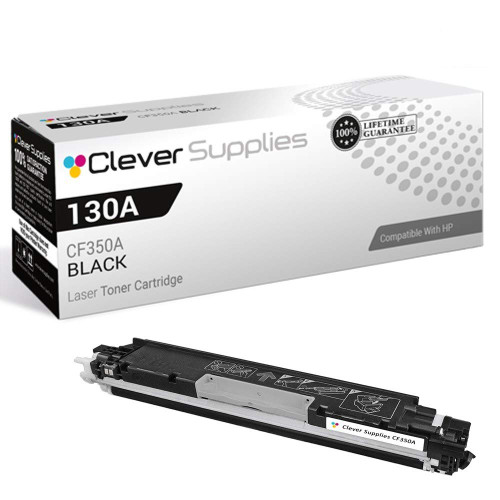
Compatible HP PRO MFP M177 (CF350A) Toner Cartridge Black

Amazon Price:

- Page Yield:
- Black: 1300
- Availability:
- In Stock
- Shipping:
- Calculated at Checkout
- Compatible Printers
- Color LaserJet Pro MFP M176n
- Color LaserJet Pro MFP M177fw
- LaserJet Pro MFP M176n
- LaserJet Pro MFP M177fw
- LaserJet Pro Pro MFP M176n
- LaserJet Pro Pro MFP M177fwi>
- Specifications
- SKU:
- CLS-HP-PRO MFP M177-BK
- Printer Brand:
- Hewlett Packard
- OEM Number:
- CF350A
- Ink Color:
- Black
- Page Yield:
- Black: 1300
- Printer Type:
- Laser Cartridge
- Condition:
- New Compatible
- Description
- Reviews



With the HP 130A Color LaserJet Series, users can enjoy a versatile lineup of printers, including the PRO M176, PRO M176N, PRO MFP M177FW, PRO MFP M176, PRO MFP M177, M176, M177, and M177FW models, catering to various printing needs with efficiency and reliability. Whether it's for personal or professional use, these printers offer high-quality prints with ease of use and seamless integration into any environment. Compatible with these printers are the CF350A Black, CF351A Cyan, CF353A Magenta, and CF352A Yellow cartridges, recognized as the HP 130A toner cartridge and toner cartridge. These cartridges ensure consistent and vibrant color output for all printing tasks, providing reliable performance and impressive results. The LaserJet Pro 100 COLOR MFP M176 and PRO 100 COLOR MFP M177 series printers offer multifunction capabilities, including printing, scanning, copying, and optional faxing, making them ideal for busy office environments. With their user-friendly design and advanced features, these printers streamline workflows and enhance productivity. With the HP 130A cartridges, users can expect sharp and clear text, as well as accurate color reproduction for graphics and images. The CF350A Black cartridge delivers deep blacks for professional-looking documents, while the CF351A Cyan, CF353A Magenta, and CF352A Yellow cartridges ensure vibrant and true-to-life colors for impressive prints. Investing in the HP 130A Color LaserJet Series printers and cartridges provides users with reliable printing solutions that meet the demands of today's fast-paced work environments. Whether it's for small businesses, home offices, or corporate settings, these printers deliver exceptional performance and quality prints every time.
Frequently Asked Questions
My M177 sat unused for months and now prints faint — did the toner go bad?
Toner doesn't dry out the way ink does; it is a dry powder. After long idle periods it can settle unevenly inside the cartridge, which prints as faint or patchy output. Lift the cartridge out, rock it gently side to side a few times, and reseat it. If pages still look tired after that, the cartridge is simply spent — and this CF350A is its replacement.
Is CF350A the same thing as the 130A my manual mentions?
Yes — same black cartridge, two labels. CF350A is the part number printed on the cartridge; 130A is the family name HP uses in manuals and on the box for the LaserJet Pro MFP M177 series.
Will sitting idle have hurt the printer itself?
Almost never. These machines tolerate long quiet stretches well; in the overwhelming majority of cases a fresh black cartridge brings output straight back to normal, for printing and copying alike.
How many pages does this cartridge print?
About 1,300 pages at standard coverage. For a seasonally used machine that can be a year or more of printing; for regular document work it is a typical single-cartridge lifespan.
What does this single cartridge cost?
$38.80 for the one black CF350A in this listing — the straightforward choice when you replace cartridges one at a time, as you need them.
How quickly can I get it?
It ships from the nearest of our IL, PA, GA, and CA warehouses. The shipping & returns page has the delivery estimates and the returns policy in full.
Should I keep a spare CF350A on hand even though the machine only wakes up a few times a year?
It is the cheapest insurance a seasonal machine can have. The pattern with an M177 that sits idle is predictable: it wakes up, prints pale because the old toner has settled, and the rocking trick either revives it or proves it spent. If a sealed spare is already in the drawer, that moment costs you a one-minute swap. If it is not, the first job of the season waits on a delivery instead.
What does each page from this cartridge actually cost?
The math is simple: $38.80 spread over the rated life of about 1,300 pages works out to roughly three cents a page. That figure assumes standard document coverage — letters, forms and invoices. A season of dense paperwork, with logos or shaded boxes on every sheet, spends the cartridge a little faster, but for ordinary text work the three-cent figure is a fair planning number for a small office budget.
How can I check the toner level before a busy stretch begins?
Print a supplies status page from the printer's control panel, or open the printer's status display on the computer it is connected to, before the busy period starts. That one check tells you whether the installed CF350A is nearly full or nearly done, and it takes less than a minute. Doing it ahead of time turns a mid-season surprise into a planned purchase while there is still no queue of work behind the machine.
What do I do with the old cartridge once the new one is in?
Keep it until the first real job has printed cleanly — a day or two is enough — so that if anything about the new cartridge disappoints, you still have the old one as evidence of what came out of the machine. After that, put the spent cartridge back in the new one's packaging and set it aside with your other recyclables. A single cartridge is a small item, but boxing it keeps loose toner dust off shelves and desks.
About This Pro MFP M177 Black Cartridge
Machines that work in seasons — a rental office, a club desk, a home business that wakes up a few times a year — usually don't need new hardware when they wake up printing pale. They need this: the correct black CF350A, dropped into the black slot in about a minute. It is covered by a 1-year warranty and 1-year free returns, and our support team answers Monday–Friday, 9 AM–5 PM CST if the first test page raises questions.
Related Items

Hewlett Packard
Compatible HP PRO MFP M177 (CF350A) Toner Cartridge 3 Black



Hewlett Packard
Compatible HP PRO MFP M177 (CF350A) Toner Cartridge 5 Black


Hewlett Packard
Compatible HP M177 (CF350A) Toner Cartridge 2 Black

Hewlett Packard
Compatible HP PRO MFP M177FW (CF350A) Toner Cartridge Black