





 See Compatible Printers
 Read more about our ink!
Hewlett Packard
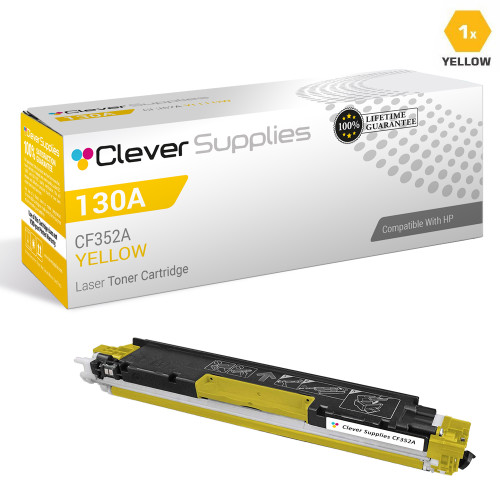
CS Compatible Replacement for HP CF352A Toner Cartridge Yellow/ HP 130A Toner

Amazon Price:

- Page Yield:
- 1,000 Pages
- Availability:
- In Stock
- Shipping:
- Calculated at Checkout
- Compatible Printers
- Color LaserJet Pro MFP M176n
- Color LaserJet Pro MFP M177fw
- LaserJet Pro MFP M176n
- LaserJet Pro MFP M177fw
- LaserJet Pro Pro MFP M176n
- LaserJet Pro Pro MFP M177fwi>
- Specifications
- SKU:
- HEWCF352A-COM
- Printer Brand:
- Hewlett Packard
- OEM Number:
- CF352A
- Ink Color:
- Yellow
- Page Yield:
- 1,000 Pages
- Printer Type:
- Laser Cartridge
- Condition:
- New Compatible
- Description
- Yields up to 1000 pages
- Manufactured specifically for HP printers Compatible HP toner cartridges offer fast hassle-free printing
- HP 130A (CF352A) Yellow toner cartridges deliver consistent yields and provide high-quality results
- Streamline your printing needs with the time-saving reliability of Compatible HP LaserJet toner cartridges
- Reviews

/> 

HP 130A (CF352A) Yellow Compatible Toner Cartridge produces superior quality and consistency for a wide array of printing needs
HP 130A (CF352A) Toner cartridge in Yellow color provides outstanding print quality for your important documents projects and presentations. Toner cartridge offers high reliability and performance.
Features:
Frequently Asked Questions
Which color is CF352A, and how do I know it is not one of the other 130A codes?
CF352A is yellow — the yellow cartridge in HP's 130A family, priced here at $36.41 as a single cartridge. The code is printed on the cartridge label for the yellow station, which keeps it distinct from the cyan and magenta cartridges in the same family. If the label on the cartridge you pulled out reads CF352A, this is its like-for-like replacement.
Why have my greens gone dull and bluish?
Green on a printed page is a partnership between cyan and yellow. When yellow fades, cyan is left on its own and greens collapse toward blue — grass looks teal, lime charts turn cold, and a fresh spring green comes out looking like deep water. Pale, washed-out greens are one of the clearest fingerprints of a yellow cartridge nearing the end, even when every other color still looks convincing.
Why is a fading yellow so much harder to spot than the other colors?
Black text and most office documents spend almost no yellow, and the human eye tolerates weak yellow longer than weak cyan or magenta — there is simply less of it in an ordinary page to miss. The shortage usually announces itself in photographs and graphics first: oranges lose their warmth, skin tones look slightly gray, and yellow highlights print so faintly they nearly disappear, while text pages still look perfectly normal.
How far should 1,000 pages of yellow actually take me?
The CF352A is rated at 1,000 pages at standard coverage. In practice, a household or office printing mostly letters and forms may take a very long time to spend a yellow cartridge, whereas color presentations, school projects and photo pages draw on it steadily. The rating gives you a fair basis for planning a spare; your own mix of color work decides how quickly you reach it.
Do I need to change anything else when I replace just the yellow?
No. Yellow occupies its own station and can be replaced by itself, leaving the cyan, magenta and black cartridges undisturbed. Afterwards, color copies will draw on the fresh yellow straight away, while scanning — a function that uses no toner whatsoever — is unaffected either way.
What should I check if colors still look washed out after fitting the new yellow?
First, print a color test or supplies page and look at the yellow band on its own: a solid, even band means the new cartridge is doing its work and the washed-out look lies elsewhere, most often in a second color that is also low. A streaky or broken yellow band points back to this station, so reseat the cartridge firmly and print the test again before assuming the worst.
After fitting the new yellow, which page proves it best?
One that carries the colors yellow builds: a page with grass, oranges or a lime-green chart. A text page spends almost no yellow and proves nothing at all, but the graphic page that looked cold and bluish under the old CF352A is an honest before-and-after test — if the greens have warmed up and the oranges glow again, the new cartridge is doing its work.
What is the earliest reliable sign that yellow is running low?
The yellow band on a color test or supplies page, breaking up or printing streaky. That band shows the shortage before ordinary pages ever look wrong, because everyday documents spend so little yellow that the fade stays invisible in normal work. Treat a broken yellow band as the order signal, rather than waiting until photographs start printing cold.
Should the spent yellow go straight out once the new one is fitted?
Keep it until the proof page has been printed and judged. If the new cartridge's yellow band is solid and the greens are warm again, the empty has told you everything it can. If the fault persists, having the old CF352A to hand helps show what actually changed between the two — and a faulty new cartridge is covered by the 1-year free returns either way.
How does this cartridge's cost spread out in real use?
The $36.41 against a 1,000-page rating works out near 3.6 cents a page, but yellow is spent so slowly in a letter-and-form household that the cost dissolves across months of ordinary printing. It surfaces only in the work that truly uses yellow — presentations, school projects, photo pages — so for most homes a single cartridge is a long, quiet stretch of coverage. All twelve offers in this family — five set configurations, the four singles and the three black packs — are compared side by side in our Best HP 130A (CF350–CF353) Toner Cartridges guide.
About This CF352A Yellow Cartridge
Yellow is the quietest color in the 130A family and often the last one anyone thinks to replace — which is exactly why this single CF352A exists. For $36.41 it puts a full 1,000-page yellow cartridge into machines such as the LaserJet Pro MFP M177fw, reviving the greens, oranges and warm tones that fade first when yellow runs short, while the rest of your cartridges carry on to the end of their own lives.
It is covered by a 1-year warranty and 1-year free returns. Orders are dispatched from warehouses in IL, PA, GA and CA — see the shipping & returns page for how delivery and returns work in practice — and help is on hand Monday–Friday, 9 AM–5 PM CST. Everything else for these printers sits in the store's HP section.
Related Items

Hewlett Packard
CS Compatible Replacement for HP CF350A Toner Cartridge Black/ HP 130A Toner
/>


Hewlett Packard
CS Compatible Replacement for HP CF351A Toner Cartridge Cyan/ HP 130A Toner
/>

Hewlett Packard
CS Compatible Replacement for HP CF353A Toner Cartridge Magenta/ HP 130A Toner
/>

Hewlett Packard
CS Compatible Replacement for HP 130A Toner Cartridge 4 Color Set (CF350A/ CF351A/ CF353A/ CF352A)
/>