




ImageClass D1150
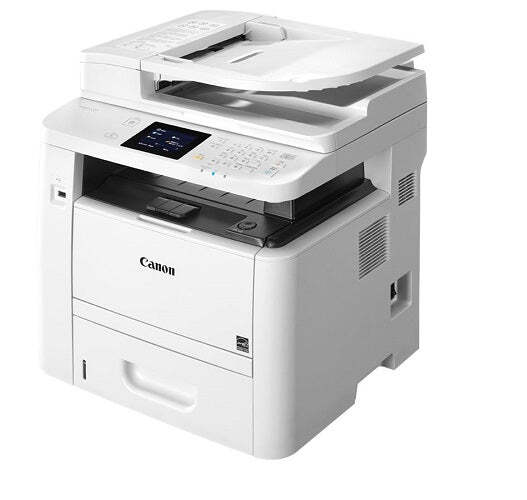
The Canon imageCLASS D1150 is the fax-first member of the D1100 multifunction line: it prints, copies and scans at 30 pages per minute with automatic duplexing and Ethernet, then adds a Super G3 fax modem and network PC fax on top. Everything it prints runs through one cartridge, the Canon 120, rated for up to 5,000 pages. The same cartridge is also stocked under Canon's C120 designation — the listing sold here as C120BK — and a jumbo build of the 120 stretches the rating to roughly 10,000 pages for heavy fax-and-print months.
Offices pick this model when the fax machine and the printer have merged into one device and the line stays busy. Contracts, orders and signed forms move in both directions all day, and the D1150 answers with network PC fax, so a document can be faxed from a desk without a walk to the machine. Duplexing keeps long incoming documents from doubling the paper bill, and the shared Ethernet connection lets a small team treat it as the office default rather than one person's desktop unit.
Toner Cartridges for ImageClass D1150
| Cartridge | Color | Page Yield |
|---|---|---|
| Canon 120 Toner Cartridge Black | Black | 5,000 pages |
| Canon 120 Toner Cartridge Jumbo Black | Black | Approx. 10,000 pages |
| Canon 120 Toner Cartridges Black 2 Pack | Black | 5,000 pages per cartridge |
| Canon 120 Toner Cartridges Black 3 Pack | Black | 5,000 pages per cartridge |
| Canon 120 Toner Cartridges Jumbo Black 3 Pack | Black | Approx. 10,000 pages per cartridge |
| Canon 120 Premium Quality Toner Cartridges Black 5 Pack | Black | 5,000 pages per cartridge |
| Canon 120 Toner Cartridges Black 5 Pack | Black | 5,000 pages per cartridge |
| Canon C120 Toner Cartridges Black (C120BK) | Black | See product page |
| Canon C120 Toner Cartridges Black 2 Pack (C120BK) | Black | See product page |
| Canon C120 Toner Cartridges Black 3 Pack (C120BK) | Black | See product page |
| Canon C120 Toner Cartridges Black 5 Pack (C120BK) | Black | See product page |
| Canon C120 Toner Cartridges Black 10 Pack (C120BK) | Black | See product page |
| Canon imageCLASS D1150 Toner Cartridge Black (C120BK) | Black | See product page |
Which cartridge should you buy?
Start with how fast the D1150 actually burns through a cartridge. A standard 120, at 5,000 rated pages, already covers weeks of ordinary correspondence, and most small offices will find the swap interval comfortable. Where the fax line runs all day and multi-page documents arrive in batches, the jumbo build near 10,000 pages halves the interruptions and lowers the cost of each printed page, since both yields are known quantities here. Multi-packs of the standard cartridge suit offices that would rather hold stock than reorder often; a two- or three-pack on the shelf means a mid-job empty cartridge is a two-minute pause, not a stalled fax queue.
Chip, toner and everyday use
The D1150 reads the cartridge chip when a new unit goes in, so seat the cartridge firmly until it clicks and let the machine finish its start-up routine before sending a job. Yield figures assume roughly 5% page coverage; a fax page dense with fine print or a shaded form uses more toner than a short letter, so treat 5,000 pages as a planning number rather than a promise. When output starts to fade, lifting the cartridge out and rocking it gently from side to side redistributes the toner inside and usually restores even coverage for the pages that remain. Keep the spare boxed, upright and out of direct sunlight, and pull the sealing strip only at the moment of the swap.
Frequently Asked Questions
What toner does the imageCLASS D1150 take?
One cartridge covers print, copy and fax output: the Canon 120, rated up to 5,000 pages. It is also stocked under the C120 code as the C120BK listing, and a jumbo version of the same cartridge roughly doubles the fill for busier offices.
Is the C120 cartridge the same thing as the Canon 120?
Yes — they are two designations for the cartridge this machine uses, which is why this page stocks both the Canon 120 listing and the C120 listing. Match either code against the label on the cartridge you remove and the order will be correct.
Does the D1150 need a separate drum unit?
No separate drum is sold or needed for this model. The imaging drum lives inside the toner cartridge itself, so every cartridge swap renews the drum surface at the same time — one part number is the whole reorder.
When is the jumbo cartridge the better buy for the D1150?
When the machine faxes and prints in volume. The jumbo build of the Canon 120 is rated near 10,000 pages, about twice the standard fill, so a busy Super G3 line spends half as much time waiting on toner changes.
More printers that use the same cartridges
The same black cartridge serves the whole D1100 family and several related Canon lines, so a spare bought for this machine is not stranded if the office layout changes: ImageClass D1320, ImageClass D1350, ImageClass D1370, ImageClass D1520, ImageClass D1550, C120, C120F, C122, C122F, C130F, ImageClass D1120, ImageClass D1170, ImageClass D1180, i-Sensys MF6680DN.