




CLX-3180WK
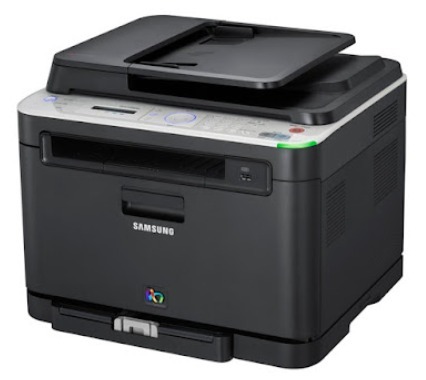
The CLX-3180WK is a color laser multifunction printer from Samsung's early-2010s CLP/CLX generation, built for home offices and micro-businesses that wanted color output without enterprise running costs. It prints, scans and copies from a single compact unit, and it feeds from four separate toner cartridges: the CLT-K407S in black, the CLT-C407S in cyan, the CLT-M407S in magenta and the CLT-Y407S in yellow. Each color lives in its own cartridge, so a page that comes out weak in one color points at one cartridge, not all four.
That four-cartridge layout suits the way a small office actually prints. Most days are heavy on black text — invoices, letters, shipping paperwork — while color appears in bursts: a presentation, a flyer, a chart for a client. Because the colors deplete at different rates, the CLX-3180WK rarely needs a full set at once. Owners who keep one black spare on the shelf cover the large majority of toner emergencies, and the color cartridges can be ordered as the printer reports them low, one at a time.
Toner Cartridges for CLX-3180WK
| Cartridge | Color | Page Yield |
|---|---|---|
| CLT-K407S | Black | See product page |
| CLT-C407S | Cyan | See product page |
| CLT-M407S | Magenta | See product page |
| CLT-Y407S | Yellow | See product page |
| CLT-K407S Black 2 Pack | Black | See product page |
| CLT-407S 4 Color Set | Black / Cyan / Magenta / Yellow | See product page |
| CLX-3180WK 4 Color Set | Black / Cyan / Magenta / Yellow | See product page |
| CLX-3180WK Premium Quality 4 Color Set | Black / Cyan / Magenta / Yellow | See product page |
Which cartridge should you buy?
Start from what the printer says is low. If only black is fading, a single CLT-K407S — or the 2 pack if your office prints text all day — is the economical move; there is no reason to touch the colors. When two or three colors are running low together, the 4 color set works out better than three separate orders and refreshes the whole machine in one session. The Premium Quality set is the alternative for owners who want the closest match to original Samsung output. Every compatible cartridge on this page carries a 1-year warranty and 1-year returns, so whichever route you take, you are not locked into a bad cartridge.
Chip, toner and everyday use
These cartridges are chipped, and the CLX-3180WK reads the chip to report toner levels — a cartridge that is not seated firmly can trigger a toner error even when it is full. Push each cartridge in until it clicks, and if a warning appears right after a change, pull the cartridge out and reseat it before suspecting the chip itself. When prints turn pale near the end of a cartridge's life, slide it out and rock it gently from side to side; the toner settles during use, and redistributing it coaxes out the remaining pages. Keep spares sealed, upright and out of direct sunlight so the toner stays loose and dry.
Frequently Asked Questions
How can I tell whether my CLX-3180WK needs toner or attention to the imaging unit?
Overall lightness across the whole page usually means a toner cartridge is running down, while a defect that repeats at the same spacing down the page points away from toner and toward the imaging side of the machine. Try the rocking trick and, if you have one, a spare CLT-K407S first — a fresh cartridge that prints cleanly settles the question. Imaging parts typically outlast several toner cartridges, so toner is the first and cheapest suspect.
Do I have to replace all four cartridges when one runs out?
No. The CLX-3180WK tracks each cartridge separately, and only the empty one needs to change. The other three keep working until their own turn comes, which is exactly why the singles exist alongside the 4 color set on this page.
My first prints with a new cartridge look faded — what should I check?
Check the sealing tape first: it has to come out completely, because a partial pull starves the cartridge and leaves output streaked or faint. Then confirm the cartridge clicked fully into its slot and run a few ordinary pages — the first sheet or two after a change can look light while toner settles into the feed path.
Can I keep a spare CLT-K407S in a desk drawer?
Yes, as long as it stays sealed in its bag, upright and somewhere at normal room temperature. A drawer away from windows and heaters is genuinely good storage; a hot garage shelf is not, because heat can clump toner inside the cartridge before it is ever installed.
More printers that use the same cartridges
The same four cartridges also fit the CLP and CLX models below, so a spare bought for this machine crosses over to any of them:
CLP-320, CLP-320K, CLP-320N, CLP-320NK, CLP-320W, CLP-321, CLP-321N, CLP-325, CLP-325K, CLP-325N, CLP-325W, CLP-325WK, CLP-326, CLX-3180, CLX-3180FN, CLX-3180FW, CLX-3180K, CLX-3180N, CLX-3185, CLX-3185CW, CLX-3185FN, CLX-3185FW, CLX-3185K, CLX-3185N, CLX-3185NK, CLX-3185W, CLX-3185WK, CLX-3186, CLX-3186FN, CLX-3186FW, CLX-3186N, CLX-3186W, CLX-3195, CLX-3195FW, Samsung-CLT407