




CLP-320
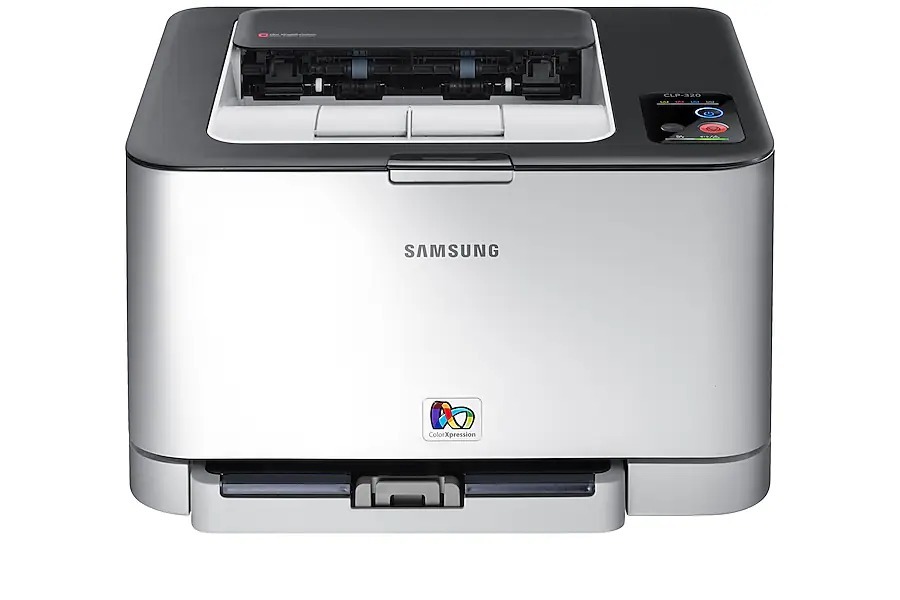
The Samsung CLP-320 brought color laser printing to home offices and micro-businesses in the early 2010s at running costs kept firmly in check, and it shares its consumables across the whole CLP-320 generation. Four separate cartridges do the work: black CLT-K407S, cyan CLT-C407S, magenta CLT-M407S and yellow CLT-Y407S — one cartridge per slot, each replaced on its own schedule.
That four-cartridge layout is what makes this machine economical to live with. A color laser does not empty evenly: black drains with everyday documents while the colors wait for the occasional chart, flyer or photo page. Because each color is its own cartridge with its own chip and level reading, you replace only the slot that is actually empty and keep printing with the other three.
Toner Cartridges for CLP-320
| Cartridge | Color | Page Yield |
|---|---|---|
| CLT-K407S | Black | See product page |
| CLT-C407S | Cyan | See product page |
| CLT-M407S | Magenta | See product page |
| CLT-Y407S | Yellow | See product page |
| CLT-K407S — 2 Pack | Black | See product page |
| CLT-407S — 4 Color Set | Black / Cyan / Magenta / Yellow | See product page |
| CLP-320 — 4 Color Set | Black / Cyan / Magenta / Yellow | See product page |
| CLP-320 Premium Quality — 4 Color Set | Black / Cyan / Magenta / Yellow | See product page |
Which cartridge should you buy?
Buy the slot, not the set, for routine replacements: when one color runs down, a single CLT-C407S, CLT-M407S or CLT-Y407S puts that color back without paying for toner you still have. Black is the exception most owners make — it empties fastest, so the black 2 Pack keeps a spare ready. A full 4 Color Set makes sense when several slots are low at once, when you are stocking a new-to-you printer, or when you simply want one box that resets the whole machine.
Chip, toner and everyday use
Each cartridge's chip reports its own level, which is why the printer can call for one color while the others still show healthy. After replacing a cartridge, run the printer's color calibration so output stays accurate across the new and old supplies. For everyday economy, print text documents in black-only mode — it rests the color cartridges entirely. Spares keep best sealed and upright in their packaging; a stored cartridge that prints lightly at first usually just needs a gentle redistribution of its toner.
Frequently Asked Questions
One color on my CLP-320 ran out much faster than the others — was it defective?
Almost certainly not. Each color is an independent consumable with its own chip, and real-world printing is never balanced: a run of documents with blue headings can empty cyan while magenta barely moves. Replace the single color, calibrate, and carry on — and lean on black-only printing for text to stretch all three colors.
Prints from my CLP-320 are faded even with a fresh black cartridge — what next?
If a new CLT-K407S did not cure the fade, the imaging unit is the next suspect; it wears on its own schedule, separate from toner. Avoid touching its drum surface, since fingerprints become permanent marks on output. Confirm which part the printer is asking for before ordering anything else.
My spare cartridge sat in a cupboard for a year — is it still good?
Kept in its protective bag with seals intact, a stored cartridge stays fresh for a long while — the packaging is designed for exactly that. If it prints lightly at first, remove it and redistribute the toner with a gentle rocking motion; settled toner wakes up quickly.
Can I keep printing when one color cartridge is empty?
For black-and-white documents, usually yes: switch the job to black-only (grayscale) output and the printer can work from the black cartridge alone. Color jobs will wait for the empty slot to be refilled, which is why owners who print color on deadlines keep one spare of each color.
More printers that use the same cartridges
This cartridge family spans the full CLP-320 generation and the CLX multifunction line built on it: CLP-320K, CLP-320N, CLP-320NK, CLP-320W, CLP-321, CLP-321N, CLP-325, CLP-325K, CLP-325N, CLP-325W, CLP-325WK, CLP-326, CLX-3180, CLX-3180FN, CLX-3180FW, CLX-3180K, CLX-3180N, CLX-3180WK, CLX-3185, CLX-3185CW, CLX-3185FN, CLX-3185FW, CLX-3185K, CLX-3185N, CLX-3185NK, CLX-3185W, CLX-3185WK, CLX-3186, CLX-3186FN, CLX-3186FW, CLX-3186N, CLX-3186W, CLX-3195, CLX-3195FW, Samsung-CLT407.