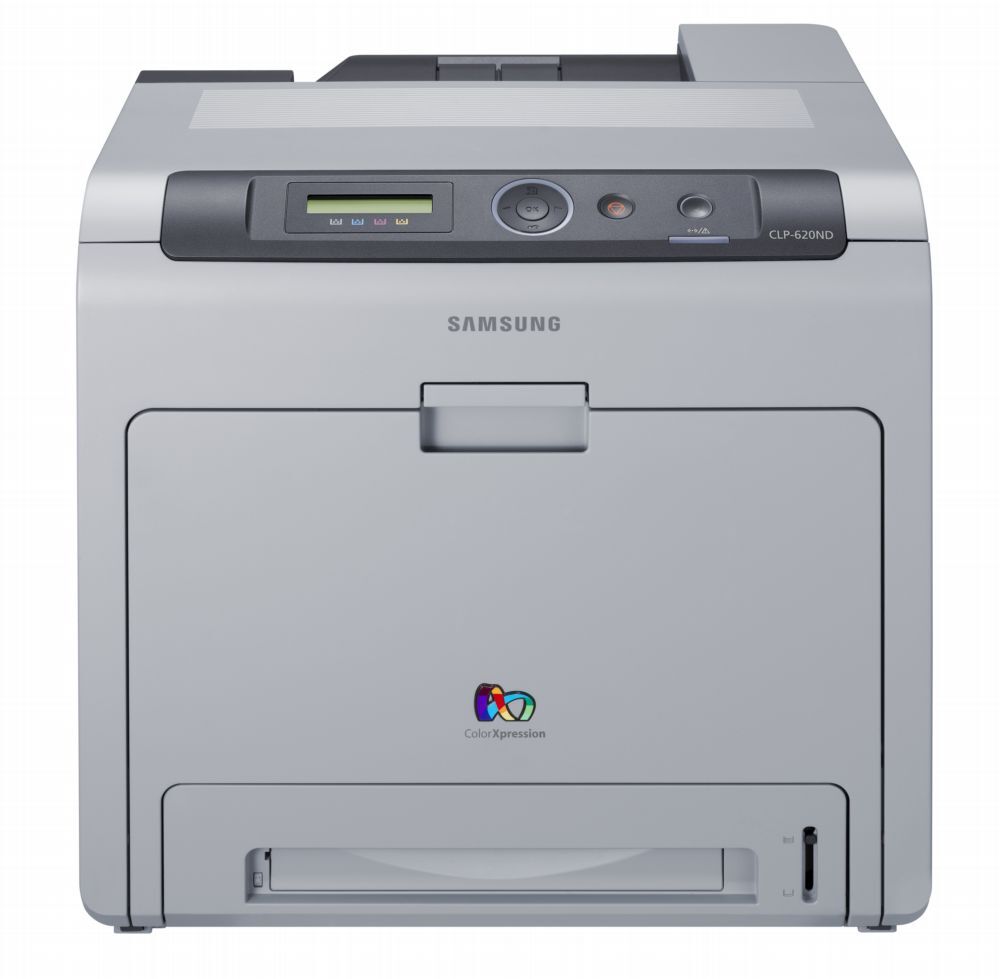
Samsung's late 2000s CLP/CLX generation included the CLP-620, a color laser printer built for everyday color work and sold as a configuration variant of the CLP-620 line for specific channel needs. Samsung specified the CLT-508S range for this model, led by the CLT-K508S black cartridge, with standard-yield colors sold as CLT-C508S in cyan, CLT-M508S in magenta and CLT-Y508S in yellow.
Everyday color work is the middle of the printing world: not the odd birthday card, not a print shop, just a workgroup producing color documents day after day as part of normal business. The CLP-620 was built for that middle — robust enough for shared duty, simple enough that cartridge changes never became an event. Its two-tier toner range is the one real decision its owners face, because the right tier depends entirely on how much of that everyday work lands on the machine.
Toner Cartridges for CLP-620
| Cartridge | Color | Page Yield |
|---|
| CLT-C508L High Yield Laser Toner Cartridge Cyan | Cyan | See product page |
| CLT-C508S Laser Toner Cartridge Cyan | Cyan | See product page |
| CLT-K508L High Yield Laser Toner Cartridge Black | Black | See product page |
| CLT-K508S Laser Toner Cartridge Black | Black | See product page |
| CLT-M508L High Yield Laser Toner Cartridge Magenta | Magenta | See product page |
| CLT-M508S Laser Toner Cartridge Magenta | Magenta | See product page |
| CLT-Y508L High Yield Laser Toner Cartridge Yellow | Yellow | See product page |
| CLT-Y508S Laser Toner Cartridge Yellow | Yellow | See product page |
| CLT-508S Toner Cartridge 2 Black (CLT-K508S) | Black | See product page |
| CLT-508S Toner Cartridge 3 Black (CLT-K508S) | Black | See product page |
| CLT-508S Toner Cartridge 5 Black (CLT-K508S) | Black | See product page |
| CLT-508S Toner Cartridge Black (CLT-K508S) | Black | See product page |
| CLT-508S Toner Cartridge Cyan (CLT-C508S) | Cyan | See product page |
| CLT-508S Toner Cartridge Magenta (CLT-M508S) | Magenta | See product page |
| CLT-508S Toner Cartridge Yellow (CLT-Y508S) | Yellow | See product page |
| CLT-508L Toner Cartridge 2 Black (CLT-K508L) | Black | See product page |
| CLT-508L Toner Cartridge 3 Black (CLT-K508L) | Black | See product page |
| CLT-508L Toner Cartridge 5 Black (CLT-K508L) | Black | See product page |
| CLT-508L Toner Cartridge Black (CLT-K508L) | Black | See product page |
| CLT-508L Toner Cartridge Cyan (CLT-C508L) | Cyan | See product page |
| CLT-508L Toner Cartridge Magenta (CLT-M508L) | Magenta | See product page |
| CLT-508L Toner Cartridge Yellow (CLT-Y508L) | Yellow | See product page |
| CLP-620 Toner Cartridge Black (CLT-K508S) | Black | See product page |
| CLP-620 Toner Cartridge Cyan (CLT-C508S) | Cyan | See product page |
| CLP-620 Toner Cartridge Magenta (CLT-M508S) | Magenta | See product page |
| CLP-620 Toner Cartridge Yellow (CLT-Y508S) | Yellow | See product page |
| CLP-620 Laser Toner Cartridges 4 Color Set | Black, cyan, magenta, yellow | See product page |
| CLP-620 Premium Quality Laser Toner Cartridges 4 Color Set | Black, cyan, magenta, yellow | See product page |
| CLT-508L High Yield Laser Toner Cartridges 4 Color Set (CLT-K508L/ CLT-C508L/ CLT-M508L/ CLT-Y508L) | Black, cyan, magenta, yellow | See product page |
| CLT-508S Laser Toner Cartridges 4 Color Set (CLT-K508S/ CLT-C508S/ CLT-M508S/ CLT-Y508S) | Black, cyan, magenta, yellow | See product page |
| CLT-508S Toner Cartridge 4 Color Set (CLT-K508S, CLT-C508S, CLT-M508S, CLT-Y508S) | Black, cyan, magenta, yellow | See product page |
| CLT-508S Toner Cartridge 5 Color Set (CLT-K508S, CLT-C508S, CLT-M508S) | Black, cyan, magenta, yellow | See product page |
| CLT-508S Toner Cartridge 8 Color Set (CLT-K508S, CLT-C508S, CLT-M508S, CLT-Y508S) | Black, cyan, magenta, yellow | See product page |
| CLT-508S Toner Cartridge 6 Color Set (CLT-C508S, CLT-M508S, CLT-Y508S) | Black, cyan, magenta, yellow | See product page |
| CLT-508S Toner Cartridge 3 Color Set (CLT-C508S, CLT-M508S, CLT-Y508S) | Black, cyan, magenta, yellow | See product page |
| CLT-508L Toner Cartridge 4 Color Set (CLT-K508L, CLT-C508L, CLT-M508L, CLT-Y508L) | Black, cyan, magenta, yellow | See product page |
| CLT-508L Toner Cartridge 5 Color Set (CLT-K508L, CLT-C508L, CLT-M508L) | Black, cyan, magenta, yellow | See product page |
| CLT-508L Toner Cartridge 8 Color Set (CLT-K508L, CLT-C508L, CLT-M508L, CLT-Y508L) | Black, cyan, magenta, yellow | See product page |
| CLT-508L Toner Cartridge 6 Color Set (CLT-C508L, CLT-M508L, CLT-Y508L) | Black, cyan, magenta, yellow | See product page |
| CLT-508L Toner Cartridge 3 Color Set (CLT-C508L, CLT-M508L, CLT-Y508L) | Black, cyan, magenta, yellow | See product page |
| CLP-620 Toner Cartridge 4 Color Set (CLT-K508S, CLT-C508S, CLT-M508S, CLT-Y508S) | Black, cyan, magenta, yellow | See product page |
Which cartridge should you buy?
This printer accepts two full tiers. The standard CLT-508S range suits workgroups whose color output is steady but light. The high-yield CLT-508L range mirrors it color for color — CLT-K508L black, CLT-C508L cyan, CLT-M508L magenta and CLT-Y508L yellow — and lasts longer per cartridge, which usually means a lower cost per page and fewer interruptions. The tiers mix freely: many offices run high-yield black, the hardest-working slot, beside standard colors. When in doubt, start standard, watch how quickly each slot empties, and promote the fast movers to the L tier at the next order. Compatible cartridges carry a 1-year warranty and 1-year returns.
Chip, toner and everyday use
Slide a new cartridge along its rails until it clicks home; the chip registers the fresh unit and the printer updates its estimates. Pull the sealing tape out completely before fitting — a partially removed seal is the classic reason a fresh cartridge prints blank. Keep cartridges out of direct light while you work, handle them by their ends, and store the workgroup's spare set sealed and indoors so a mid-run swap never waits on a delivery.
Frequently Asked Questions
What should I do first when installing a new CLT-K508S in the CLP-620?
Pull the sealing tape completely out of the new cartridge — it usually has a pull tab on one end — then give the cartridge a gentle rock to distribute the toner before installing it. A partially removed seal is the top reason a fresh cartridge prints blank in this machine.
Do I need a different driver for the CLP-620 on each computer I own?
Each computer needs its own copy of the driver, but the printer itself requires no changes when you add machines. Install the same driver package on every PC, point network installs at the printer's IP address, and printing stays consistent across the workgroup.
The CLP-620 front cover will not close after I installed the cartridge — why?
The cartridge is almost certainly not fully seated. Open the front cover, pull the cartridge out by its handle, check that every orange seal and piece of tape is removed, then slide it along the rails until it clicks. Close the cover and print a test page to check for even toner coverage.
More printers that use the same cartridges
The CLP-620 shares its CLT-508 toner range with these Samsung models: CLP-620ND, CLP-670, CLP-670N, CLP-670ND, CLX-6220, CLX-6220FX, CLX-6220FX/XAA, CLX-6250, CLX-6250FR, CLX-6250FX, Samsung-CLT508.




