




LaserJet M725 MFP
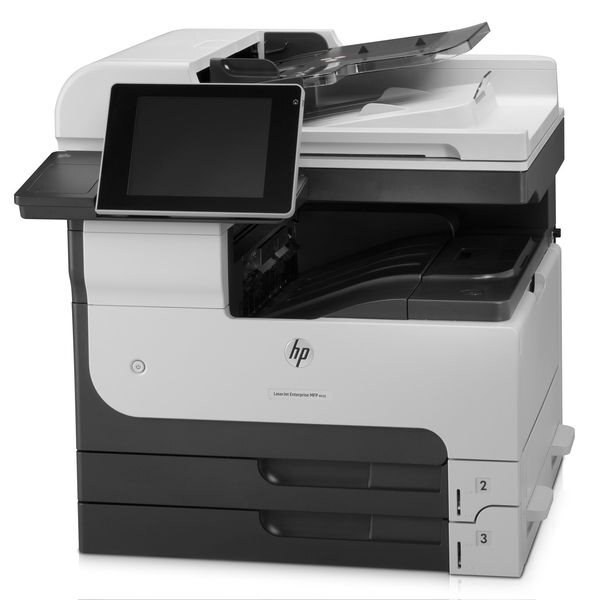
The LaserJet M725 MFP is the essential configuration of HP's 2012 A3 multifunction line — a monochrome machine for print, copy and scan work in departments that live on tabloid-size documents. Its supply is the HP 14 cartridge family in three depths: the standard CF214A, the cartridge HP sells as the 14A; the high-yield CF214X, its 14X; and the extended-fill CF214XX (HP 14XX) above both. Every listing on this page is black — there is no color hardware here to feed.
Universities, legal offices and design studios made this model a fixture because A3 multifunction machines are shared infrastructure, not personal printers. One unit on a department floor handles the oversize filings, drawings and proof sheets that letter-size machines cannot touch, and it tends to stay in place for years. That kind of service life rewards a short supply list: one cartridge family, three capacities, and nothing else to stock, track or reorder by mistake when a tray empties in the middle of a filing deadline.
Toner Cartridges for LaserJet M725 MFP
| Cartridge | Color | Page Yield |
|---|---|---|
| CF214A Black | Black | See product page |
| CF214X High Yield Black | Black | See product page |
| CF214A Black 3 Pack | Black | See product page |
| CF214A MICR Black | Black | See product page |
| CF214X High Yield Black 3 Pack | Black | See product page |
| CF214X High Yield MICR Black | Black | See product page |
| CF214XX High Yield Black 3 Pack | Black | See product page |
| CF214XX High Yield Black | Black | See product page |
| CF214A Premium Quality Black 3 Pack | Black | See product page |
Which cartridge should you buy?
Start with how hard the department actually prints. A small team that uses the M725 MFP for occasional tabloid work will get honest service from the standard cartridge and pay the least per box. Busy floors should skip straight to the high-yield tier: the cartridge costs more up front, but each change covers far more pages and the cost per page falls. The extended-fill tier exists for the hardest-run machines — the ones where a supply run interrupts someone every few weeks. The MICR builds, such as the CF214A MICR, are a separate case: they are formulated for check printing and magnetic reading, not a general upgrade, so order them only if checks are part of the workload.
Chip, toner and everyday use
The M725 MFP reads the chip on the cartridge at installation, so a new unit should register without ceremony: pull the sealing tape, slide it home and let the machine take its first reading before judging it. The display's toner gauge is an estimate built from page counts, which means a warning is a planning signal rather than an emergency. When output turns light toward the end of a cartridge, lifting it out and rocking it gently from side to side redistributes the remaining toner and often restores even coverage for a while. Keep the spare in its bag, upright, at room temperature, away from direct sun.
Frequently Asked Questions
Does the LaserJet M725 MFP need a separate drum unit?
No separate drum appears on this page's shelf, and none is needed to keep the machine supplied: the cartridges listed here are the only consumable the M725 MFP takes. When print quality eventually fades, the cartridge is the part that gets replaced — match the code, CF214A or CF214X, and swap it in.
Which cartridge suits a department that prints tabloid documents every day?
Daily tabloid volume belongs on the high-yield CF214X at minimum, and the extended-fill CF214XX is worth its premium when the machine is shared by a whole floor. Both install exactly like the standard cartridge; the difference is simply how long each one lasts before the next change.
Why do the first pages look faded right after I install a fresh cartridge?
Toner settles during shipping and storage, so a new cartridge can deliver uneven density on its first runs. Remove it, rock it slowly side to side to level the toner inside, and reseat it firmly. Pages should even out within a short run; if they do not, confirm the sealing tape came out completely.
Will one cartridge order cover the other M712 and M725 machines in our building?
Yes — this is one cartridge family across the whole line, which is why the family list below is long. A spare bought for the M725 MFP also fits the M712 printers and the other M725 configurations sharing the same supply shelf, so a single stock of 14-family cartridges covers the fleet.
More printers that use the same cartridges
The same three cartridge tiers also feed the rest of the M712/M725 generation: HP CF214A, LaserJet 700 M712DN, LaserJet 700 M712N, LaserJet 700 M712XH, LaserJet 700 MFP M725, LaserJet 700 MFP M725DN, LaserJet 700 PRINTER M712, LaserJet 700 PRINTER M712DN, LaserJet 700 PRINTER M712N, LaserJet 700 PRINTER M712XH, LaserJet 700 PRINTER M715, LaserJet Enterprise 700 M712, LaserJet Enterprise 700 M712DN, LaserJet Enterprise 700 M712N, LaserJet Enterprise 700 M712xh, LaserJet Enterprise 700 M725DN MFP, LaserJet Enterprise 700 MFP M725, LaserJet Enterprise 700 MFP M725DN, LaserJet Enterprise 700 PRINTER M712DN, LaserJet Enterprise 700 PRINTER M712N, LaserJet Enterprise 700 PRINTER M715, LaserJet Enterprise 700 Printer M712, LaserJet Enterprise 700 Printer M712XH, LaserJet Enterprise MFP M725DN, LaserJet Enterprise MFP M725F, LaserJet Enterprise MFP M725Z, LaserJet Enterprise MFP M725Z PLUS, LaserJet M712, LaserJet M712DN, LaserJet M712N, LaserJet M712XH, LaserJet M715, LaserJet M715 LaserJet, M725 MFP, LaserJet M725DN MFP, LaserJet M725X MFP, LaserJet M725Z MFP, LaserJet M725Z+ MFP, LaserJet MFP M725DN, LaserJet MFP M725F, LaserJet MFP M725Z, LaserJet MFP M725Z PLUS.