




Color Laser 1235CN
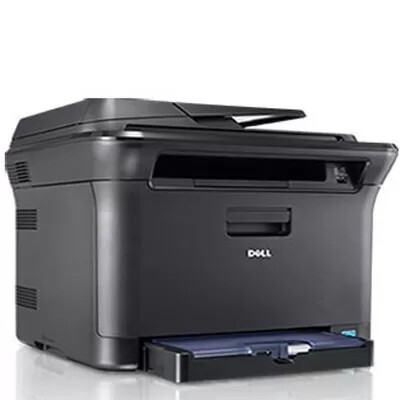
The Dell 1235CN is the networked multifunction of the compact color line - one of the smallest color laser MFPs of its era, adding an automatic document feeder, Ethernet networking and fax to the print engine, and able to scan directly to a USB flash drive. It prints at up to 17 pages per minute in mono and 4 in color, and it runs on a single supply stream: the 330-3012 black cartridge plus 330-3015 cyan, 330-3014 magenta and 330-3013 yellow. Keep a spare black on hand - at roughly 1,500 pages per cartridge, it is the one that runs out first.
Busy small offices value the 1235CN because it replaces four devices with one machine, and the same logic applies to its supplies: four cartridges total, shared by every function the box performs. Scanning and faxing consume no toner, but a shared MFP gets printed from by everyone, so its black cartridge works harder than a personal printer ever does. The buying routine that suits it is a spare black on the shelf at all times and color singles ordered as each one fades - the listings below cover both habits.
Toner Cartridges for Dell 1235CN
| Cartridge | Color | Page Yield |
|---|---|---|
| 330-3012 | Black | About 1,500 pages |
| 330-3015 | Cyan | See product page |
| 330-3014 | Magenta | See product page |
| 330-3013 | Yellow | See product page |
| 330-3012 / 330-3015 / 330-3014 / 330-3013, 4 Color Set | Black, cyan, magenta, yellow | See product page |
| Dell 1235CN, 4 Color Set | Black, cyan, magenta, yellow | See product page |
| Dell 1235CN Premium Quality, 4 Color Set | Black, cyan, magenta, yellow | See product page |
Which cartridge should you buy?
Start with black. On a shared multifunction, the 330-3012 does most of the work - copies, faxes received, everyday documents - and at roughly 1,500 pages it cycles faster than any color, so many offices keep it as a standing spare and reorder the moment the spare goes in. The three colors are numbered separately and replaced individually: 330-3015 cyan, 330-3014 magenta and 330-3013 yellow, each bought only when its own level drops. A 4 Color Set suits a full refresh when the machine has aged into several low cartridges at once, and the Premium Quality set is the closest equivalent to the original build. Every compatible cartridge here is backed by a 1-year warranty and 1-year returns.
Chip, toner and everyday use
Because the 1235CN sits on a network, its supply warnings reach you through the printer status reporting - treat the first low-black warning as the reorder point and the spare-swap as a same-day job, since a shared MFP found empty blocks the whole office, not one desk. Fit cartridges one at a time, matching each code to its color slot, and push them fully in so the chip reports the new level correctly. If a color prints weakly before its warning appears, rocking that cartridge gently side to side redistributes the toner and usually restores coverage for a while. Store spares sealed and flat in the office supply cabinet, oldest stock first.
Frequently Asked Questions
How many toner cartridges does the Dell 1235CN hold?
Four - one each for black, cyan, magenta and yellow. They are the 330-3012, 330-3015, 330-3014 and 330-3013, and each is replaced individually as it empties rather than as a set.
Which cartridge runs out first on the 1235CN?
Black, in almost every office. Copies, incoming faxes and routine documents are all monochrome work, and the black cartridge is rated at roughly 1,500 pages, so it cycles well ahead of the colors. Keeping one spare black on the shelf is the cheapest insurance this machine can have.
The 1235CN prints blurry text. Is the cartridge bad?
Not necessarily. Blurry text on this model can come from damp paper or a wrong paper-type setting as easily as from a failing cartridge. Try a fresh, dry ream first and confirm the paper setting matches what is loaded; if the blur persists with a new cartridge fitted, then look at the drum.
Does scanning or faxing use toner?
Scanning uses none, and sending a fax uses none either - only printing and copying consume toner, plus any fax you receive and print. That is still plenty on a shared machine, which is why the black cartridge deserves its standing spare.
More printers that use the same cartridges
The rest of this compact family runs on the same four cartridges, so spares interchange across all of these printers: Color Laser 1230, Color Laser 1230C, Color Laser 1230CN, Color Laser 1235, Color Laser 1235C, Dell (330-3012, 330-3015, 330-3014, 330-3013).