Frequently Asked Questions
Why is this cartridge sold under the number 330-3015 instead of a printer name?
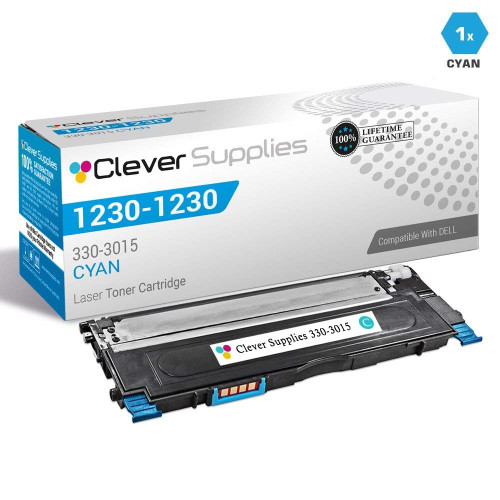
Because 330-3015 is the supply code Dell assigns to this cyan cartridge, and it is the most reliable way to identify it. Printer families get marketed under several names, but the part number on the cartridge label never changes: if the cyan cartridge in your machine is stamped 330-3015, this listing is that exact supply item in a compatible build. It is the cyan toner for the Dell Color Laser 1230c and Color Laser 1235c, rated at 1,000 pages and priced at $37.13.
What does one page actually cost with the 330-3015 — honestly?
The math is $37.13 divided by 1,000 rated pages, which comes to about 3.71 cents per page. We will say plainly what that means: this is an expensive way to buy cyan pages, and no wording on this page will pretend otherwise. The 330-3015 is a small, standard-size cartridge for a compact color laser, so the fixed cost of the cartridge is spread over relatively few pages. What the price buys is the correct, exact-fit cyan supply for a 1230c or 1235c when that is the cartridge your printer needs — not a low per-page rate.
Why is the yield only 1,000 pages?
That is the published rating for this cartridge size, measured the same way Dell rates the original — at roughly 5% page coverage, about what a typical document with some color elements uses. The cartridge is complete and fully filled; it is simply a small cartridge, because the Color Laser 1230c and 1235c are compact machines with compact supply bays. Dense color pages, charts and full-bleed graphics will use cyan faster than the rating suggests, while light color use can stretch it further.
We mostly print black text. Why does the cyan still run down?
Color lasers use small amounts of color toner even on jobs that look black-and-white: calibration cycles, cleaning passes and composite-black rendering in some documents all draw on the cyan supply a little at a time. So it is normal for the 330-3015 in a 1230c or 1235c to reach empty even in an office that rarely prints in color. When it does, the printer stops for that color — which is why a single cyan cartridge, rather than a whole set, is the usual purchase.
How do I confirm 330-3015 is the code I need before ordering?
Open the front cover of your printer and read the label on the cyan cartridge — it should show 330-3015. The supplies screen in the printer's menu lists the installed cartridge codes as well. If your machine is a Dell Color Laser 1230c or 1235c and the cyan label matches that number, you have the right listing. Ordering by the number, rather than by the printer's marketing name, is the surest way to avoid a wrong-color or wrong-model mistake.
What protection do I get, and how fast will it arrive?
This compatible cartridge is covered by a 1-year warranty and 1-year free returns, and our support team is available Monday through Friday, 9 AM to 5 PM CST if anything prints wrong. Full terms are on our shipping and returns page. Orders ship from four warehouses — Illinois, Pennsylvania, Georgia and California — routed from the closest stocked location, so a replacement cyan usually arrives in a few business days. The rest of the range for these printers is on the Dell toner page.
The cyan and magenta codes differ by one digit — how do we avoid fitting the wrong one?
Read the color word on the label, not just the number. The cyan is 330-3015 and the magenta is 330-3014: they serve the same printers, they look alike, and one digit is an easy thing to misread on a hurried order or a hurried swap. A cartridge seated in the wrong slot does not produce an error message — it produces wrong colors, quietly, until someone notices the prints. Matching the word 'cyan' to the cyan slot takes two seconds and removes the whole failure mode.
What do prints look like when the cyan is the cartridge running out?
Cyan carries the blues and greens, so its fading shows there first: skies wash out or take on a purple tinge, blues lose their depth, and greens flatten — while black text on the same page stays perfectly sharp, because black is a separate cartridge doing separate work. That split, tired colors over crisp text, is the signature of a single color supply ending. When you see it, the 330-3015 is the cartridge to reach for, not the whole set.
How do we prove a new cyan cartridge in its first pages?
Print a page carrying a solid area of blue — a chart, a headed document with a blue banner, anything with a broad cyan fill. Look for the blue to be even across its full width on the first couple of pages, with no pale streak running down one side. An even block confirms the 330-3015 is seated and feeding; a streaked one says reseat it before printing anything that will be judged. One page now is cheaper than a reprint later.
What should we do with the spent cyan cartridge?
Mark it. Write 'spent' and the date on its box before it goes anywhere near a shelf, because a used 330-3015 is visually identical to a fresh one and to its magenta and yellow neighbors. The hurried-swap mistake — an empty going back into the machine while the new one sits in the waste pile — happens in offices that skip this ten-second habit. Keep the marked empty until the new cartridge has proven itself, then let it leave with your normal office waste or recycling.
About This Cartridge
This is a compatible Dell 330-3015 cyan toner cartridge for the Color Laser 1230c and Color Laser 1235c, rated at 1,000 pages and priced at $37.13 — about 3.71 cents per page, stated plainly because that is not a cheap per-page figure. It is the right-sized, honestly rated cyan supply for these compact printers when yours runs out. It ships from our IL, PA, GA or CA warehouses and is backed by a 1-year warranty with 1-year free returns and weekday support, 9 AM to 5 PM CST.






 See Compatible Printers
 Read more about our ink!